OmniAgent
Introduction
OmniAgent is the unified data collection layer of vuSmartMaps, enabling efficient and high-performance collection of observability data, including logs, metrics, and traces from diverse sources. It provides flexibility by supporting agent-based, remote, and hybrid data collection modes, making it suitable for different environments.
OmniAgent manages multiple data collection probes on a host system, ensuring that each probe gathers the required telemetry data as defined by the associated O11ySources. It continuously monitors the health of all probes and automatically performs recovery actions when issues arise. Within the overall vuSmartMaps architecture, OmniAgent interfaces with the vuSmartMaps Management Console through a secure control channel to provide centralized monitoring, update management, and seamless management of multiple hosts. Just like an air traffic controller coordinating multiple flights from different directions, OmniAgent ensures that every data source operates in sync, collecting, reporting, and recovering efficiently without disruption.
OmniAgent solves four key platform challenges:
- Unified collector management: single agent to manage all probes (no separate installs).
- Remote configuration: all probe configs can be controlled from the console UI.
- Automated discovery (future): discovering services/logs automatically on target systems.
- APM auto-instrumentation (future): automatic trace instrumentation without manual code change.
Think of OmniAgent as a traffic controller for data. Just like an air traffic controller ensures that every aircraft takes off and lands safely without interference, OmniAgent coordinates how data from different systems flows into vuSmartMaps, keeping it organized, synchronized, and free of conflict.
OmniAgent Architecture Overview
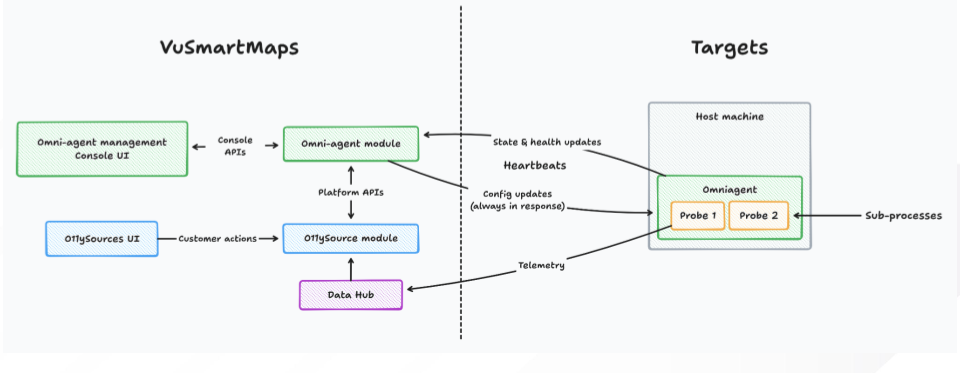
The OmniAgent architecture describes how vuSmartMaps manages configuration, collects telemetry, and monitors the health of all hosts through a unified agent-and-probe model.
vuSmartMaps Platform Layer
This layer provides centralized configuration and management.
- OmniAgent Management Console: Displays host and probe health, reporting status, and lifecycle actions.
- O11ySources Module: Defines what data needs to be collected.
- OmniAgent Module: Sends configuration updates and receives heartbeats, state updates, and probe status from every host.
Control & Communication Layer
This is the channel that connects the platform to each host.
- Config Updates: Delivered from the platform to the OmniAgent on each host.
- Heartbeats & Health Updates: Sent from hosts to the platform for monitoring.
- Telemetry Flow: Probe-collected data is sent into the Data Hub.
Target Host Layer
Each monitored system runs its own agent and probes.
- OmniAgent (Host Orchestrator): Applies configs, manages probe lifecycle (start/stop/restart/upgrade), and monitors probe health.
- Probes: Lightweight collectors for logs, metrics, application data, or system health.
- Sub-Processes: Internal tasks created by probes to perform collection efficiently.
OmniAgent Concepts and Components
1. What is OmniAgent?
OmniAgent is the unified data collection layer of vuSmartMaps. It manages multiple data collection probes on a host, collects observability data (logs, metrics, traces), monitors probe health, and communicates with the vuSmartMaps Management Console for centralized monitoring and control.
2. What is the Role of OmniAgent?
OmniAgent acts as the central orchestration component within the vuSmartMaps observability framework. It manages the lifecycle of all probes by applying configurations, monitoring their health, and executing control actions such as start, stop, restart, and upgrade. It ensures:
- Secure configuration enforcement
- Real-time heartbeat monitoring and diagnostics
- Automated recovery from failures
- Coordination of upgrades and rollbacks
OmniAgent communicates directly with all probes and sends status updates to the vuSmartMaps Management Console, acting as a bridge between probe operations and centralized visibility.
3. What is the relationship between OmniAgent, Probes, and O11ySource?
- OmniAgent manages and controls probes, which are modular data collectors responsible for gathering logs, metrics, and other telemetry from the host.
- Each probe is linked to one or more O11ySources, which define what data is collected, how frequently, and through which collection mode (local, remote, or hybrid).
- OmniAgent ensures that probes are installed, configured, and maintained in alignment with the O11ySource definitions, and reports their health and activity status back to the platform.
4. Where OmniAgent Fits in the Overall System?
- OmniAgent is a key component of the vuSmartMaps observability platform, deployed across monitored environments to manage and operate data collection probes on each host. It maintains continuous communication with the central Management Console, enabling centralized deployment, configuration management, and real-time visibility into probe health and data collection status across all hosts.
- It supports both local and remote data collection, ensuring comprehensive observability across environments.
5. Is OmniAgent a single process that collects all types of data?
- No. OmniAgent is not a monolithic data collector.
- Instead, it acts as a unified controller for multiple independent probes (such as metricbeat, filebeat, healthbeat, etc.). These probes continue to exist as separate processes, but OmniAgent manages their installation, configuration, lifecycle, and health through a single unified control layer.
6. How does OmniAgent function on the host? Is it a supervisor?
- Yes. OmniAgent operates as a Supervisor on the host. It oversees and manages all probe processes. Each probe runs as a child process under OmniAgent, and the supervisor ensures that probes are correctly configured, healthy, restarted when required, and upgraded safely.
7. What problems does OmniAgent solve?
OmniAgent centralizes and automates data collection across hosts. It:
- Manages probe lifecycle (start/stop/restart/upgrade)
- Enforces configurations securely
- Monitors the health and heartbeats of probes
- Handles automatic recovery from failures
- Keeps the Management Console updated with host/probe status
8. How does OmniAgent fit into the overall vuSmartMaps architecture?
OmniAgent runs on each monitored host and manages all probes on that host. It communicates with the vuSmartMaps Management Console via a secure control channel to receive configurations, send health status, and coordinate updates, giving you centralized visibility across all hosts.
9. What are Probes?
Probes are specialized data collection modules (like logbeat,healthbeat) managed by OmniAgent. Each probe collects a specific type of telemetry (logs, metrics, etc.) from a defined source on the host.
10. What are the primary responsibilities of OmniAgent?
- Configuration Management – Apply new or updated configurations from the Management Console to the appropriate probes.
- Probe Lifecycle Control – Start, stop, restart, and upgrade probes.
- Monitoring & Reporting – Track probe health, heartbeats, and errors, and send status to the console.
- Self-Healing – Detect failed probes and perform automated recovery steps (e.g., restart).
- Security Enforcement – Execute control actions only according to authorized roles and permissions.
11. How does OmniAgent communicate with probes?
- Probes send heartbeat signals and status updates to OmniAgent. OmniAgent performs health checks on probes using their health endpoints to continuously monitor their state and availability.
- When probe configurations change, OmniAgent pushes the updated configuration to the probes, verifies that the probes restart successfully, and automatically rolls back to the previous configuration if the updated configuration fails. OmniAgent also collects diagnostic information when probes crash or fail to start, helping with troubleshooting and analysis.
12. What happens during a probe upgrade?
OmniAgent coordinates probe upgrades by:
- Ensuring version compatibility
- Applying the new package
- Tracking upgrade progress
- Rolling back to a previous version if the upgraded probe fails to operate correctly
13. What are the prerequisites for installing OmniAgent?
- Supported OS: Linux and Windows
- Permissions:
- Linux: root privileges (e.g., via
sudo) to install as a system service - Windows: Administrator rights to run the installer or CLI
14. How does OmniAgent receive updates from the platform?
OmniAgent periodically sends heartbeat messages (roughly once a minute) to the platform. If there are any pending updates, they are included and delivered in the platform’s response to that heartbeat.
15. What happens if OmniAgent is removed from a host?
- When OmniAgent is uninstalled from a host, the OmniAgent service is stopped and all probe processes managed by it are terminated. OmniAgent is also removed from the system service registry, so it no longer runs or reports to the platform.
- However, the OmniAgent working directory including configuration files, probe configurations, and logs is retained on the host. This ensures that operational data is preserved for troubleshooting or future reuse.
- If OmniAgent is later reinstalled on the same host using the same working directory, it automatically restores the previously associated probes and configurations, allowing data collection to resume without requiring manual reconfiguration.
16. What happens if probes overuse system resources?
OmniAgent continuously monitors each probe’s resource usage. If a probe exceeds its configured CPU or memory limits, OmniAgent will safely restart it to bring usage back within acceptable thresholds.
17. What happens if a probe unexpectedly stops?
OmniAgent automatically detects the failure and restarts the probe. You can also manually restart it from the UI and use health filters to quickly find and act on unhealthy probes.
18. How does OmniAgent know the state of a probe?
OmniAgent first checks whether the probe’s process is running. In addition, it performs health checks using an HTTP endpoint exposed by the probe, giving a more accurate view of whether the probe is healthy and functioning as expected.
19. What happens if OmniAgent stops or fails to report?
You can quickly identify non-reporting OmniAgents using filters in the console UI. On the host, the underlying system service manager (such as systemd or the Windows Service Manager) will automatically attempt to restart OmniAgent to restore normal operation.
20. What happens if multiple OmniAgents are started on the same host?
OmniAgent enforces a single-process model. If one instance is already running, any additional OmniAgent process will fail to start until the existing instance has stopped.
- On Linux, OmniAgent uses a user-level file lock based on a reliable OS system call.
- The lock is taken when the process starts.
- If it can’t get the lock, the process simply does not start.
- When the process exits, the lock is released automatically.
- In most banking setups, there is only one OS user for this, so this mechanism is enough for our needs.
- On Windows, OmniAgent uses a global mutex lock, which is a locking mechanism provided directly by Windows.
21. How would this omniagent change the way we work as of now?
Installing and Rolling Out Collectors
Today (Without OmniAgent)
- Probes like filebeat, metricbeat, and custom agents must be installed manually on each host.
- Every environment or new server requires reinstalling and reconfiguring these collectors.
- Different teams may deploy different versions or configs, causing inconsistency.
With OmniAgent
- Only one component is installed on the host: OmniAgent.
- All required probes are automatically spawned and managed based on O11ySource configurations.
- A new host onboarding becomes:
- Install OmniAgent
- Let it register with the platform
- The platform automatically pushes the correct probes/configs
- This guarantees standardized observability across all hosts.
Configuration and Lifecycle Management
Today (Without OmniAgent)
- Configuration changes require SSH access and manual file edits (vi, Ansible, scripts).
- Each probe must be manually restarted, with a risk of misconfiguration.
- It is difficult to know which configuration version is currently active on which host.
With OmniAgent
- All configurations are centrally stored and managed via O11ySources.
- OmniAgent automatically:
- Applies updated configs
- Restarts probes safely
- Rolls back if the new config causes probe failure
- Lifecycle operations are performed through:
- The UI (start, stop, restart, upgrade, bulk actions)
- The omniagentctl CLI for scripted workflows
- You gain complete visibility into
which host runs which configuration.
Monitoring, Health, and Troubleshooting
Today (Without OmniAgent)
- Checking if a probe is running requires SSHing into hosts and inspecting logs.
- You rely on external or custom monitoring to detect failures.
- There is no native concept of probe health inside the observability platform.
With OmniAgent
- Probe health becomes part of the platform:
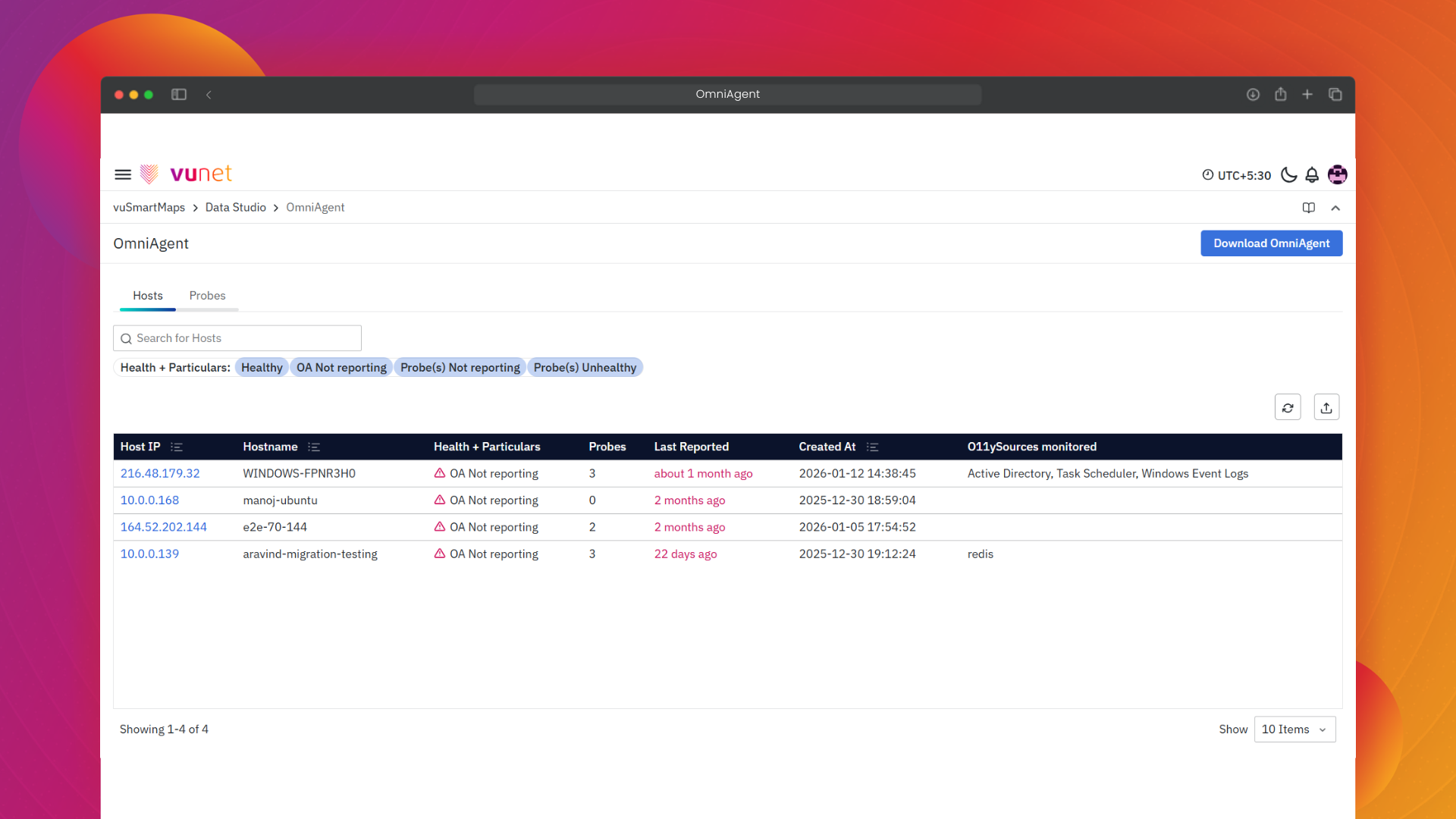
- Healthy / Unhealthy / Not Reporting shown in the Probes view
- OA Not Reporting / Probe(s) Not Reporting / Probe(s) Unhealthy shown in the Hosts view
- OmniAgent provides built-in automation:
- Automatically restarts probes that crash or exceed resource limits
- Automatically rolls back configs if a new one fails
- Troubleshooting becomes UI-driven instead of SSH-driven.
Upgrades and Change Management
Today (Without OmniAgent)
- Probe upgrades happen host-by-host or through custom automation.
- Tracking which version runs where is complex.
- Rollbacks are manual and often risky.
With OmniAgent
- Upgrades are executed directly from the platform using bulk actions.
- OmniAgent manages the entire upgrade lifecycle:
- Ensuring version compatibility
- Tracking upgrade progress
- Automatically rolling back if required
- This provides safe, consistent, and predictable updates across environments.
Resource Usage and Stability
Today (Without OmniAgent)
- If a probe consumes too much CPU or memory, you detect it only through general infrastructure alerts.
- No built-in mechanism enforces resource boundaries for probes.
With OmniAgent
- Administrators can define CPU/memory caps, polling frequency, and enabled modules.
- OmniAgent monitors these limits and can:
- Restart probes exceeding thresholds
- Display resource health centrally in the UI
- Result: probes behave predictably and are prevented from destabilizing the host.
Security and Access Patterns
Today (Without OmniAgent)
- Frequent SSH access is needed to manage collectors.
- Each probe may communicate with the platform separately.
- Credentials and configuration files are scattered across multiple agents.
With OmniAgent
- A single, secure control channel is used for all communication between host and platform.
- Role-based permissions control who can start, stop, or upgrade probes.
- The need for SSH access decreases significantly, improving security and operational hygiene.
22. What is the resource utilization of OmniAgent?
- Adding new probes does not meaningfully increase OmniAgent’s own resource usage.
- OmniAgent’s CPU use is capped at 1 core, and this limit cannot be changed. In normal operation, it uses less than 0.5% of a CPU core.
- It typically uses under 40 MB of memory.
- You may see short CPU spikes when probe packages are being extracted and installed, but even then, it will stay within the 1-core CPU limit.
- There is also a hard memory cap of 250 MB for OmniAgent.
OmniAgent Role and Responsibilities
OmniAgent serves as the central orchestration layer within the vuSmartMaps observability framework. It manages the lifecycle and configuration of all probes deployed on a host, ensuring their continuous and reliable operation. Its primary responsibilities include:
- Configuration Management: Applies new configurations pushed from the vuSmartMaps Management Console to the relevant probes.
- Probe Lifecycle Control: Starts, stops, restarts, and upgrades probes based on user actions or automated recovery triggers.
- Monitoring & Reporting: Continuously monitors probe health, heartbeat frequency, and error states, and reports them to the Management Console.
- Self-Healing: Detects probe failures and initiates automated recovery actions such as restarts or reassignments.
- Security Enforcement: Works in conjunction with role-based access controls to ensure only authorized actions are executed.
OmniAgent Communication with Probes
OmniAgent maintains real-time communication with all probes managed on the host to ensure efficient data collection and system stability.
- Heartbeat Signals: Probes send periodic heartbeat updates to OmniAgent, which are then relayed to the Management Console for visibility.
- Configuration Synchronization: When configuration changes are initiated (e.g., enabling or disabling a module), the updated configuration is pushed to the probe and verified for successful application. If a probe fails to restart after an update, OmniAgent automatically restores the previous configuration version to maintain stability.
- Diagnostics & Error Reporting: If a probe fails to start, crashes, or encounters configuration issues, OmniAgent captures diagnostic data and sends alerts to the Management Console.
- Upgrade Coordination: During probe upgrades, OmniAgent ensures version compatibility, tracks upgrade progress, and performs rollbacks if necessary.
Probes
Probes are specialized data collection modules managed by the OmniAgent. Each probe is responsible for gathering telemetry data—such as logs, metrics, or traces—from specific sources or services on the host. Examples include filebeat, metricbeat, and healthbeat. Probes operate under the supervision of the OmniAgent and are tightly integrated with O11ySources to ensure accurate and timely data collection.
How Probes Are Installed and Managed
Probes are installed automatically when an OmniAgent is deployed on a host. Their lifecycle is managed through the OmniAgent Management Console:
- Installation: Probes are launched based on the selected O11ySource configuration. If a required probe is not present, OmniAgent automatically runs that probe to begin data collection.
- Start/Stop: Administrators can manually start or stop probes from the console.
- Restart: Probes can be restarted to apply new configurations or recover from unresponsive states.
- Upgrade: The console supports upgrading probes to the latest version to ensure compatibility and performance.
Bulk actions are available to manage multiple probes simultaneously across hosts.
Resource Capping (Limits)
To ensure system stability and prevent resource exhaustion, probes can be configured with resource caps:
- CPU and Memory Limits: Administrators can define thresholds for CPU and memory usage per probe.
- Polling Frequency: Data collection intervals can be adjusted to balance performance and resource consumption.
- Module Selection: Only necessary modules can be enabled to reduce overhead.
These limits are enforced by the OmniAgent and can be monitored via the OmniAgent Management Console.
If a probe exceeds the CPU/memory limit, OmniAgent restarts it automatically.
Probe Health Checks
Probe health is continuously monitored and displayed in the Probes tab of the Management Console. Health statuses include:
- Healthy: The probe is in its expected state — for example, it is running when expected to run or stopped when expected to be stopped.
- Unhealthy: The probe’s actual state does not match the expected state — for instance, it is running when expected to be stopped, or stopped when expected to be running.
- Not Reporting: Probe has stopped sending data.
The Status column separately indicates whether a probe is currently running or not.
Administrators can use filters to quickly identify probes that require attention and take corrective actions, such as a restart or an upgrade.
