O11ySources
Overview
Welcome to the O11ySources User Guide, your comprehensive reference for managing and onboarding observability integrations within the vuSmartMaps™ platform. An O11ySource represents a supported integration or component type that defines what kind of observability data can be collected, such as from applications, databases, servers, cloud services, or network infrastructure. Each O11ySource provides the structure, capabilities, and configuration options required to onboard data into the platform.
Within an O11ySource, one or more Source Instances are configured to represent the target systems or endpoints from which observability data is collected. A Source Instance defines the connection between the platform and a specific monitored target, such as a server, application, database, network device, or cloud service. Depending on the management method supported by the O11ySource, data collection is performed through OmniAgent Managed, Remote Collection, or Manual Deployment. Once configured, Source Instances enable vuSmartMaps to collect, process, and monitor observability data from the associated target.
Why This Feature Is Useful
- O11ySources provide a centralized framework for onboarding observability data into vuSmartMaps. They simplify the process of integrating applications, databases, cloud services, infrastructure devices, and third-party platforms by providing standardized configuration, data collection, and monitoring workflows.
- By using O11ySources, organizations can onboard observability data consistently across diverse environments while reducing manual effort and configuration complexity. O11ySources enable teams to collect metrics, logs, events, and operational telemetry from multiple technologies, providing the foundation for dashboards, storyboards, alerts, analytics, and proactive monitoring throughout the platform.
- Supports multiple management models including OmniAgent Managed, Remote Collection, and Manual deployment, allowing organizations to adopt the most suitable onboarding approach for each environment.
Example Scenario
A system administrator needs to onboard Linux servers, databases, network devices, and cloud services into vuSmartMaps for centralized monitoring. Using O11ySources, the administrator enables the required integrations, configures Source Instances, selects the appropriate management method, and verifies data collection. Once the configuration is complete, dashboards, storyboards, alert rules, and fields become available, providing end-to-end visibility into the monitored environment.
When to Use This Feature
Use O11ySources when you need to:
- Onboard a new application, server, database, cloud service, or infrastructure component for monitoring.
- Configure observability data collection from target environments.
- Manage Source Instances associated with monitored systems.
- Enable OmniAgent Managed, Remote Collection, or Manually Managed data collection methods.
- Configure grouped or non-grouped monitoring sources.
- Import new O11ySources or upgrade existing integrations.
- Monitor data collection health and configuration status.
- View available datasets, metrics, and collected fields.
- Configure dashboards, storyboards, and alerts based on collected data.
- Troubleshoot data collection issues.
- Scale observability onboarding across multiple environments and applications.
Comprehensive Understanding
The O11ySources page serves as the central location for onboarding and managing observability integrations in vuSmartMaps.
From this page, you can:
- View all supported O11ySources.
- Enable and configure integrations.
- Create, import, export, and manage Source Instances.
- Configure grouped and non-grouped O11ySources.
- Select the appropriate data collection method.
- Monitor Source Instance configuration and data reception status.
- Access ContextStreams, Storyboards, Alert Rules, and Fields associated with each O11ySource.
- Manage observability onboarding from a single interface.
Step-by-step instructions
Follow these steps to onboard a new observability source:
- Navigate to Integrations → O11ySources.
- Locate the required O11ySource from the available integrations.
- Open the O11ySource details page.
- Review compatibility, prerequisites, supported operating systems, and collection methods.
- Enable the O11ySource.
- Verify the selected management method requirements. Install OmniAgent only for O11ySources that support or require OmniAgent Managed deployment.
- Navigate to the Sources tab.
- Create a new Source Instance or import Source Instances.
- Configure target details and credentials.
- Select the appropriate management method:
- OmniAgent Managed
- Remote Collection
- Manually Managed
- Review the configuration summary.
- Complete the configuration process.
- Verify Source Instance status and data reception.
- Review ContextStreams, Storyboards, Alert Rules, and Fields generated for the source.
- Begin monitoring collected observability data.
Data Onboarding with O11ySources
O11ySources simplify the data onboarding process in vuSmartMaps by providing a structured and consistent way to define, configure, and activate observability data collection across different systems. Data onboarding begins by selecting and enabling an O11ySource, which defines the type of integration and the kind of data that can be collected. Once an O11ySource is enabled, one or more Source Instances are configured to represent the actual targets from which data is collected.
The onboarding workflow follows this sequence:
- Enable O11ySource: Enable an O11ySource to make its configuration and data collection capabilities available within the platform.
- Configure Source Instances: Create and configure one or more Source Instances by specifying the target endpoint and selecting the appropriate management method based on the capabilities of the O11ySource. Supported management methods may include OmniAgent Managed, Remote Collection, or Manual Deployment.
- Deploy and Initiate Data Collection: Based on the selected management method, the platform either automatically deploys and manages the required probe through OmniAgent, remotely connects to the target system, or provides the required binaries and configuration files for manual deployment. Once the deployment or configuration is complete, observability data collection begins.
- Process and Enrich Data: The collected data flows through processing pipelines where it is transformed, enriched with contextual information, and prepared for storage.
- Visualize and Act on Data: The processed data is made available through dashboards, storyboards, alert rules, and analytics, enabling real-time observability, historical analysis, and proactive monitoring.
This structured onboarding approach ensures a clear setup sequence, reduces configuration errors, and provides reliable visibility across your environment, forming the foundation of an efficient and scalable observability ecosystem.
Data Flow Journey
This section explains how observability data flows through vuSmartMaps, from the point at which a Source Instance is configured to the point at which insights are consumed through visualizations and alerts.
The data flow journey consists of the following key stages:
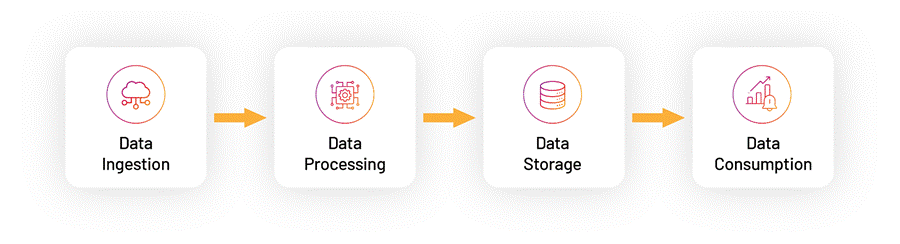
Data Ingestion
- Data ingestion begins after a Source Instance is configured and activated within an O11ySource. Observability data is collected using the management method configured for each Source Instance. Depending on the capabilities of the O11ySource, data collection can be performed through OmniAgent Managed, Remote Collection, or Manual Deployment.
- For OmniAgent Managed Source Instances, OmniAgent automatically deploys, configures, and manages the required probes on the target host. For Remote Collection, the platform securely communicates with the target system to collect data without requiring local probe deployment. For Manual Deployment, administrators deploy the required binaries and configuration files on the target host to enable data collection.
- Once data collection begins, the collected observability data is securely ingested into the platform for processing, enrichment, storage, and visualization.
Data Processing
After ingestion, data is processed through the ContextStreams module. ContextStreams manages the complete data processing workflow, including: After ingestion, data is processed through the ContextStreams module. ContextStreams manages the complete data processing workflow, including:
- Input streams that receive data from Source Instances
- Pipelines that perform transformations, filtering, and enrichment
- Output streams that route processed data to downstream systems
This stage enriches raw data with context and structure, enabling accurate analysis and efficient downstream consumption.
Data Storage
- The processed data is stored in Hyperscale and Postgres data stores.
- These storage layers are optimized to support both high-volume data ingestion and fast query performance, forming the foundation for analytics, dashboards, and alerting capabilities within vuSmartMaps.
Data Consumption
In the final stage, stored data is consumed through dashboards, storyboards, alerts, and reports. This is where users interact with the data to:
- Monitor system health and performance
- Analyze trends and anomalies
- Receive proactive alerts
- Make informed operational decisions using both real-time and historical data
To fully leverage the O11ySource framework, the journey begins with enabling an O11ySource and configuring the required Source Instances. This guide walks you through each stage of the process, helping you understand how data flows through the platform and how each component contributes to reliable, end-to-end observability.
FAQs
What is the difference between an O11ySource and a Source Instance?
An O11ySource defines the supported integration type and the observability data it can collect. A Source Instance represents a specific target system or endpoint configured under that O11ySource.
What management methods are available for Source Instances?
Depending on the O11ySource, Source Instances can use OmniAgent Managed, Remote Collection, or Manual Deployment. The available method depends on the capabilities and requirements of the selected O11ySource.
Does enabling an O11ySource start data collection immediately?
No. Enabling an O11ySource makes its configuration and collection capabilities available. Data collection begins after one or more Source Instances are configured and activated using a supported management method.
What should I verify before configuring a Source Instance?
Review the O11ySource compatibility, prerequisites, supported operating systems, collection methods, target details, credentials, and management-method requirements. Install OmniAgent only when the selected O11ySource supports or requires OmniAgent Managed deployment.
How does observability data flow through vuSmartMaps?
Data is collected from configured Source Instances, processed and enriched through ContextStreams, stored in Hyperscale and Postgres, and then consumed through dashboards, storyboards, alerts, reports, and analytics.
What types of data can O11ySources collect?
O11ySources can collect metrics, logs, events, and other operational telemetry, depending on the selected integration and its supported capabilities.
What becomes available after an O11ySource and Source Instance are configured?
After successful configuration and data collection, processed data becomes available for monitoring and analysis. Associated ContextStreams, dashboards, storyboards, alert rules, fields, and analytics workflows can then be used according to the O11ySource definition.
