Data Retention
Introduction
In vuSmartMaps, administrators can efficiently manage data retention settings through a user-friendly graphical interface. This comprehensive guide provides an overview of how to define retention durations for Hot, Warm, and Archived storage, optimizing system performance, compliance, and data management.

Data Retention Hierarchies
vuSmartMaps supports the data storage strategy, subdivided into two broad categories: Live Data Storage and Archived Storage.
- Live Data Storage includes Hot and Warm storage, where data remains queryable and accessible for analysis.
- Archived Storage is used for long-term retention, where data is not available for direct queries and requires restoration before access.
Live Data
Hot Storage
Hot Storage serves immediate and frequent access needs for recent and critical data. This storage offers the fastest access speeds, making it ideal for live queries, active analytics, and real-time operations. Administrators can set the number of days data remains in Hot Storage before being transitioned to the next storage, ensuring optimal performance and availability.
Warm Storage
Warm Storage provides intermediate storage for data that is less frequently accessed than Hot Storage but remains relevant and needs moderate-speed access. This storage is suitable for data that is still in use but not as frequently queried or analyzed as Hot data. You can specify how long data stays in Warm Storage before being moved to the Archive storage.
Archived Data
Archived Storage is used for long-term retention of historical or infrequently accessed data. Data in this storage is not immediately available for live queries but is retained for reference, compliance, and long-term storage needs. Administrators can bring archived data back to the Warm storage when necessary using the restore functionality.
Data transition schedules are configured as follows:
- Hot to Warm: This schedule runs at 00:30 every day.
- Hot/Warm to Archive: This schedule runs every 6 hours, with the first execution time depending on when the
DAOpod is started.
The configuration of data retention settings is flexible, allowing configurations to suit user-specific requirements.
Archival Strategy Configuration
Administrators can configure how data transitions between Live Storage (Hot and Warm) to Archived Storage using two archival strategies: Archive Data Daily and Archive on Live Data Retention Period Expiry. These strategies define how data is backed up, moved, and retained across the different storage tiers. This can be achieved through the "Data Retention Settings" option. Clicking on this button opens a modal that provides two options for defining the archival strategy:
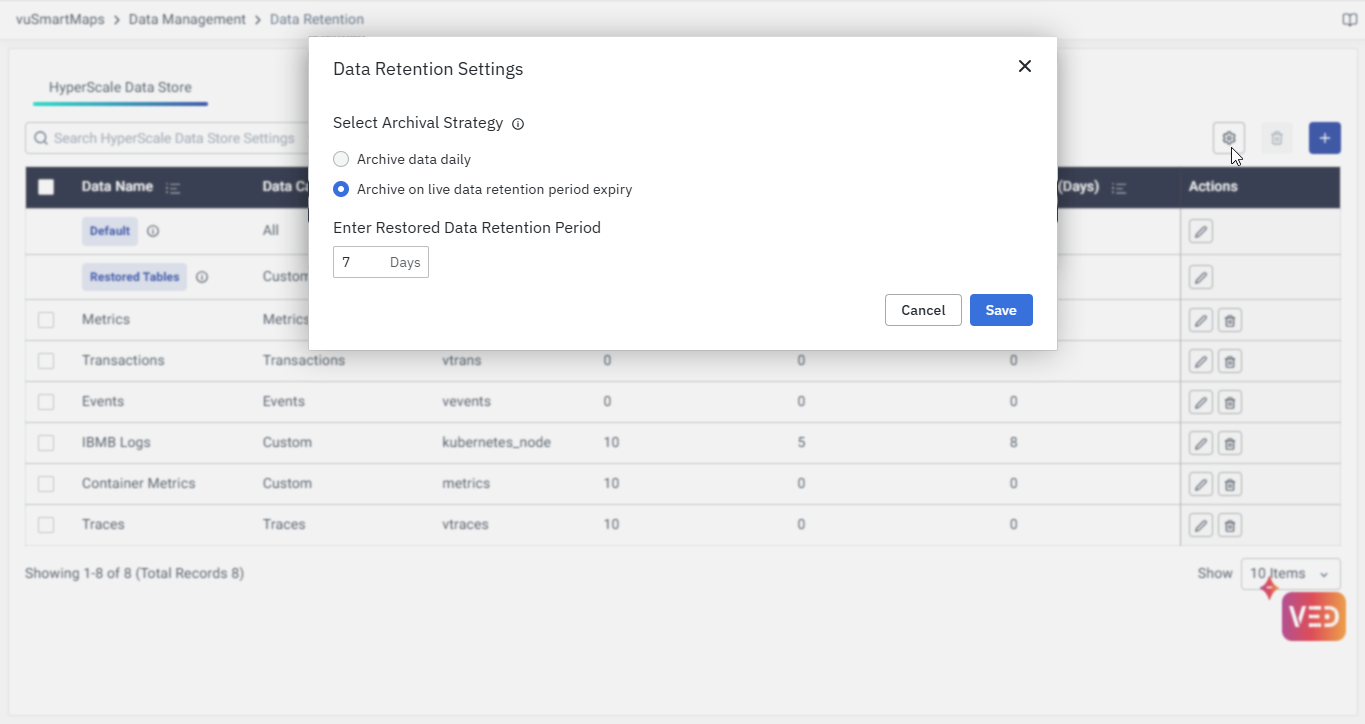

Archive Data Daily
In this strategy, data is archived daily, starting from the previous day (N-1). Data in Hot and Warm storage is backed up to Archive Storage according to the retention periods configured for each storage tier. A copy of the data is always stored in the Archive, regardless of whether it resides in Hot or Warm storage.
For example: If the retention periods are configured as:
- Hot: 3 days
- Warm: 1 day
- Archive: 4 days
Here’s how the data flows:
- Data remains in Hot Storage for 3 days and is also backed up to Archive Storage during this time.
- After 3 days, it moves to Warm Storage for 1 day.
- After the 1-day Warm retention, data is moved to Archive Storage for another 4 days.
Example Timeline (assuming today is the 20th):
- Hot Storage will have data from the 17th to 19th (3 days).
- Warm Storage will have data from the 16th (1 day).
- Archive Storage will have data from the 12th to 19th (4 extra days in Archive).
In total, the data will be retained for 3 + 1 + 4 = 8 days across these storage tiers, with 4 days of backup stored in Archive.
The retention period for each storage (Hot, Warm, Archived) is calculated separately, and the backup is created in the Archive from Hot and Warm before the data moves. The Archive storage ensures the preservation of data for additional days beyond the live data retention.
Archive on Live Data Retention Period Expiry
In this strategy, there is no backup maintained in the Archive when the data is in Hot or Warm storage. Only after the configured retention period for Hot and Warm storage expires, the data is moved to Archive storage.
For example: If the retention periods are:
- Hot: 3 days
- Warm: 1 day
- Archive: 4 days
The data will move as follows:
- Data stays in Hot Storage for 3 days.
- After 3 days, it moves to Warm Storage for 1 day.
- After the Warm retention expires, it moves directly to Archive Storage for 4 days.
Example Timeline (assuming today is the 20th):
- Hot Storage will have data from the 17th to 19th (3 days).
- Warm Storage will have data from the 16th (1 day).
- Archive Storage will have data from the 12th to 15th (4 days).
This strategy does not involve the backup step. Data simply moves between Hot, Warm, and Archive based on the configured retention periods.
The retention period for this strategy is calculated from the day the data is configured to be removed from Hot or Warm storage. No additional backup is stored in the Archive. Data will be retained in the Archive only for the configured retention period.
Restored Data Retention Period
The system allows you to specify the retention period for restored data through the "Enter Restored Data Retention Period" field. This setting determines how long the restored data will remain in the main storage tables before being deleted.
Key Features:
- Default Retention Period: 7 days (system default)
- Restoration Target: Data is restored directly to the main storage tables
- Data Deletion Process: Once the restored data retention period has expired, the restored data will be deleted permanently.
- Flexible Configuration: Administrators can customize the retention period based on business requirements
How It Works:
- When archived data is restored, it's moved back to the main storage tables
- The restored data remains accessible in the main tables for the specified retention period (default: 7 days)
- After the retention period expires, the data will be deleted.
- This ensures that frequently accessed restored data remains readily available while maintaining the overall data lifecycle management
The restored data retention period is independent of the original archival strategy settings and provides additional flexibility for data access and management workflows.
Edge Cases
1. Zero Retention Period for Archival
If the Archive Retention Period is set to 0, no archival functionality is applied. Here’s how this scenario works:
Example:
- Hot retention: 3 days
- Warm retention: 1 day
- Archive retention: 0 days
For the "Archive Data Daily" strategy, 4 days of backup will still be maintained, but no extra days will be retained in Archive Storage. Essentially, it will only duplicate the data for the backup period, and once archived, it will not stay in Archive.
For the "Archive on Live Data Retention Period Expiry" strategy, nothing will be moved to Archive Storage. Data will only remain in Hot for 3 days and Warm for 1 day, and once those retention periods expire, the data is deleted.
2. Warm Storage is Not Configured
Effect on Interpretation of Retention Policies
Even if a retention period is defined for Warm storage, it is ignored if the Warm tier is not integrated into the system. The retention policy effectively becomes a two-tier setup: Hot ➝ Archive, skipping the Warm layer altogether.
Effect on the Retention Process
If the archival strategy is Archive Data Daily, then:
- Data from Hot storage is directly archived.
- Since Warm is not present, the system will only back up Hot data.
- The Archive will contain fewer days of backup compared to a full Hot+Warm setup.
If the archival strategy is Archive on Live Data Retention Period Expiry, then:
- Data moves from Hot directly to Archive once the Hot retention expires.
- The configured Warm retention is ignored, and the data is deleted or archived based only on Hot + Archive logic.
Example:
Retention Policy: Hot – 5 days, Warm – 3 days, Archive – 10 days
If Warm is not configured:
- Archive Data Daily: Only 5 days of Hot data is archived (instead of 8 days if Warm was present).
- Archive on Live Data Retention Expiry: Data is deleted or archived after 5 days, not 8.

3. Archive Storage is Not Configured
Effect on the Retention Process
When Archive storage is not integrated, any configured Archive retention value is ignored, and no data is backed up to Archive storage.
Archive Data Daily Strategy:
- Data from Hot and Warm is not backed up, even if a retention period is defined.
- Archive tier is skipped; data is retained only in Hot and Warm.
- Result: Archive will not hold any backup copies, potentially affecting long-term retention guarantees.
Archive on Live Data Retention Period Expiry Strategy:
- Once data exceeds the Hot + Warm retention period, it is permanently deleted.
- The archive tier is unavailable for final transition or long-term backup.
- Policies relying on Archive storage for compliance or recovery will not function.
Example:
Retention Policy: Hot – 5 days, Warm – 3 days, Archive – 10 days
If Archive storage is not configured:
- Archive Data Daily: Archive tier is empty; backup data from Hot and Warm is not stored.
- Archive on Live Data Retention Expiry: Data is deleted after 8 days; Archive retention is not applied.
FAQs
What happens to data after the retention period expires in each storage tier?
- Hot Storage: Data moves to Warm or is deleted, depending on Warm retention.
- Warm Storage: Data moves to Archive or is deleted, based on Archive retention.
- Archive Storage: Data is retained for the configured period, then permanently deleted.
Can I edit the default data retention policy?
Yes, you can modify the default retention durations for Hot, Warm, and Archive storage by clicking the Edit icon on the Default policy row in the Data Retention settings. However, the default policy cannot be deleted.
How often is data moved between storage tiers in vuSmartMaps?
- Hot to Warm: Daily at 12:30 AM
- Hot/Warm to Archive: Every 6 hours, starting from the DAO pod’s start time
I want to visualize the data which is in the cold state. Can I do that?
Direct querying or visualization of data in the cold tier is not possible. To access and visualize this data, you must first restore it from the cold tier to the warm tier. Once restored, you can query and build visualizations on the data as needed.
If I reduce the retention period for any tier, what happens to the existing data?
Data that exceeds the new retention period will be purged automatically. For example, reducing Hot from 10 → 5 days causes data older than 5 days to be moved to Warm or deleted (if Warm is zero).
What are the two archival strategies supported in vuSmartMaps?
- Archive Data Daily:
- Creates a backup copy of Hot and Warm data daily into the Archive
- Archive can hold data beyond its live availability
- Archive on Live Data Retention Expiry:
- Moves data to Archive only after it leaves Warm
- No duplicate backup is created during Hot/Warm stages
What happens if the Archive retention is set to 0 days?
This configuration effectively disables Archive retention.
- In Archive Data Daily: Backup will still happen, but data will not persist after archival.
- In Archive on Live Expiry: No archival will happen; data will be deleted after Warm.
Can I apply different data retention policies for different types of data like logs, traces, metrics, etc.?
Yes. You can create separate retention policies per data category (e.g., Logs, Metrics, Traces) and even configure custom rules using table name wildcards. This ensures granular control based on data importance.
If multiple retention policies match a table name, which one is applied?
vuSmartMaps uses the longest prefix match to decide which policy to apply. For example, if logs-* and logs-heartbeat* both match a table, the logs-heartbeat* policy is used. This ensures that more specific policies override generic ones.
What happens to retention policies if Warm or Archive storage is not enabled?
If Warm storage is not configured, data transitions directly from Hot to Archive (or is deleted if Archive is also disabled). Similarly, if Archive storage is not configured, data is deleted after the Warm retention expires. Configured retention values for a disabled tier are ignored.
