VuNet Query Language (VQL)
Vunet Query Language (VQL) is a powerful text-based query language designed for comprehensive data analysis. It supports a range of functions and advanced query syntax to enable users to interact with and analyze data effectively. VQL allows for case-sensitive and case-insensitive searches, pattern matching, logical conditions, and field-specific queries, making it a versatile solution for querying large datasets.

String Search
VQL supports string searches by allowing the user to add a string in the form of "<value>", i.e., string values enclosed within double quotes.
For example:
log_group: "group1".
This returns all rows where the log_group column con
tains the string group1.
Handling Special Characters in String Search
- Any search value enclosed within double quotes (
" ") is treated as a string search. - If the value contains special characters, spaces, or symbols, it must be enclosed in double quotes and escaped correctly.
- All quoted searches are internally translated to a
LIKEcondition in ClickHouse. - Because of this, certain characters (such as
%and_) have special meaning and must be escaped to avoid incorrect results or query failures.
Incorrect handling of special characters may result in errors or unexpected behavior.
Escape Rules (ClickHouse-Compatible)
The table below lists the special characters that require escaping and how they should be handled:
| Character | Why Special | How to Escape | Example |
|---|---|---|---|
' | String delimiter | \' or '' | 'O\'Reilly' or 'O''Reilly' |
\ | Escape character | \\ | 'C:\\logs\\app.log' |
% | LIKE wildcard | Escape using \ | LIKE '%\%%' ESCAPE '\' |
_ | LIKE wildcard | Escape using \ | LIKE '%\_%' ESCAPE '\' |
" | Normal character | No escape needed | 'He said "OK"' |
\n | Newline | \n | 'line1\nline2' |
\t | Tab | \t | 'col1\tcol2' |
\r | Carriage return | \r | 'abc\rdef' |
\0 | Null byte | \0 | 'a\0b' |
Usage Examples
- Search for a value containing a backslash:
log_group:"group\\new"
- Search for a value containing double quotes:
log_group:"group\"name"
- Search for a value containing a newline:
log_group:"group\nname"
- Search for a value containing a tab:
log_group:"group\tname"
Token Search
Tokens are a continuous sequence of alphanumeric values or characters. Token Search filters entries based on the provided value. It performs a case-insensitive search. The syntax for using Token Search is as follows:
field_name:value
The field parameter is optional. If it is not provided, the search will be performed only in the message field of the table. Please note that when searching in a table that does not contain a message field, you must specify the field parameter.
For example, to search for "Error" in the message field, use the following:
Error
Similarly, to search for "Error" in a field named severity, use the following:
severity:Error
- Token Search supports only alphanumeric values and does not support special characters.
- If the search value contains special characters or spaces, use String Search (“ “) instead. Using Token Search for such values may result in errors.
Phrase Search
Phrase search refines results based on the specified phrase. It conducts a case-insensitive search and accommodates spaces and special characters. The syntax for using phrase search is as follows,
field_name:"phrase to be searched"
The field parameter is optional. If it is not provided, the search will be performed only in the message field of the table. Please note that when searching in a table that does not contain a message field, you must specify the field parameter.
For example, to search for "Error in VuBlock" in the message field, use the following:
“Error in VuBlock”
Similarly, to search for "log collector" in a field named vublock_name, use the following:
vublock_name:“log collector”
Please note that phrase search is currently not supported for any VQL functions like case(), starts(), or ends().
Phrase Search follows the same escaping rules as String Search. Any special characters inside a phrase must be escaped appropriately.
Regex Filter
The Regex filter in Vunet Query Language (VQL) enables advanced pattern matching and text extraction within your data. Unlike standard filters that search for exact values or simple conditions, the Regex filter lets you define complex patterns to capture a wide range of entries, even those that do not match a simple string or exact match.
Syntax
- Search in the
messagefield:
regex("pattern")
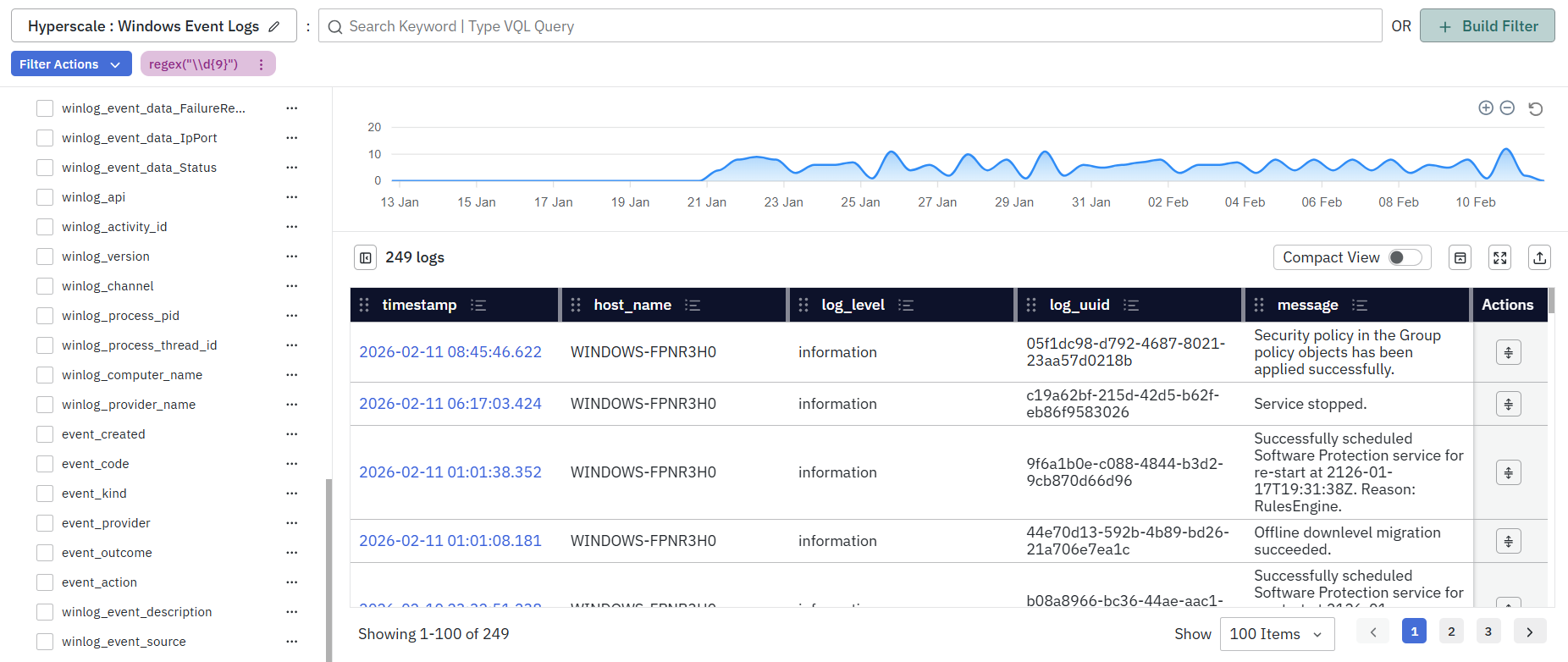
- For example, to search for entries containing a 9-digit number:
regex("\\d{9}")
- Search in a specific field:
field_name:regex("pattern")
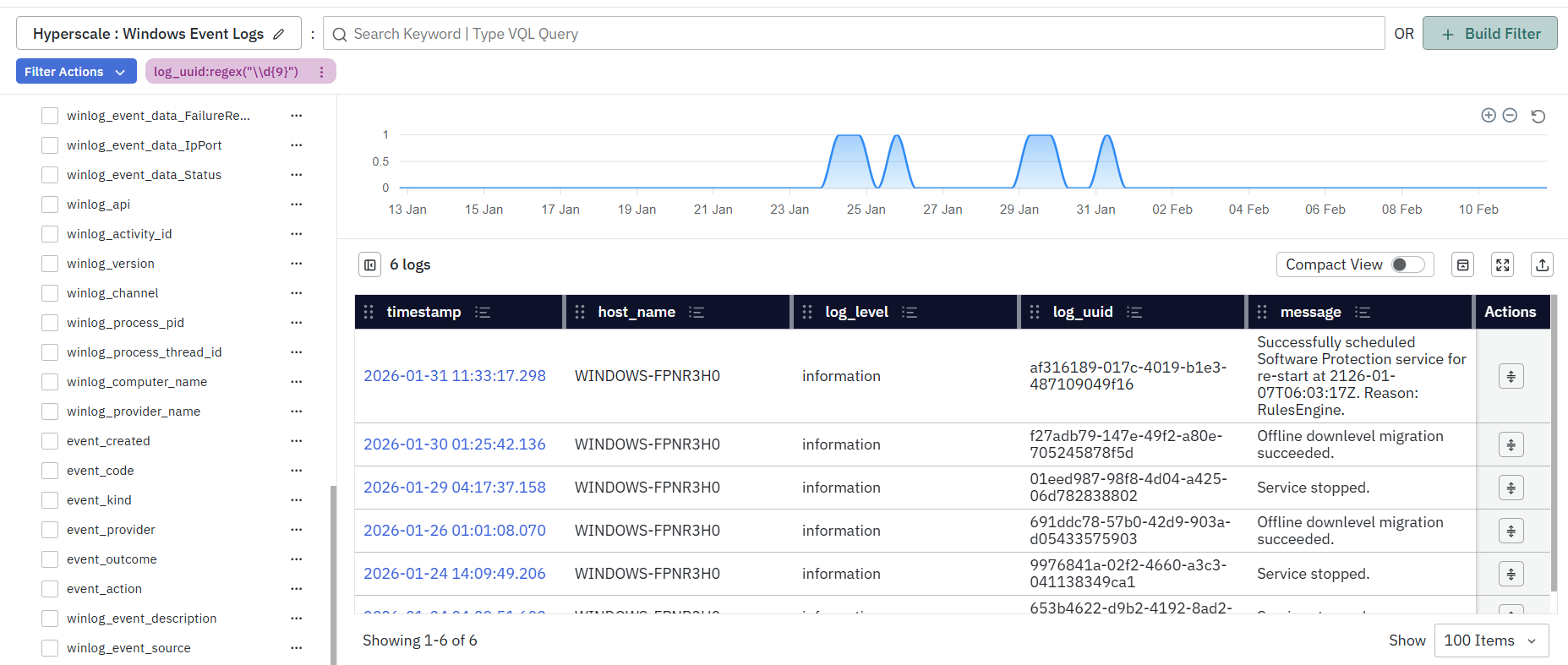
- For example, to search for a 9-digit number in the
log_uuidfield:
log_uuid:regex("\\d{9}")
Escaping Rules for Regex
- Regex patterns are enclosed in double quotes and therefore follow the same escaping rules as String Search.
- If the regex pattern contains special characters such as (
\(backslash),"(double quotes),%, _),they must be escaped appropriately as defined in the Handling Special Characters in String Search section.
Example: Escaping Backslashes Correctly
- To match a digit using
\d, you must escape the backslash inside the quoted string:
regex("\\d{9}")
Here:
\\represents a literal\- The regex engine receives
\d{9}
Use Cases
- Identify Specific Patterns: Use regex to identify specific types of errors, such as stack traces, exception logs, or custom error messages.
- Complex Pattern Matching: Filter logs based on varying formats, such as IP address structures, different date formats, or partial matches following a specific pattern.
Case Sensitive Search
By default, all VQL operations are case insensitive. To support case sensitivity users can use case-sensitive search which refines results based on exact matching and respects case sensitivity. The syntax for using case sensitive search is as follows,
field_name:case(value)
The field parameter is optional. If it is not provided, the search will be performed only in the message field of the table. Please note that when searching in a table that does not contain a message field, you must specify the field parameter.
For example, to search for "VuAlert" in the message field, use the following:
case(VuAlert)
Similarly, to search for "Linux" in a field named log_group, use the following:
log_group:case(Linux)
Prefix Search
Prefix search filters results based on values that start with the specified value. This search is case insensitive. The syntax for using prefix search is as follows,
field_name:starts(value)
The field parameter is optional. If it is not provided, the search will be performed only in the message field of the table. Please note that when searching in a table that does not contain a message field, you must specify the field parameter.
For example, to search for entries, whose message field starts with "err" , use the following:
starts(err)
This will yield results starting with 'err' within the message field.
Similarly, to search for entries, whose log_group field starts with "lin", use the following:
log_group:starts(lin)
This will yield results starting with 'lin' in field log_group.
New Addition: VQL now supports searching for phrases within the starts function. This allows users to filter results based on values that start with a specific phrase, including spaces and special characters.
For example, to search for entries where timestamp starts with “2024-08-07,” use the following:

Phrases used inside starts() follow String Search escaping rules. Special characters must be escaped if present.
Suffix Search
Suffix search filters results based on values that end with the specified value. This search is case insensitive. The syntax for using suffix search is as follows,
field_name:ends(value)
The field parameter is optional. If it is not provided, the search will be performed only in the message field of the table. Please note that when searching in a table that does not contain a message field, you must specify the field parameter.
For example, to search for entries, whose message field ends with "ror”, use the following:
ends(ror)
This will yield results ending with ‘ror’ within the message field.
Similarly, to search for entries, whose log_group field ends with "lin", use the following:
log_group:ends(ux)
This will yield results ending with ‘ux’ in field log_group.
:::New Addition VQL now supports searching for phrases within the ends function. This enables users to filter results based on values that end with a specific phrase, accommodating spaces and special characters. :::
For example, to search for entries where the message field ends with "has empty bucket," use the following:

Phrases used inside ends() follow String Search escaping rules. Special characters must be escaped if present.
Finding Entries with Provided Values
Match entries having one of the provided values and return them. This is case sensitive. The syntax is as follows,
field_name:in(value1, value2, …)
Returns entries containing any of the exact specified values. This function does not support phrases. The field parameter is optional. If it is not provided, the search will be performed only in the message field of the table. Please note that when searching in a table that does not contain a message field, you must specify the field parameter.
For example, to search for entries, whose severity field is either ‘error’ or ‘warning’, use the following:
severity:in(error, warning)
Searching for entries which has a non-null value
Returns entries where a specified field has a non-null value. The syntax is as follows,
field_name:exists
The field parameter is optional. If it is not provided, the filtering will be performed only in the message field of the table. Please note that when searching in a table that does not contain a message field, you must specify the field parameter.
For example, to retrieve entries that do not have a null value in the message field, use the following:
exists
Similarly, to retrieve entries that do not have a null value in the log_group field, use the following:
log_group:exists
If we have to search for the word “exists”, we need to enclose it with double quotes.
Comparison Operators
Equals to
The equals to operator allows you to do precise filtering based on exact matches. The syntax for using equals to operator is as follows,
field_name:=value
The field parameter is mandatory.
For example, to find entries that match "9000" in a field named port, use the following:
port:=9000
Similarly, the equals to operator can be used to match string values. For example, to find entries that match "VuAlert" in the field module, use the following:
module:=VuAlert
Greater than
The greater-than operator enables filtering based on values that exceed a specified threshold. The syntax for using greater-than operator is as follows,
field_name:>threshold
The field parameter is mandatory. Here the threshold represents a numeric value. Note that this operator is supported only for fields of numeric type.
For example, to find entries in the field error_count where the value is greater than "20",
error_count:>20
Less than
The less-than operator enables filtering based on values that are lower than a specified threshold. The syntax for using less-than operator is as follows,
field_name:<threshold
The field parameter is mandatory. Here the threshold represents a numeric value. Note that this operator is supported only for fields of numeric type.
For example, to find entries in the field error_count where the value is less than "20",
error_count:<20
Greater than or equal to
The greater-than-equal-to operator enables filtering based on values that meet or exceed a specified threshold. The syntax for using greater-than-equal-to operator is as follows,
field_name:>=threshold
The field parameter is mandatory. Here the threshold represents a numeric value. Note that this operator is supported only for fields of numeric type.
For example, to find entries in the field error_count where the value is greater-than-equal-to "20",
error_count:>=20
Less than or equal to
The less-than-equal-to operator enables filtering based on values that meet or are lower than a specified threshold. The syntax for using less-than-equal-to operator is as follows,
field_name:<=threshold
The field parameter is mandatory. Here the threshold represents a numeric value. Note that this operator is supported only for fields of numeric type.
For example, to find entries in the field error_count where the value is less-than-equal-to "20",
error_count:<=20
Filter for entries within a range
Filter entries containing values within a specified range. The syntax is as follows,
field_name:[start:end]
The field, start and end parameters are mandatory. Here, the start and end parameters specify the beginning and end of the specified range value and are numeric values. Note that this operator is supported only for fields of numeric type.
For example, to find entries in the field error_count where error count is between 0 and 5.
error_count:[0:5]
Negating a query
To filter out entries by excluding a particular value, you can use the negation operator (~). The syntax is as follows,
~field_name:value
//Compatible with other functions and operators.
~field_name:case(value)
~field_name:>threshold
The field parameter is optional. If it is not provided, the operation will be performed only in the message field of the table. Please note that when searching in a table that does not contain a message field, you must specify the field parameter.
For example, to return entries that do not contain "success," use the following,
~success
Similarly, to return entries where the log_group field does not start with "Lin," use the following,
~log_group:starts(Lin)
Combining multiple queries
To combine multiple queries, use the AND/OR logical operators. An AND operation can be performed by using a blank space or a "+" between two queries. An OR operation can be performed using "|" between two queries.
Example of an AND operation:
log_group:Linux error_count:[0:5]

//This can also be written as follows
log_group:Linux + error_count:[0:5]
Example for an OR operation
log_group:Linux | module:=VuAlert
It is also possible to combine AND/OR operators to create more complex queries. For example,
log_group:Linux | module:=VuAlert + error_count:[0:5]
Please note that brackets are not currently supported, so operators are applied in the order they appear.
$__VQL() macro
The $__VQL() macro is available to enhance query capabilities in data models. Vunet Query Language (VQL) can be utilized in data models to create filter conditions by specifying (VQL) queries within a $__VQL macro. Presently, it functions only within the Data Modelling Workspace - Write Query section, specifically designed for hyperscale datastores.
The $__VQL macro facilitates filtering and searching tables, with future plans for aggregation and ordering. To use this macro, it must be integrated into the WHERE clause within Hyperscale’s query. For example,
SELECT * from vulog WHERE $__VQL(case(Error) + django)
Users can also employ the $__dynamicVariable() macro within $__VQL for dynamic value population. Utilize the raw option for proper functionality. For example,
SELECT * from vulog WHERE $__VQL(case(Error) + $__dynamicVariable(server, django, 'raw'))
Using VQL with Data Models
VQL can also be used in Data Models to dynamically filter data at query execution time. In Data Models, VQL is typically combined with macros to enable flexible, runtime-driven query behavior without requiring the caller to directly modify SQL queries.
The following sections explain how dynamic variables, categories, and categorical macros work when using VQL in Data Models.
Data Model Template Queries
Data Models support template-based queries, where certain parts of the SQL can be dynamically replaced or enabled at runtime using macros.
Currently, Data Models provide __$dynamic* macros that allow values to be injected into SQL queries at execution time.
What are Data Model (DM) Variables?
DM variables are value templates that are substituted into the SQL at runtime.
If a value for a variable is not provided, it is either:
- Replaced with an appropriate SQL value that does not affect statement execution, or
- Replaced with a user-defined default value, as applicable.
The $__dynamicVariable macro alone is sufficient to alter SQL behavior at runtime, including modifying entire SQL statements. However, this approach requires the caller to be SQL-aware.
Given this complexity, we propose splitting the templating problem into two distinct parts:
- Allowing the caller to replace specific SQL fragments at runtime.
- Allowing the caller to enable or disable certain SQL logic at runtime.
Together, these capabilities provide more granular control at the external caller level while preserving flexibility through user input. This enables the caller to control SQL execution without needing to be SQL-aware. To address this, Data Models introduce categories.
Categories
Categories can be considered as control flags defined by users (query authors) that allow the caller or executor to modify specific query behavior at execution time. For example, categories can be used to enable bucketing or time bucketing, or to change the type of aggregation being performed.
There should be a predefined and exhaustive set of categories from which users can choose. Self-defined categories, essentially variations of predefined categories used to distinguish subcategories, may be allowed, subject to certain considerations.
The following categories can be defined:
timebucketagghostappenvservicebranchcityetc.
For self-defined categories, the following naming convention can be enforced:
<predefined_category>_<desired_name>
These categories must then be associated with SQL expressions that can be enabled or disabled at runtime. To achieve this, we introduce categorical macros.
Categorical Macros
$__cat*
We introduce a set of $__cat* macros that conditionally enable specific SQL segments when the corresponding categories are active, and disable them otherwise.
Syntax
$__catSelect(category, expr, repl=>NULL)
$__catFilter(category, expr, repl=>NULL)
$__catGroup(category, expr, repl=>NULL)
$__catOrder(category, expr, repl=>NULL)
All of these macros follow the same syntax and usage pattern.
Arguments (supports named notation)
- category: The category name.
- expr: The SQL expression to be enabled when the category is active.
- repl (optional): The SQL expression to use when the category is disabled. This defaults to a value appropriate for the underlying database. By default, an appropriate SQL expression is used to ensure that
expris effectively disabled and that the SQL interpreter does not raise an error.
SELECT
Syntax
SELECT $__catSelect(category, expr)
FROM table_name
WHERE condition
Example
User-defined query:
SELECT timestamp,
       cpu_used_pct AS "CPU Util",
       mem_used_pct AS "Memory Util",
       $__catSelect(app, app_name AS "Application"),
       $__catSelect(branch, branch_name AS "Branch")
FROM system_stats
WHERE $__timeFilter("timestamp")
Macro Expansion
Assume the caller enables the app category.
SELECT timestamp,
       cpu_used_pct AS "CPU Util",
       mem_used_pct AS "Memory Util",
       app_name AS Application,
       NULL
FROM system_stats
WHERE <time filter on "timestamp">
::: note
The NULL value in the SELECT clause is ignored during data retrieval.
:::
WHERE
Syntax
SELECT column_name(s)
FROM table_name
WHERE $__catFilter(category, expr)
Example
User-defined query:
SELECT timestamp,
       cpu_used_pct AS "CPU Util",
       mem_used_pct AS "Memory Util",
       $__catSelect(app, app_name AS "Application"),
       $__catSelect(branch, branch_name AS "Branch")
FROM system_stats
WHERE $__timeFilter("timestamp")
  AND $__catFilter(app, $__dynamicFilter("app_name", $Application))
  AND $__catFilter(branch, $__dynamicFilter("branch_name", $Branch))
Macro Expansion
Assume the caller enables the app category and provides
$Application = ['App1', 'App2'].
SELECT timestamp,
       cpu_used_pct AS "CPU Util",
       mem_used_pct AS "Memory Util",
       app_name AS Application
FROM system_stats
WHERE <time filter on "timestamp">
  AND "app_name" IN ('App1', 'App2')
  AND true
GROUP BY
Syntax
SELECT column_name(s)
FROM table_name
WHERE condition
GROUP BY $__catGroup(category, expr)
The $__catGroup macro should always be used together with $__catSelect to avoid GROUP BY errors.
Example
User-defined query:
SELECT timestamp,
       avg(cpu_used_pct) AS "CPU Util",
       avg(mem_used_pct) AS "Memory Util",
       $__catSelect(app, app_name AS "Application"),
       $__catSelect(host, server_ip AS "Server IP"),
       $__catSelect(branch, branch_name AS "Branch")
FROM system_stats
WHERE $__timeFilter("timestamp")
GROUP BY $__catGroup(app, "Application"),
         $__catGroup(host, "Server IP"),
         $__catGroup(branch, "Branch")
Macro Expansion
Assume the caller enables the app category.
SELECT timestamp,
       avg(cpu_used_pct) AS "CPU Util",
       avg(mem_used_pct) AS "Memory Util",
       app_name AS "Application",
       NULL,
       NULL
FROM system_stats
WHERE <time filter on "timestamp">
GROUP BY "Application",
         NULL,
         NULL
ORDER BY
Syntax
SELECT column_name(s)
FROM table_name
WHERE condition
ORDER BY $__catOrder(expr, category)
The sort order (ASC / DESC) is determined dynamically by the caller module at query execution time, based on the requirement. If the caller does not specify an order, ASC is used by default.
Example
User-defined query:
SELECT timestamp,
       avg(cpu_used_pct) AS "CPU Util",
       avg(mem_used_pct) AS "Memory Util",
       $__catSelect(app, app_name AS "Application"),
       $__catSelect(app, server_ip AS "Server IP"),
       $__catSelect(branch, branch_name AS "Branch")
FROM system_stats
WHERE $__timeFilter("timestamp")
ORDER BY $__catOrder(app, "Application"),
         $__catOrder(app, "Server IP"),
         $__catOrder(branch, "Branch")
Macro Expansion
Assume the caller enables the app category.
SELECT timestamp,
       avg(cpu_used_pct) AS "CPU Util",
       avg(mem_used_pct) AS "Memory Util",
       app_name AS "Application",
       server_ip AS "Server IP",
       NULL
FROM system_stats
WHERE <time filter on "timestamp">
ORDER BY "Application",
         "Server IP",
         NULL
$__catDynReplace
We introduce this powerful categorical dynamic replacement macro to address any use case not already covered by the existing $__cat* macros. This macro provides maximum flexibility by allowing multiple expressions, default values for each expression, and the ability to disable the expression—similar to standard $__cat* macros—by specifying a replacement expression when the category is disabled.
Syntax
| $__catDynReplace(cat, expr, repl, clause, choices=>NULL) |
|---|
Arguments (supports named notation)
- category: The category name.
- expr: The SQL expression to enable when the category is enabled. This expression may include variables. If variables are used in
expr, the user must also providechoices. - repl: The SQL expression to use when the category is disabled. This macro is intended for advanced users who understand database behavior; therefore, no default replacement is applied.
- clause: The SQL clause in which the macro is used.
- choices: The allowed choices for this macro, including default values.
- The number of choices must match the number of variables.
- If one choice is provided per variable, it is treated as the default value.
- If multiple choices are provided per variable, the first choice for each variable is treated as the default value.
With great power comes great responsibility. Since this macro provides extensive control over SQL behavior, it is the user’s responsibility to ensure that the DM schema is preserved for all replacements. This includes proper use of AS in the SELECT clause, correct usage of repl where required, and overall SQL correctness.
Example Use Cases
How can you write a query that enables time bucketing with different intervals?
If you want to write a query that enables time bucketing with different intervals, the following query can be used.
SELECT $__catDynReplace(
           timebucket,
           toStartOfInterval("timestamp", INTERVAL $interval),
           toStartOfInterval("timestamp", INTERVAL '1 hour'),
           SELECT,
           choices=>('1 hour', '5 minutes', '15 minutes', '30 minutes')
       ) AS ts,
       $__catSelect(
           timebucket,
           avg(cpu_used_pct),
           cpu_used_pct
       ) AS "CPU Util",
       $__catSelect(
           timebucket,
           avg(mem_used_pct),
           mem_used_pct
       ) AS "Memory Util"
FROM system_stats
WHERE $__timeFilter("timestamp")
GROUP BY ts
How can you aggregate fields dynamically?
If you want to write a query that allows you to dynamically choose the aggregation type and the column on which the aggregation is performed, the following query can be used.
SELECT $__catDynReplace(
           agg,
           $aggType($aggField),
           min(cpu_used_pct),
           SELECT,
           choices=>(
               (min, max, avg),
               (cpu_used_pct, mem_used_pct)
           )
       ) AS aggregate,
       $__catSelect(app, app_name AS "Application"),
       $__catSelect(branch, branch_name AS "Branch"),
       city
FROM system_stats
WHERE $__timeFilter("timestamp")
GROUP BY $__catGroup(app, "Application"),
         $__catGroup(branch, "Branch"),
         city
The above query returns one aggregate of type $aggType on the field $aggField.
How can you return multiple dynamic aggregates?
If you want the query to return two aggregates, you can achieve this in the following ways.
Option 1: Use two instances of $__catDynReplace(...)
SELECT $__catDynReplace(
           agg,
           $aggType1($aggField1),
           min(cpu_used_pct),
           SELECT,
           choices=>(
               (min, max, avg),
               (cpu_used_pct, mem_used_pct)
           )
       ) AS aggregate1,
       $__catDynReplace(
           agg,
           $aggType2($aggField2),
           min(cpu_used_pct),
           SELECT,
 choices=>(
               (min, max, avg),
               (cpu_used_pct, mem_used_pct)
           )
       ) AS aggregate2,
       $__catSelect(app, app_name AS "Application"),
       $__catSelect(branch, branch_name AS "Branch"),
       city
FROM system_stats
WHERE $__timeFilter("timestamp")
GROUP BY $__catGroup(app, "Application"),
         $__catGroup(branch, "Branch"),
         city
Option 2: Use a single instance and handle the expression appropriately
SELECT $__catDynReplace(
           agg,
           $aggType1($aggField1) AS aggregate1,
           $aggType2($aggField2) AS aggregate2,
           min(cpu_used_pct) AS aggregate1,
           min(mem_used_pct) AS aggregate2,
           SELECT,
           choices=>(
               (min, max, avg),
               ("cpu_used_pct", "mem_used_pct"),
               (min, max, avg),
               ("cpu_used_pct", "mem_used_pct")
           )
       ),
       $__catSelect(app, app_name AS "Application"),
       $__catSelect(branch, branch_name AS "Branch"),
       city
FROM system_stats
WHERE $__timeFilter("timestamp")
GROUP BY $__catGroup(app, "Application"),
         $__catGroup(branch, "Branch"),
         city
In the second approach, $__catDynReplace(...) is used to return multiple selections within a single expression. While this is supported, the query author must ensure that the DM schema is preserved. Failure to do so may result in unforeseen downstream issues.
How can the same query supply both time-bucketed and raw time series data?
If you want to write a query that enables time bucketing when requested, and otherwise returns raw time series data, the following query can be used.
SELECT $__catDynReplace(
           timebucket,
           toStartOfInterval("timestamp", INTERVAL $interval),
           "timestamp",
           SELECT,
           choices=>('5 minutes', '15 minutes', '30 minutes', '1 hour')
       ) AS ts,
       $__catSelect(
           timebucket,
           avg(cpu_used_pct),
           cpu_used_pct
       ) AS "CPU Util",
       $__catSelect(
           timebucket,
           avg(mem_used_pct),
           mem_used_pct
       ) AS "Memory Util"
FROM system_stats
WHERE $__timeFilter("timestamp")
GROUP BY $__catGroup(timebucket, ts)
