Mobile RUM
Introduction
Mobile Real User Monitoring (MRUM) helps you understand how real users experience your mobile applications in real time. By adding VuNet’s Mobile SDK to your app, MRUM automatically tracks key performance details like screen load times, API call latency, crashes, errors, and user interactions. This data is securely sent to vuSmartMaps, where it is processed and displayed in easy-to-read dashboards. These insights help you quickly detect problems, analyze trends, and improve both app performance and user experience. MRUM works across Android and Flutter apps, supporting detailed tracking of screens, APIs, and user sessions, along with geographical and device-specific breakdowns.
MRUM Architecture

The Mobile RUM architecture enables real-time performance monitoring by capturing telemetry directly from end-user mobile applications.
- End User:
The process starts when an end user accesses the mobile application. Instrumented code, embedded within the app via the Mobile RUM SDK, collects RUM data such as screen load times, API call performance, crashes, ANRs, and user interactions. - Internet:
The captured telemetry data is securely transmitted over the internet to the organization’s infrastructure. - Firewall:
The data passes through an external firewall into a secure Demilitarized Zone (DMZ). - DMZ – Web Server / Proxy Server:
A web server or proxy server hosted within the DMZ receives the RUM data. This server can:
- Act as a reverse proxy, or
- Be a dedicated server that forwards telemetry to the internal observability platform.
- Internal Firewall:
The forwarded data passes through an internal firewall to reach the organization's internal network. - Internal Network – Data Center (DC):
Within the DC, the vuSmartMaps RUM Collector ingests the telemetry data. - RUM Server & Databases:
The RUM Collector forwards the data to the RUM Server, which processes and stores it in connected databases. This processed data is then used for visualization, performance analysis, and troubleshooting within the observability platform.
Deployment and Configuration
Mobile RUM works by integrating VuNet’s Mobile SDK into your mobile application, enabling it to collect performance and usage data in real time. After the SDK is added, the application must be rebuilt and redeployed with the integration in place. Once deployed, the SDK automatically sends the collected data to vuSmartMaps, where it can be analyzed to improve application performance and overall user experience.
The configuration process for comprehensive monitoring involves two key steps:
- Configuring vuSmartMaps for Mobile RUM: Enable the Mobile RUM O11ySource in vuSmartMaps, configure the data source with your application details, and download the required SDK package (for Flutter) or configure the Android Native SDK as per the instrumentation guide.
- Client-Side Instrumentation: Integrate the VuNet Mobile RUM SDK into your mobile application (Flutter or Android Native). Initialize it with the required telemetry endpoints, application details, and optional tracking features such as slow frame detection, screen navigation tracing, and API monitoring.
- Additional Configuration Details: For secure and scalable data collection, deploy a proxy server in the DMZ. The proxy handles SSL termination, CORS enforcement, API key authentication, and forwards telemetry to the vuSmartMaps RUM Collector inside the internal network.
Following these steps, Mobile RUM is successfully integrated, allowing continuous monitoring of performance trends, stability metrics, and user interactions for improved mobile application observability.
Mobile RUM Dashboards
The Mobile RUM Dashboards, included with Mobile RUM, can be accessed by clicking on Dashboards in the left menu. On the Dashboards page, you can find the MRUM App Catalog using the Search bar. Navigate to the MRUM App Catalog dashboard which is located in the Mobile RUM folder.

Once you access the Mobile RUM Dashboards, the first page you’ll see is the MRUM App Catalog. Mobile RUM provides a range of dashboards designed to give you meaningful insights into your application's mobile performance. Here are the available dashboards:
- Application Overview Dashboard
- MRUM App Catalog – Lists all monitored mobile applications with quick access to session statistics, error counts, and regional usage insights.
- Detailed Application Metrics Dashboards
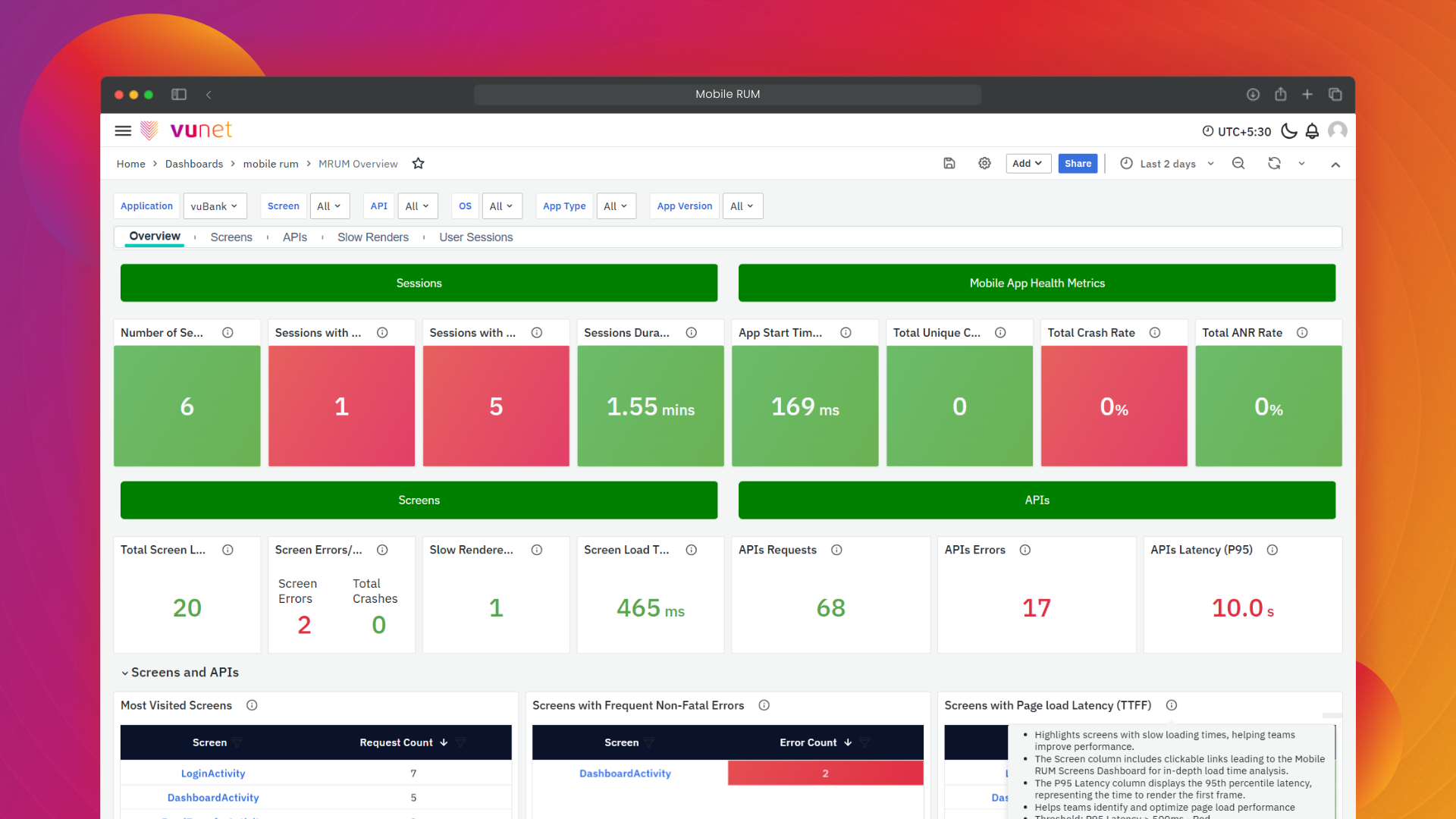
- MRUM Overview – Summarizes key performance metrics for screens, APIs, crashes, and sessions, providing a high-level view of app health.
- MRUM Screens – Shows screen-level metrics such as request counts, load latency, and error trends.
- MRUM APIs – Displays API performance data, including call volumes, error counts, and latency.
- MRUM Slow Render – Highlights screens with slow-render frames that may impact UI performance.
- MRUM User Sessions – Provides session counts, error trends, duration insights, and breakdowns by OS, device, and network.
- Trace Listing Dashboards
- MRUM Tracelisting - provides a unified view of the most recent screen and API traces, showing key details like duration, status, and response codes to help monitor and troubleshoot app performance..
- Trace Visualization Dashboard
- MRUM Trace Map – Presents a visual flow of screen/API events within a session, helping trace execution paths and timing.
- User Session Insights
- MRUM User Session Details – Offers a detailed breakdown of a single user session, including screen/API usage, flame graphs, slow tasks, and error logs.
- Geographical Insights
- MRUM Geo Map – Displays session activity by geographic region with filters for app version, OS, screen, and other parameters to identify location-specific trends and issues.
