Host Landscape & Auto Discovery Instrumentation
Overview
What is ADI?
Auto-Discovery & Instrumentation (ADI) is a capability in vuSmartMaps that automatically discovers supported infrastructure and application components, maintains them in a centralized inventory through the Host Landscape, and simplifies the process of onboarding those components for monitoring and instrumentation. ADI combines automated discovery, inventory management, policy-driven onboarding, monitoring, and instrumentation into a unified workflow that helps organizations continuously maintain visibility into their monitored environments.
In the context of ADI, supported refers to infrastructure platforms, operating systems, runtime technologies, middleware, databases, messaging systems, application servers, web servers, and other infrastructure or application components that are compatible with the platform's discovery and instrumentation capabilities. When supported components are detected, ADI automatically discovers them, synchronizes the discovered information with the centralized inventory, evaluates them against the configured onboarding policies, and prepares eligible components for monitoring and instrumentation.
ADI is designed to provide a structured and automated approach for identifying supported infrastructure and application components running within an environment. Through continuous discovery, the platform identifies operating system information and supported runtime technologies, application servers, databases, messaging systems, network-accessible services, and other supported infrastructure and application components on registered hosts.
At a high level, ADI combines four closely related capabilities into a single operational workflow:
Auto Discovery
Automatically discovers operating system information, runtime technologies, application servers, databases, messaging systems, network-accessible services, and other supported infrastructure and application components running on registered hosts.
Inventory / Host Landscape
Maintains a centralized and continuously synchronized inventory of registered hosts and discovered entities, allowing users to view discovered assets, monitoring status, discovery information, onboarding progress, and infrastructure relationships from a single interface.
Automatic Monitoring
Evaluates discovered entities against the configured onboarding policies associated with the selected Environment and Host Group, and automatically provisions monitoring for supported components where applicable.
Supported Instrumentation
Automatically enables instrumentation for supported technologies based on configured onboarding policies, allowing metrics, logs, traces, and other supported observability data to be collected with minimal manual configuration.
After discovery, the platform synchronizes the discovered information with the centralized inventory, classifies supported entities, evaluates the configured onboarding policies, and initiates monitoring and instrumentation for eligible components. Depending on organizational policies and deployment requirements, some onboarding or monitoring actions may still require user review, approval, or manual initiation from the Host Landscape before monitoring becomes active.
For users, ADI provides a streamlined observability experience by reducing the manual effort required to identify, inventory, onboard, and monitor supported infrastructure and application components. Through continuous discovery and centralized inventory management, administrators can quickly understand the current state of their environment, review monitoring status, validate onboarding outcomes, and manage discovered assets from a single interface within the Host Landscape.
Examples of supported components include Apache Tomcat, JBoss/WildFly, Apache HTTP Server, Apache Karaf, and Quarkus. These technologies are currently supported on Linux-based hosts only. When these supported components are detected on onboarded hosts, ADI automatically creates inventory entities, evaluates the applicable onboarding policies, and prepares eligible components for monitoring and instrumentation. Other technologies and platforms are not supported at this time.
In the current scope, ADI focuses on providing a centralized and controlled discovery and monitoring experience. Discovery results, inventory information, onboarding status, monitoring state, OmniAgent health, and instrumentation progress are presented through the Host Landscape, enabling administrators to review, validate, and manage discovered infrastructure and application components throughout their lifecycle.
ADI currently supports automatic discovery and monitoring of supported components on Linux hosts. OmniAgent-managed Linux hosts are displayed in the Host Landscape, and supported infrastructure and application components running on those hosts are discovered. Hosts running on other operating systems are not included in the ADI discovery and inventory workflow for the current release.
Supported Discovery Technologies
OmniAgent supports automatic discovery of a wide range of infrastructure components and application technologies. Depending on the installed software and operating system, the agent can identify supported runtimes and services for automatic monitoring.
The following categories are currently supported:
| Category | Supported Technologies |
|---|---|
| Application Servers | Apache Tomcat, JBoss/WildFly |
| Web Servers | Apache HTTP Server |
| Application Runtimes | Apache Karaf, Quarkus |
| Infrastructure | Linux Hosts |
The supported technologies and infrastructure are currently available for Linux only.
Supported Platforms, Components, and Telemetry
OmniAgent currently supports automatic discovery and monitoring for supported Linux-based components.
Depending on the component being monitored, OmniAgent can automatically provision:
- Metrics
- Logs
- Traces
Support for additional operating systems, application runtimes, telemetry types, and deployment environments is introduced as platform capabilities continue to evolve.
Why This Feature Is Useful
ADI is introduced to address the challenges of modern environments where infrastructure and services change frequently. In such environments, manual onboarding can be time-consuming and may lead to delayed observability coverage, inconsistent monitoring, or newly deployed components remaining unmonitored.
By continuously discovering supported nodes and entities and maintaining them in a centralized inventory, ADI helps users quickly understand what is running in the environment and what may require monitoring action.
For example:
- If a new JVM-based application is deployed on a Linux server, ADI can detect the newly running runtime and display it in the Host Landscape so that users can review its monitoring status and onboarding state.
- In environments where multiple servers are provisioned dynamically, such as development or scaling environments, administrators can install and register OmniAgent on the required hosts. ADI then automatically identifies supported components and associated services running on those registered hosts without requiring users to manually onboard each component individually.
This approach improves visibility across changing environments, reduces manual operational effort, and helps minimize observability gaps caused by missed or delayed onboarding activities.
How does ADI simplify onboarding?
- ADI simplifies onboarding by introducing a discovery-driven workflow. Once OmniAgent is installed and the host is registered with the platform, the system can detect eligible components running on the host, add them to the Host Landscape, and evaluate them for monitoring based on configured policies. This reduces the need to manually identify and onboard each component individually. Users can review discovered assets from a single interface and use monitoring states such as Not Monitored, Onboarding, Monitoring, and Onboarding Failed to understand current onboarding progress and take action where needed.
- When a supported component is detected, ADI automatically creates the corresponding inventory entity, evaluates the applicable monitoring policies, provisions the required monitoring configuration, and starts telemetry collection without requiring separate onboarding for each supported component.
Relationship with OmniAgent
Auto Discovery & Instrumentation (ADI) extends the existing OmniAgent framework by using OmniAgent as the host-side execution layer for discovery and monitoring operations. OmniAgent establishes secure communication with the vuSmartMaps platform, registers monitored hosts, executes discovery through Discovery Probes, and manages the lifecycle of deployed probes.
The information collected by OmniAgent is processed by the platform to synchronize the centralized Host Landscape inventory, evaluate monitoring policies, and automatically onboard supported infrastructure and application components for monitoring and instrumentation. Host Landscape provides administrators with a unified view of discovered assets, monitoring status, onboarding progress, and OmniAgent health from a single interface.
Example Scenario
A DevOps team provisions several new Linux application servers for a production environment. Instead of manually identifying and onboarding each server, the administrator installs OmniAgent using the generated platform-specific installation command.
After the OmniAgent service starts, the host is automatically registered with the vuSmartMaps platform. Discovery Probes identify supported infrastructure and application components running on the host and synchronize the discovered information with the Host Landscape inventory. The platform evaluates the configured monitoring policies associated with the selected Environment and Host Group, automatically provisions monitoring where applicable, and enables instrumentation for supported technologies.
Operations teams can immediately review discovered assets, verify onboarding progress, monitor OmniAgent health, and confirm monitoring status directly from the Host Landscape.

Auto-Discovery & Instrumentation Overview
Auto-Discovery & Instrumentation (ADI) follows a discovery-driven workflow that automatically identifies supported infrastructure and application components, synchronizes them with the centralized Host Landscape inventory, evaluates configured monitoring policies, and enables monitoring and instrumentation for supported technologies. This workflow minimizes manual onboarding effort while providing continuous visibility into the monitoring state of discovered assets.
The Host Landscape provides a centralized operational view of discovered hosts, entities, monitoring states, environments, and onboarding activity. Consider adding a Host Landscape UI screenshot here to help users quickly understand the overall ADI workflow and inventory view.

ADI follows a connected operational flow:
Discovery
Automatically identifies operating system information, runtime technologies, application services, processes, and other supported infrastructure and application components on registered hosts.
Inventory
Synchronizes discovered assets with the centralized Host Landscape inventory and continuously updates discovery information.
Monitoring & Onboarding
Evaluates discovered entities against the configured monitoring policies associated with the selected Environment and Host Group and prepares eligible entities for monitoring.
Instrumentation
Automatically enables instrumentation for supported technologies and begins collecting observability telemetry such as metrics, logs, and traces.
High-Level User Benefit
ADI reduces the manual effort required to discover, inventory, onboard, monitor, and instrument supported infrastructure and application components. By providing a centralized inventory through the Host Landscape, administrators can quickly understand what resources are running in the environment, review their monitoring and onboarding status, identify gaps in observability coverage, and manage discovered assets from a single interface. This improves operational visibility, accelerates monitoring adoption, and helps maintain an accurate representation of the monitored environment.
Key Components of ADI
Auto-Discovery & Instrumentation (ADI) in vuSmartMaps is built around a set of core components that work together to discover supported assets, present them in a centralized landscape view, and help users understand their current observability status.
The most relevant user-facing components of ADI are:
- OmniAgent
- Discovery Probe
- Host Landscape
- Hosts and Entities
- Monitoring Status
- Supported Instrumentation
These components together support the overall ADI workflow of discovery, visibility, monitoring readiness, and supported instrumentation.
OmniAgent
- OmniAgent acts as the host-side management and probe control layer that enables the discovery-driven workflow used by ADI.
- It manages probes on the target host, supports centralized control from the platform, and provides the underlying execution model through which discovery is performed.
Discovery Probe
- The Discovery Probe is responsible for collecting host-level information and identifying supported runtime-level components and sending the discovered information to the platform.
- In the current documented scope, it is especially relevant for collecting host information, detecting processes with open ports, and discovering supported runtime components such as JVMs.
Host Landscape
- The Host Landscape is the primary user-facing interface for ADI.
- It provides a centralized view of discovered assets and serves as the main place to review discovery results, monitoring status, and related asset information.
Hosts and Entities
- Within the Host Landscape, Hosts represent registered or onboarded infrastructure nodes, while Entities represent supported runtime or application components identified within those hosts.
- This helps users understand both the infrastructure layer and the discovered components running within it.
Monitoring Status
- Monitoring Status provides visibility into the onboarding state of discovered hosts and entities.
- This includes Not Monitored, Onboarding, Monitoring, and Onboarding Failed, helping users quickly identify what is already monitored and what may still require action.
| Status | Description |
|---|---|
| Not Monitored | Discovery completed but monitoring has not started. |
| Onboarding | Monitoring configuration is currently being applied. |
| Monitoring | Monitoring is active and telemetry is being collected. |
| Onboarding Failed | Monitoring setup failed and requires user attention. |
Supported Instrumentation
- ADI also introduces support for automatic instrumentation of supported runtimes. In the current release, ADI discovery and instrumentation are supported only on Linux hosts. Supported Linux hosts with OmniAgent installed and registered are displayed in the Host Landscape, and supported components running on those hosts are discovered.
- The primary focus is on JVM-based trace onboarding and instrumentation for supported Linux environments.
Accessing the Host Landscape
The Host Landscape page in vuSmartMaps is the primary interface for viewing and managing the discovery-driven inventory introduced through Auto-Discovery & Instrumentation (ADI). It provides a centralized view of discovered assets and related observability information, allowing users to review hosts, entities, OmniAgent details, and history from a single interface.
Navigation Path

To access the Host Landscape page:
- Open the main navigation menu.
- Expand Data Studio.
- Click Host Landscape.
- You can also access Host Landscape from the Data Studio landing page by selecting the Host Landscape tile.
- Navigation path: vuSmartMaps > Data Studio > Host Landscape
Available Tabs
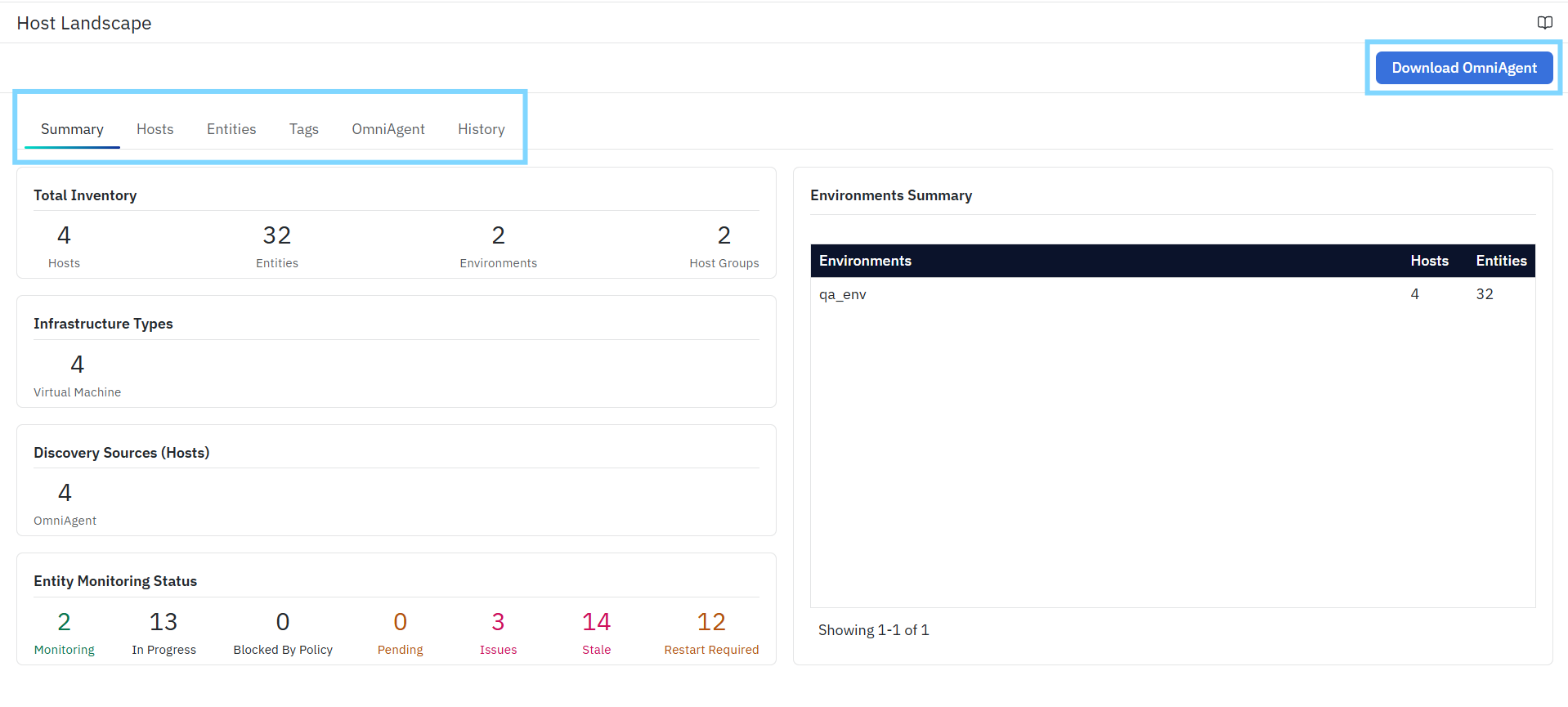
The Host Landscape page includes the following tabs:
- Summary – Provides a high-level overview of the Host Landscape, including inventory counts, infrastructure type distribution, discovery source summary, entity monitoring status, and environment-level summary.
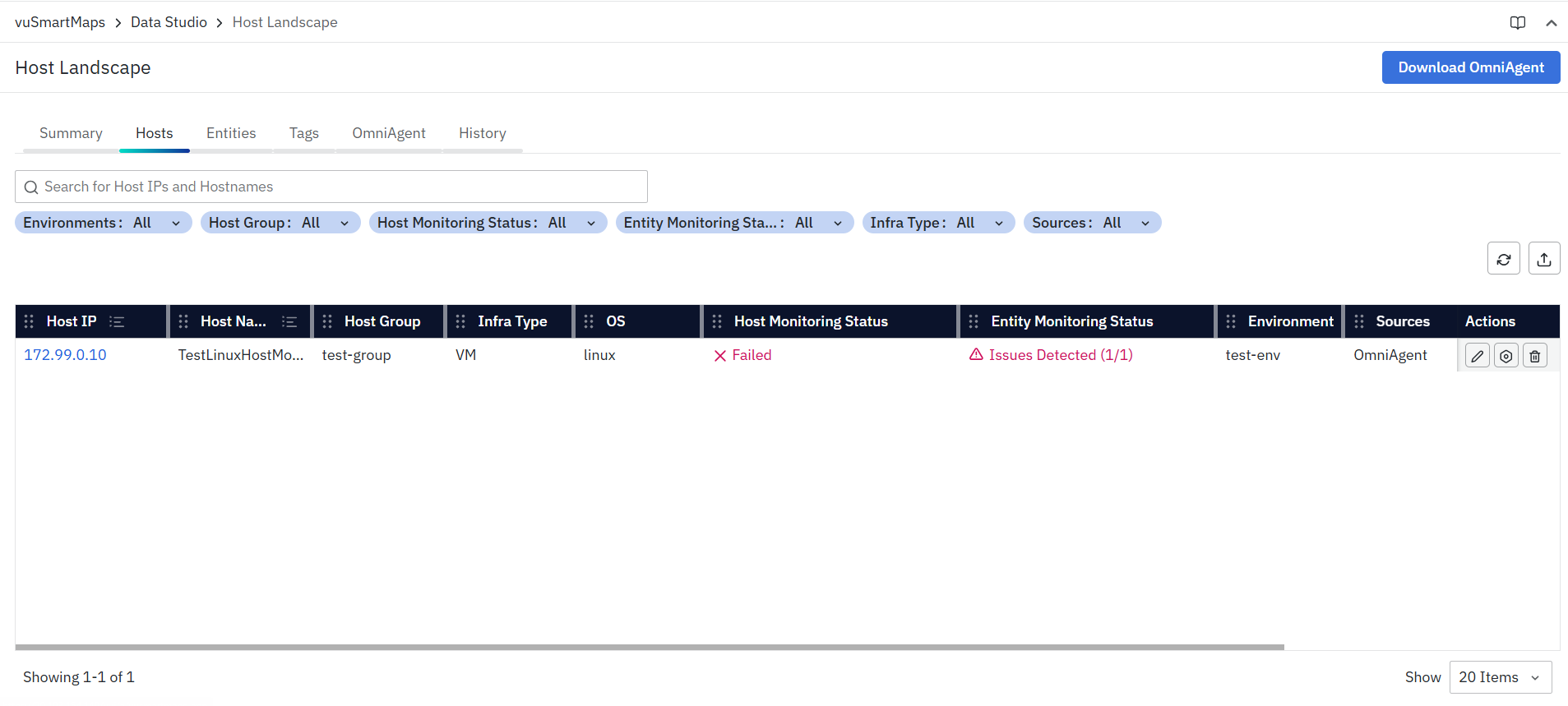
- Hosts – Displays discovered hosts and their infrastructure-level details, along with monitoring status, environment association, source information, and available actions.
- Entities – Displays discovered entities and component-level details, including monitoring status, source information, host association, and available actions.
- Tags – Provides an organizational view of the Host Landscape through Environments and Host Groups, allowing users to review and manage classification details for discovered assets.
- OmniAgent – Displays OmniAgent-managed hosts and related health, reporting, and probe information. This tab also includes a related Probe view for probe-level visibility.
- History – Displays the discovery and onboarding activity history for the Host Landscape, including events such as discovery, monitoring attempts, status changes, and onboarding outcomes.
Download OmniAgent
The Download OmniAgent button is available in the top-right corner of the Host Landscape page and provides quick access to the OmniAgent package. For more details, refer to the Download OmniAgent Section Below.
Comprehensive Understanding
The Host Landscape page is the central inventory and operational view for Auto-Discovery & Instrumentation (ADI) in vuSmartMaps.
- It provides a unified view of discovered hosts, discovered entities, OmniAgent-managed hosts, related probe health, and discovery/onboarding activity.
- This page helps users understand what infrastructure has been discovered, what components are associated with those systems, what is being monitored, and whether the supporting agent and probe layers are healthy and reporting.
What This Page Provides
The Host Landscape page allows users to:
- Review discovered hosts
- Inspect discovered entities associated with those hosts
- Understand the monitoring and onboarding state
- Organize assets through environments and host groups
- Verify OmniAgent health for OmniAgent-managed hosts
- Review probe-related health signals
- And track discovery/onboarding activity through history
How Hosts, Entities, OmniAgent, and Probe Are Related
The Host Landscape combines multiple related layers of the ADI workflow:
- A Host represents the discovered infrastructure system, such as a supported server or virtual machine.
- An Entity represents a discovered component or monitorable unit associated with a host.
- OmniAgent is the host-level agent installed on supported systems for OmniAgent-managed discovery, collection, and monitoring workflows.
- A Probe is a specialized component managed by the OmniAgent to perform discovery or telemetry collection tasks.
In practical terms, an OmniAgent runs on a host and can manage one or more probes on that host. In ADI workflows, a discovery probe collects host and runtime/process metadata and sends that information back to the platform. The platform processes this data and creates or updates inventory objects, which are then shown in the Host Landscape as hosts and entities. This relationship allows the Host Landscape to provide a connected view across infrastructure, discovered components, agent health, and probe-level operational signals.
FAQs
What is Auto-Discovery & Instrumentation (ADI)?
Auto-Discovery & Instrumentation (ADI) is a discovery-driven capability that automatically identifies supported infrastructure and application components on registered hosts, maintains the discovered information in a centralized Host Landscape, and simplifies monitoring and instrumentation.
What is the Host Landscape?
The Host Landscape is the centralized inventory page that displays discovered hosts, entities, monitoring status, OmniAgent health, Discovery Probe status, and onboarding history.
Which operating systems are currently supported by ADI?
In the current release, ADI automatic discovery and instrumentation are supported only on supported Linux hosts. OmniAgent installation may support Linux and Windows, but the ADI discovery and inventory workflow described here applies only to supported Linux hosts.
Which technologies can ADI discover?
The documented supported technologies include Apache Tomcat, JBoss/WildFly, Apache HTTP Server, Apache Karaf, Quarkus, and Linux hosts. Other technologies and platforms are not supported by the current ADI discovery scope.
What telemetry can ADI collect?
Depending on the supported component, ADI can provision metrics, logs, and traces. The available telemetry depends on the component and its configured monitoring policy.
What is required for ADI discovery and automatic monitoring to start?
OmniAgent must be installed and started on a supported host, and the ADI_ENABLED platform configuration must be enabled. The selected Environment and Host Group determine the monitoring policies applied after discovery.
