About

Introduction
On the "About" page of vuSmartMaps, you'll find essential information about the software and your company:
- Software Version:
The software version of vuSmartMaps is prominently displayed on this page. It helps you identify the current version installed for your setup. - Company Information:
Alongside the software version, you can access various company-related details on this page. These details are valuable for generating reports and gaining insights into vuSmartMaps. Also, the default timezone is defined here, which will be used across the platform.
Importance of the About Section in vuSmartMaps
The "About" section plays a vital role within the vuSmartMaps platform for the following reasons:
- Version Checking:
vuSmartMaps periodically releases new versions of the platform to enhance functionality, security, and user experience. The "About" section allows you to quickly check the installed version to keep your platform up-to-date. - Company Information for Reporting:
Beyond software version information, the "About" section provides access to company-related data including default timezone. This data is crucial for generating accurate reports and making informed decisions within your organization. Alongside, any update in the company information can be done here.
The registered details of the company, available with VuNet are configured here. Email ID configured here will be notified about license validity, license expiry, and system diagnostics information in case of errors.
Navigating through the About Page
The Definitions page can be accessed from the platform left navigation menu by navigating to Account Management > About.
On clicking the About, you will be redirected to the following landing page.
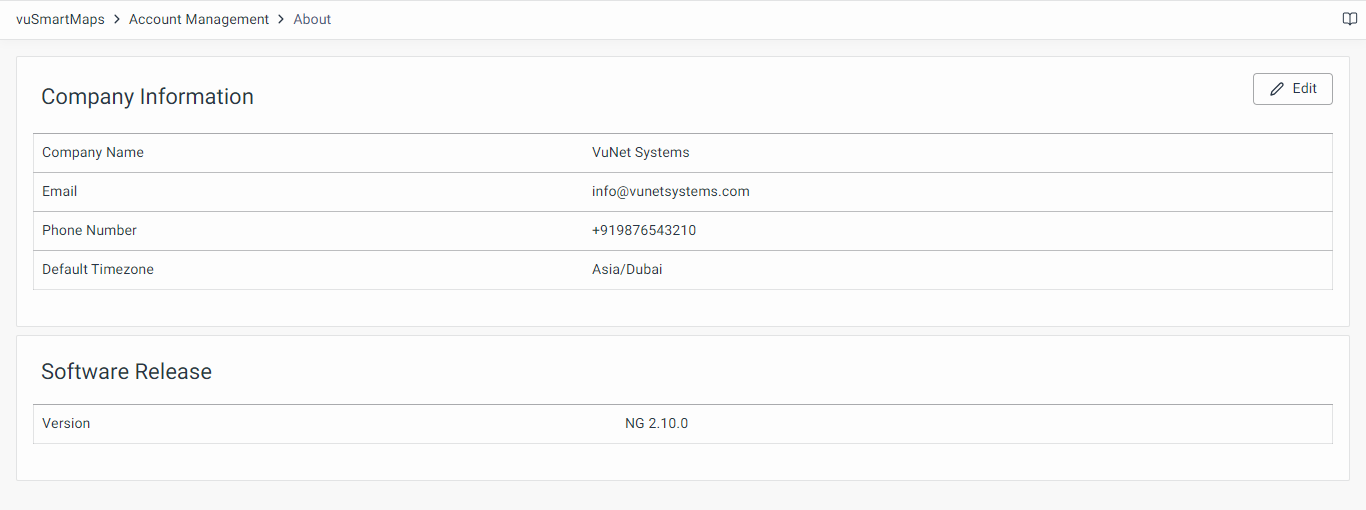
Details on the About Page
As shown in the above screenshot, there are two details on the About page:
- Company Information
- Software Release
Company Information
Company information consists of the following:
- Company Name
- Email: The email ID configured here will be notified about license validity, license expiry, and system diagnostics information in case of errors.
- Phone number
- Default Timezone: The base timezone for each vuSmartMaps installation, set during installation and configurable only by the Admin, ensuring consistent time settings across the platform.
Software Release
Software release details consist of the Version number of vuSmartMaps.

Updating Company Information
There is an Edit button (on the top right corner) to update the company information. Clicking on the Edit button shall redirect you to the following dialog box, where necessary details may be updated.
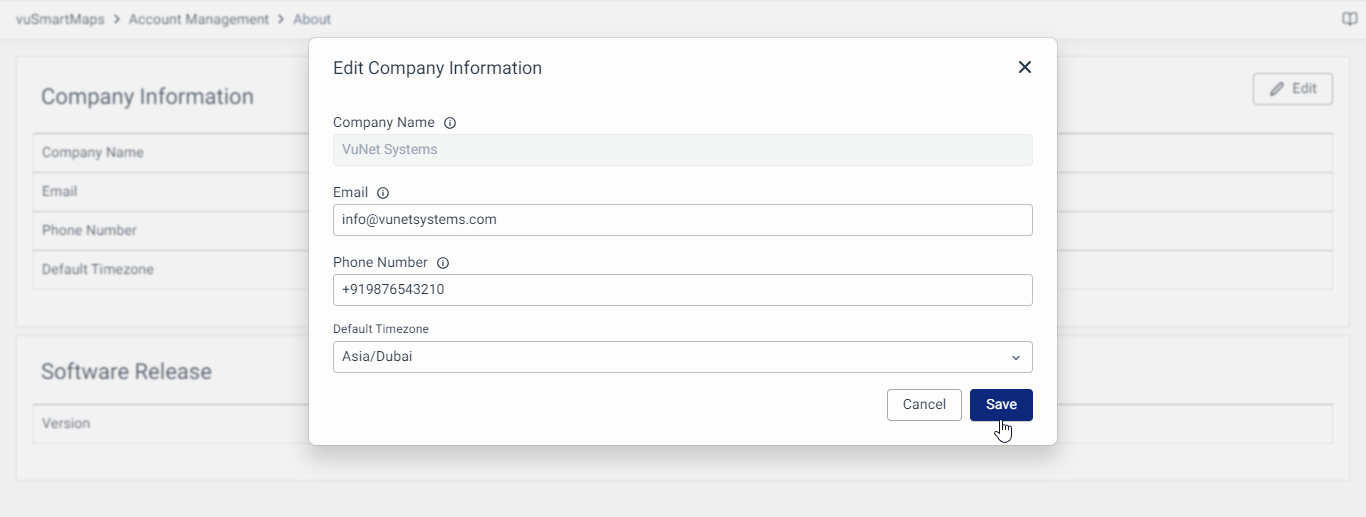
The company name on the About page must be updated before the License upload. Post license update, the Company name editing should be avoided. The license file provided is strictly mapped to the Company Name configured in the installation. Any mismatch can lead to license validation issues.
Default Timezone
Each vuSmartMaps installation will have a default timezone configured from the About page. By default, this is set to UTC. This timezone serves as the base timezone for the platform and can only be updated by the Admin. The default timezone is used for:

- The user interface (observability): viewing Alerts, Dashboards, Reports, Log Analytics, and downloading Reports and Dashboards as PDFs with a Global time selector.
- Scheduling: The timezone for the scheduled time for Alerts and Reports.
- Distributed channels: Timezone of the content sent via Emails, SMS, WhatsApp, ITSM, etc.
The default timezone can be updated ONLY by the Admin.
User-specific timezones can also be configured by each user from the Profile page, allowing customization of the timezone settings for individual preferences while the platform-wide operations adhere to the default timezone.
