NG 3.2.0
What's New in NG 3.2.0
vuSmartMaps NG 3.2.0 advances the platform's Modern Observability Platform capabilities with significant additions across application performance, digital experience monitoring, automated telemetry, and platform reliability.
The headline addition in Application Performance Monitoring is Code-Level Visibility and Payload Capture for Java, enabling SRE and operations teams to trace failures and latency to the method level directly within TraceMap, without switching to a separate tool. Digital experience coverage is further enhanced with Session Replay, User Experience Index (UEI), and PII protection in Browser RUM, providing deeper visibility into end-user experiences and helping teams investigate frontend issues more effectively.
Platform foundations are also strengthened with enterprise-grade Kubernetes packaging through vuKube, expanded SiteManager capabilities for cluster lifecycle management, and centralized API Key Management for secure machine-to-platform authentication and governance.
Release at a Glance
Application Performance Monitoring
Code-Level Visibility extends TraceMap to method-level execution, enabling production RCA without leaving the platform.
-
Code-Level Visibility for Java applications — controllers, services, repositories, exception details.
-
Payload Attribute Capture for Java
Automated Telemetry & Discovery
ADI coverage expands across additional Java components, enabling broader automated discovery and instrumentation for application environments. The release also introduces new O11ySources and simplifies onboarding for sources that require credentials input from the user.
- ADI support for Tomcat, JBoss, Karaf, and Quarkus, extending automated discovery and instrumentation across additional Java-based application environments.
Digital Experience Monitoring
Browser RUM is enhanced with deeper visibility into real user experiences through session-level insights, experience scoring, and privacy-focused controls.
- Session Replay, User Experience Index (UEI), and PII protection in Browser RUM provide deeper visibility into user journeys while helping protect sensitive user information.
Enterprise Reliability & Infrastructure
vuSiteManager becomes the central control plane for cluster lifecycle management, alongside hardened Kubernetes packaging through vuKube.
-
vuSiteManager: Expanded capabilities for configuration, node management, upgrades, and platform operations.
-
vuKube: Enterprise-grade Kubernetes packaging with built-in security hardening for fresh installations.
Platform Governance & Operations
API Key Management, Internal Alerting, and Self-Observability Phase 2 strengthen platform control, monitoring, and operational visibility.
- Centralized API Key Management: Supports API key lifecycle management for secure machine-to-platform authentication. Omniagent uses these API keys to connect with vuSmartMaps through the control channel.
- Internal Alerting: Enables monitoring and reporting of internal applications and services running within vuSmartMaps through dedicated alert policies, system console visibility, and notification routing.
- Credential File Upload: Supports secure file-based credential onboarding for TLS, GCP, and OCI-based O11ySources.
- Self Observability Phase 2, SNMP extensibility, SapphireIMS ITSM, and Grafana 12.4.x further strengthen platform monitoring, integrations, and operational capabilities.
Feature Details
The following sections detail all new features and enhancements in NG 3.2.0, organized by capability area. Each entry covers what is new, why it matters, and where to find it on the platform. Readers can navigate directly to the capability area most relevant to their role or deployment context.
Application Performance Monitoring
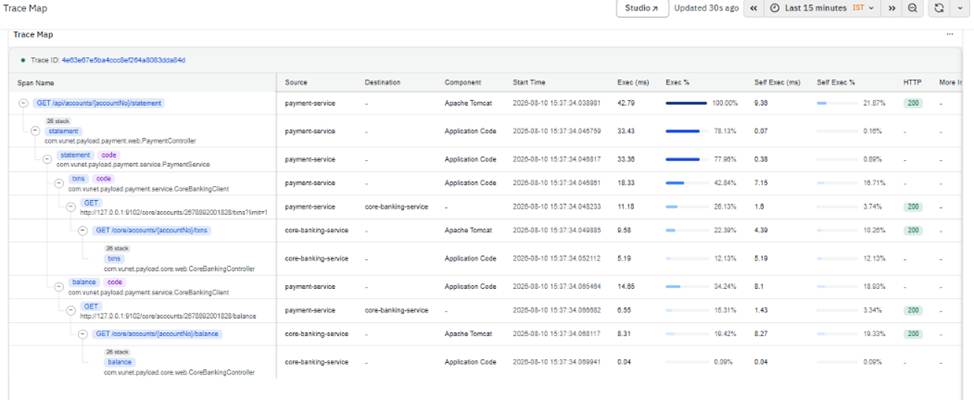
APM – Code-Level Visibility for Java
- What is new: APM now provides Code-Level Visibility for Java applications, extending TraceMap with deeper application execution context to help understand where processing occurs within the application.
- Why it matters: This helps SRE and operations teams identify the application areas contributing to failures or latency and perform production RCA directly within TraceMap, without switching to a separate APM tool.
- Where to find it: Observability → Application Performance Monitoring → TraceMap
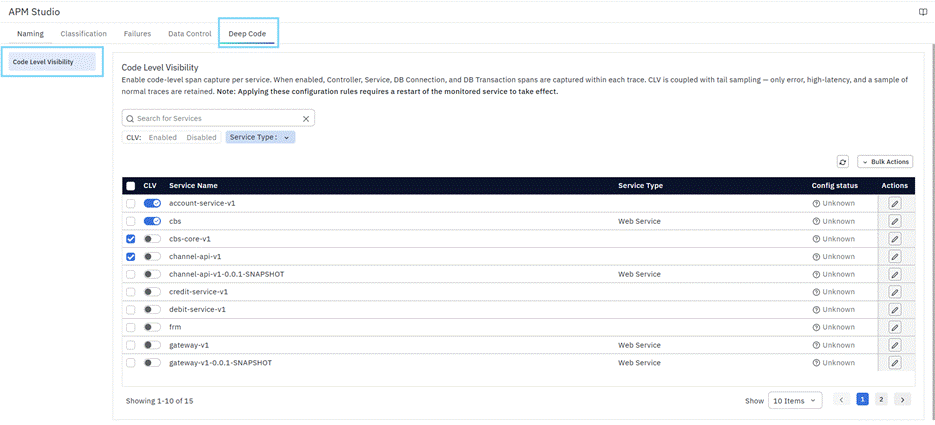
Managing Code-Level Visibility (CLV) from APM Studio
- What is new: Code-Level Visibility (CLV) can be enabled and managed directly within APM Studio. This update introduces simplified sampling policies to filter code-level spans and an ORM Span toggle to control repository-level instrumentation.
- Why it matters: These enhancements make CLV configuration easier, help prevent accidental changes to system-generated sampling policies, and provide better control over trace volume based on monitoring requirements.
- Where to find it: Observability Studio → APM Studio → Code-Level Visibility (CLV) Configuration
APM – Payload Attribute Capture
- What is new: APM has been enhanced to support additional request attribute extraction methods for Java applications. NG 3.2 adds Payload-based extraction for Java, extending the attribute capture capabilities available in NG 3.1.
- Why it matters: This provides more flexibility to capture application-specific attributes for improved trace search, filtering, and analysis.
Other Minor Enhancements to APM
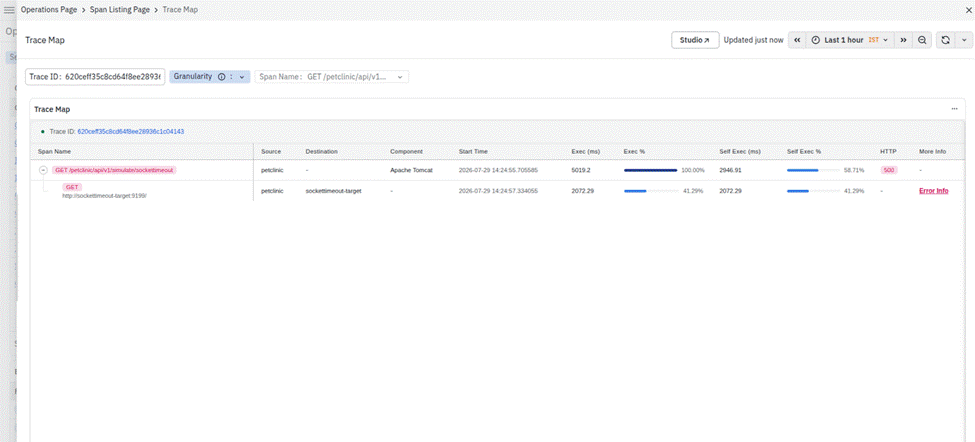
APM Enhancement – Socket Timeout Exception Visibility
- What is new: The Traces Dashboard now displays the destination endpoint for operations that encounter Socket Timeout Exceptions. This allows users to quickly identify the downstream host, service, or endpoint associated with the timeout directly from the trace details, without relying on application logs.
- Why it matters: This enhancement accelerates troubleshooting by helping users quickly identify the endpoint responsible for timeout failures, reducing investigation time and improving root cause analysis.
- Where to find it: Observability Hub→ Application performance monitoring → Traces Map
APM Studio – Enhanced OpenTelemetry Trace Processing
- What is new: APM Studio now uses an optimized trace processing engine that improves the performance of OpenTelemetry trace enrichment while maintaining existing rule configurations. The enhancement also introduces support for a defined set of OTTL functions and operators to configure naming, classification, priority, and failure-detection rules.
- Why it matters: This enhancement improves trace processing efficiency, reduces resource consumption, and provides a more consistent and reliable experience when configuring APM Studio rules.
- Where to find it: Observability Studio → APM Studio
Automated Telemetry & Discovery
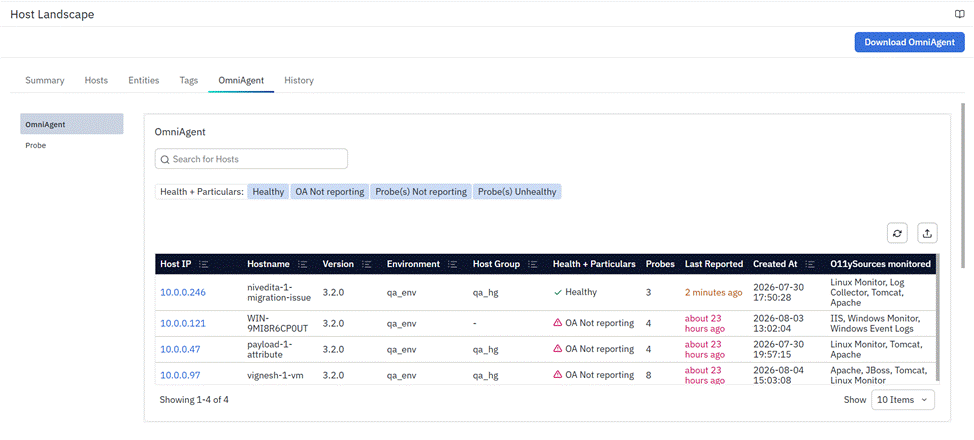
ADI – Expanded Component and Host Landscape Support
- What is new: Auto Discovery and Auto Instrumentation (ADI) has been enhanced with support for additional Java components, including Apache Tomcat, JBoss, Apache Karaf, Quarkus, and Apache HTTP Server, along with Windows-based discovery and instrumentation. Host Landscape also supports grouped O11ySources and credential-based discovery.
- Why it matters: These enhancements extend ADI coverage across more technologies and operating systems, while simplifying discovery, instrumentation, and onboarding.
- Where to find it: Data Studio → Host Landscape
Auto-Discovery Instrumentation (ADI) – Usability Improvements
- What is new: Auto-Discovery Instrumentation (ADI) has been enhanced with several usability improvements, including reduced permission requirements for discovery, an improved restart workflow, clearer restart status information, and additional filtering options for entities that require a restart.
- Why it matters: These enhancements simplify ADI operations, improve visibility into restart requirements, and provide a more streamlined experience when managing discovered components and monitoring sources.
- Where to find it: Data Studio → Host Landscape
Digital Experience Monitoring
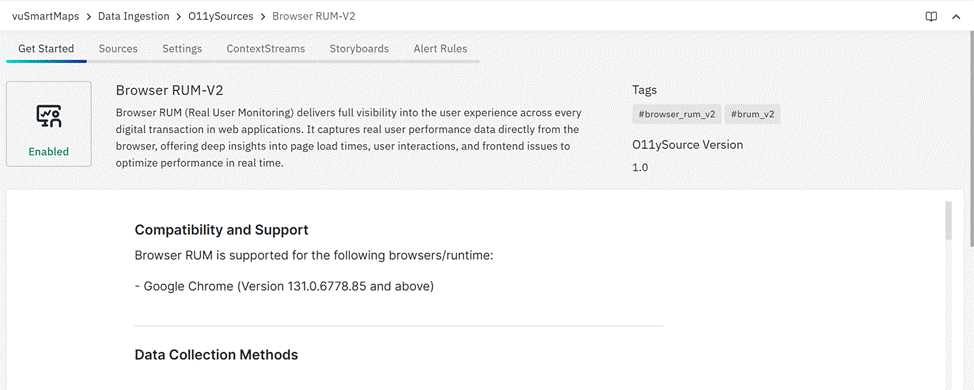
Browser RUM Enhancements
- What is new: Browser RUM has been enhanced with Session Replay and User Experience Index (UEI) capabilities, along with PII protection controls to help safeguard sensitive user information. The update also improves support for monitoring high-traffic web applications, enabling scalable browser observability for enterprise environments.
- Why it matters: These enhancements help teams better understand user behavior, meet privacy and compliance requirements, and monitor browser performance effectively across large-scale applications.
- Where to find it: Browser RUM
Browser RUM – ADI Support for Apache HTTP and NGINX
- What is new: Browser RUM has been enhanced with Auto Discovery and Auto Instrumentation (ADI) support for Apache HTTP Server on Linux and Windows, and NGINX on Linux. The enhancement automatically discovers web servers and hosted applications, creates Browser RUM source mappings, and dynamically injects the RUM script into eligible HTML responses without requiring manual server configuration.
- Why it matters: This simplifies Browser RUM onboarding for web applications by automating web server discovery, source creation, and instrumentation. Runtime configuration can also be updated dynamically without restarting the web server.
- Where to find it: Browser RUM
Enterprise Reliability & Infrastructure
SiteManager – Improvements
- What is new: SiteManager has been enhanced to support more platform lifecycle and operational activities, including configuration changes, node management, platform and service upgrades, migration activities, and cluster status monitoring. It also integrates Self Observability troubleshooting workflows and commands into the SiteManager CLI.
- Why it matters: These enhancements provide a centralized way to manage and troubleshoot vuSmartMaps environments, reducing the need for direct cluster access and manual operational commands.
- Internal Documentation: vuSiteManager (vsm) Operator User Guide
vuKube – Enterprise Kubernetes Packaging
- What is new: Introduced VuNet’s hardened, enterprise-grade Kubernetes packaging, purpose-built for secure and reliable deployment of VuNet workloads. The offering provides built-in security hardening, vulnerability management, and enterprise-grade support, clearly differentiating it from generic open-source Kubernetes distributions.
- Why it matters: This provides a secure and supported Kubernetes foundation for enterprise deployments, helping organizations strengthen their platform security, address vulnerabilities, and simplify operational management.
- Internal Documentation: vuKube – User Guide
Post-Jobs Framework Enhancements
- What is new: The post-jobs framework has been enhanced to standardize and streamline post-installation and upgrade tasks. O11ySource installations can now also be executed in parallel, allowing multiple sources to be installed simultaneously.
- Why it matters: This improves deployment efficiency, reduces manual intervention, and helps reduce the overall time required for platform upgrades and O11ySource installations.
Platform Governance & Operations
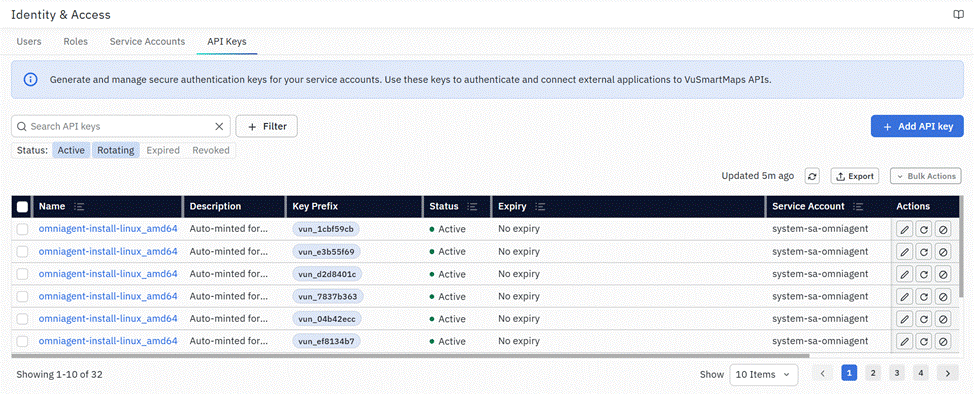
Service Accounts and API Key Management Interface
- What is new: Introduced a dedicated Service Accounts and API Key Management interface to manage non-human identities used by applications and automated services. Users can now centrally manage the lifecycle of API keys assigned to Service Accounts—including key creation, secret viewing (displayed once), key expiration tracking, rotation, and revocation.
- Why it matters: This provides a secure and centralized way to manage API access, simplifies key lifecycle operations, and improves governance and auditability for machine-to-platform authentication.
- Where to find it: Account Management → Identity & Access → API Keys & Account Management → Identity & Access → Service Accounts
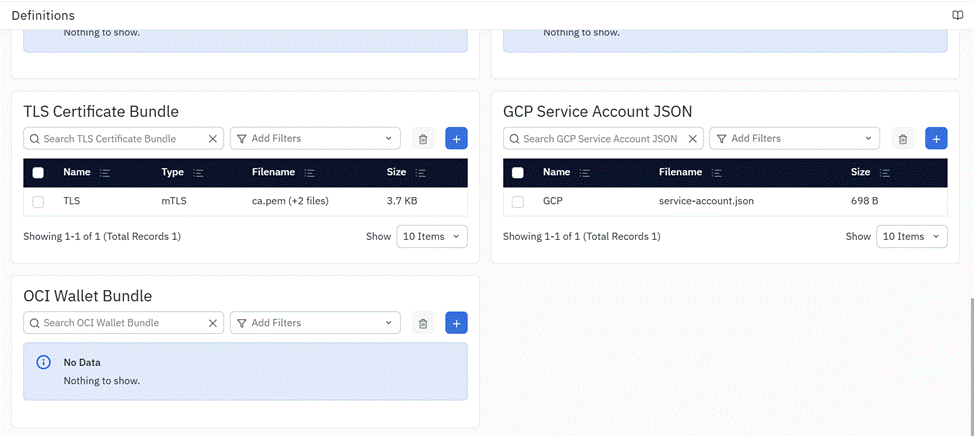
Credential File Upload Support
- What is new: Platform Settings now supports uploading and managing file-based credentials directly within the platform. Users can securely upload credential files such as TLS Certificate Bundles, GCP Service Account JSON files, and OCI Wallet Bundles, and reuse them across supported O11y Sources.
- Why it matters: This feature simplifies credential management, eliminates manual file handling during source onboarding, and provides a secure and centralized way to manage file-based authentication for supported integrations.
- Where to find it: Platform Settings → Definitions → Credentials
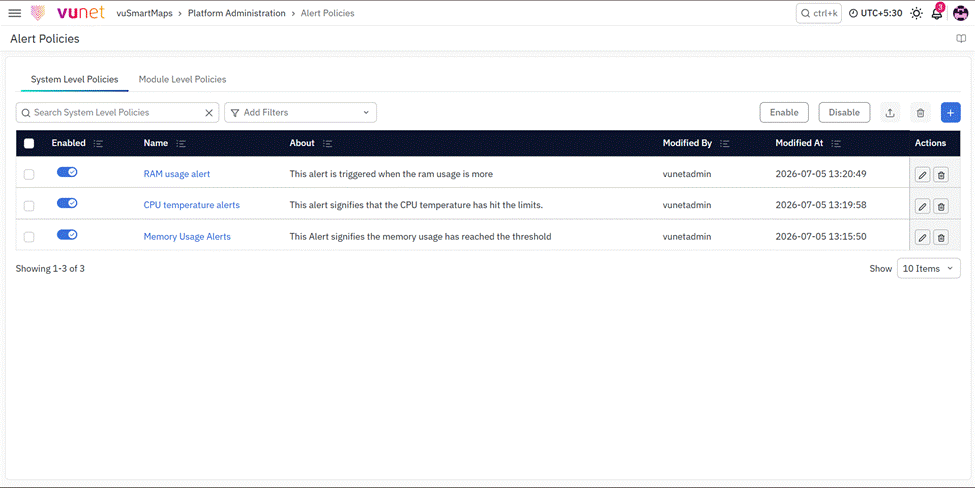
Internal Alerting
- What is new: Internal Alerting provides centralized monitoring and reporting of alerts generated by internal applications and services running within vuSmartMaps. It includes dedicated Alert Policies, the System Console, Notification Routing, and Bell Icon notifications to manage platform-level events.
- Why it matters: It gives Platform Administrators a centralized view of internal application health and alerts, helping them detect issues, configure notifications, and respond to platform events more efficiently.
- Internal Documentation: Internal Alerting Module – User Guide
Self Observability – Phase 2
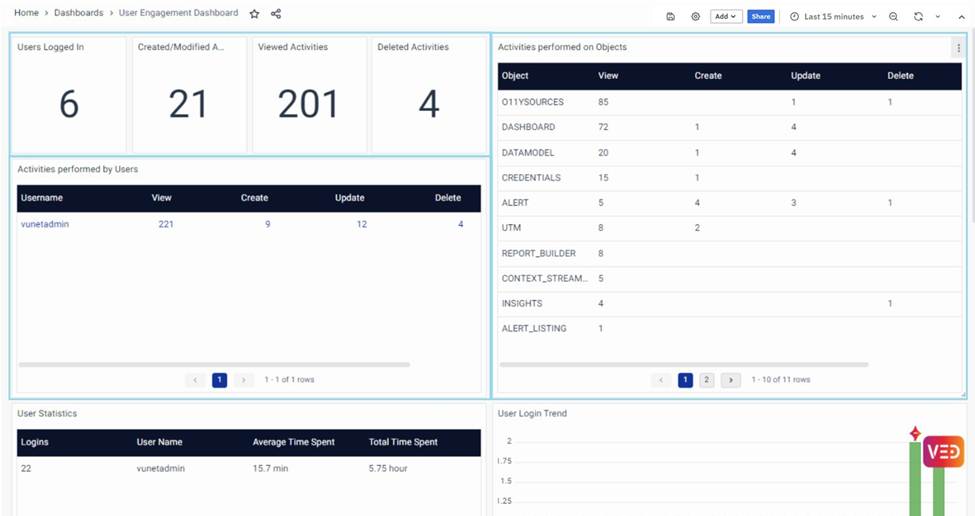
- What is new: Self Observability has been enhanced with new dashboards and monitoring capabilities for data ingestion, data consumption, and platform service health. The update also introduces improved alerting, health insights, and guided diagnostics to help platform teams identify and troubleshoot issues more efficiently.
- Why it matters: These enhancements provide better visibility into platform health, accelerate issue detection, and enable faster troubleshooting through centralized dashboards and actionable insights.
- Where to find it: Dashboards → Self Observability
SNMP Vendor and OID Extensibility
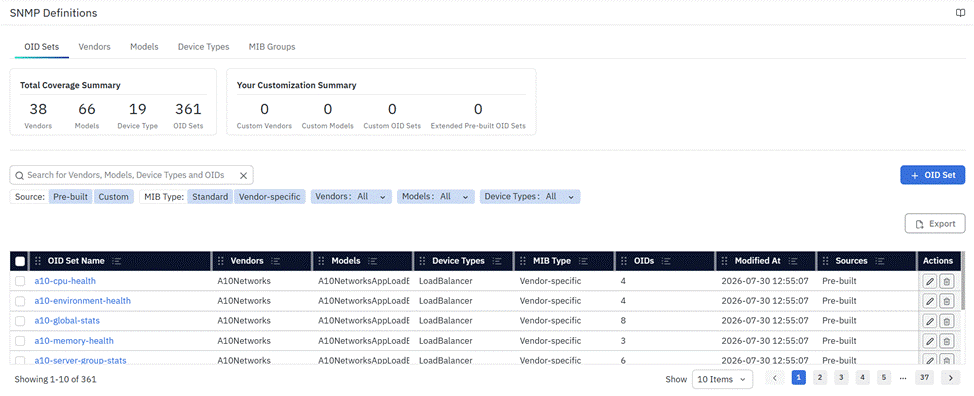
- What is new: SNMP Definitions has been enhanced with a UI-driven way to add and manage vendors, models, device types, and OID sets without backend changes. Users can also extend existing OID sets and import or export OID definitions to support faster onboarding of new SNMP devices.
- Why it matters: This reduces dependency on engineering teams and enables solutioning teams to quickly extend SNMP monitoring for new vendors, models, and customer-specific OIDs.
- Where to find it: Data Studio → SNMP Definitions
Other Minor Enhancements to Enterprise Reliability & Infrastructure
Historical Alert Execution
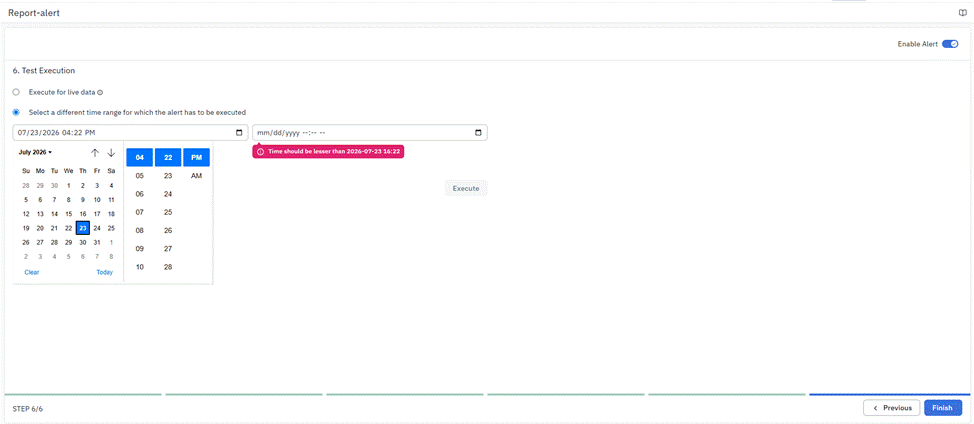
- What is new: Historical alert execution now validates the selected execution window and processes it in interval-based slices based on the alert rule's configured schedule. The execution window is also limited to a maximum of 24 hours to ensure efficient and accurate processing.
- Why it matters: These enhancements provide more accurate historical alert evaluations, align execution with the configured alert schedule, and help prevent oversized execution requests that could impact system performance.
- Where to find it: Observability Studio → Alert Configuration Studio →Test Execution
SapphireIMS ITSM Support
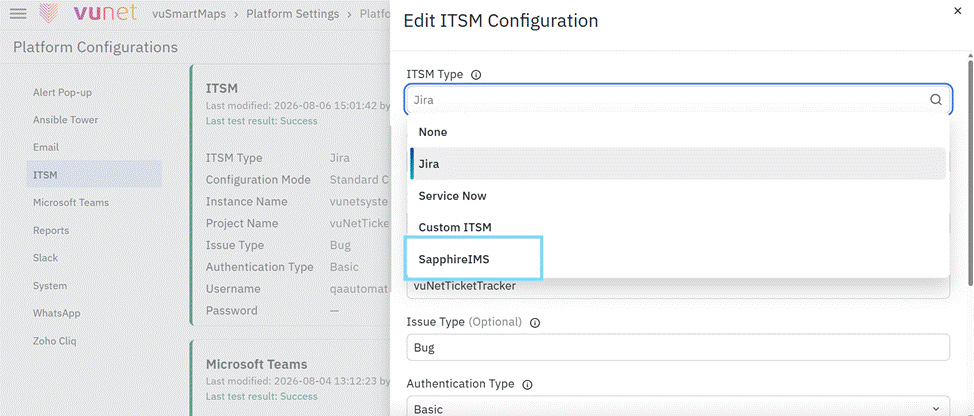
- What is new: NG now provides native SapphireIMS ITSM integration as a dedicated option in ITSM Preferences. Users can configure the SapphireIMS instance and authentication details and enable automated ticket handling for alerts, including ticket creation, updates, closure, and status checks.
- Why it matters: This simplifies SapphireIMS integration by eliminating the need to configure it through Generic ITSM and provides a dedicated configuration experience for managing the alert-to-ticket lifecycle.
- Where to find it: Configurations → ITSM Preferences → SapphireIMS
Grafana Platform Upgrade
- What is new: The embedded Grafana platform has been upgraded from Grafana 11.x to Grafana 12.4.x, bringing the latest platform improvements while preserving VuNet-specific customizations, integrations, and user experience. The upgrade also includes compatibility updates, UI enhancements, and improved platform stability.
- Why it matters: This upgrade ensures continued support with the latest Grafana release, improves platform reliability and compatibility, and provides users with an enhanced and up-to-date dashboarding experience.
- Where to find it: Dashboards
Platform Security – Vulnerability Assessments and Security Checks
- What is new: Platform security has been strengthened through comprehensive vulnerability assessments and security checks covering web and API security, network security, dependencies, container images, Kubernetes, server runtime, SAST, secrets, OSS licenses, and End-of-Life components.
- Why it matters: These assessments help identify and address security vulnerabilities, configuration weaknesses, dependency risks, exposed secrets, and unsupported components, strengthening the overall security posture of the platform.
Custom KTE Consolidation
- What is new: Custom KTE consolidation enables multiple custom KTEs to be consolidated into a single master KTE using the
JSONAsStringformat. The consolidated KTE can also be deconsolidated when individual KTEs are required. - Why it matters: This simplifies the management of multiple custom KTEs, reduces the number of individual KTEs that need to be maintained, and provides flexibility to restore the consolidated KTEs based on user requirements.
- Internal Documentation: Custom KTE consolidation
Upgrade & Migration
vuSmartMaps NG 2.16 to 3.2 Upgrade
- What is new: Supports a guided upgrade from NG 2.16 to NG 3.2 using vuSiteManager, including platform, service, and PostgreSQL upgrades.
- Upgrade Path: Versions earlier than NG 2.16 and older versions of NG 2.16 must first be upgraded to NG 2.16.14.
- Prerequisites: Ensure the NG 2.16 environment is running, and the required NG 3.2 upgrade bundle and vuSiteManager components are available.
- Upgrade & Validation: The workflow covers environment checks, upgrade preparation, service and PostgreSQL migration, and post-upgrade validation.
- Documentation: NG 3.2 – Upgrade and Management using SiteManager
SiteManager Upgrade and Migration Support
SiteManager now provides a guided workflow for platform and service upgrades, node management, and migration activities. For NG 3.2, vuSiteManager supports the NG 2.16 to NG 3.2 upgrade path, including PostgreSQL migration, service upgrades, post-upgrade synchronization, and Self Observability troubleshooting workflows. This reduces the need for direct cluster access and manual operational commands during upgrade and migration activities.
- Upgrade Guide: NG 3.2 – Upgrade and Management using SiteManager
- Operator Guide: vuSiteManager (vsm) Operator User Guide
Post-Jobs Framework
The post-jobs framework has been standardized to streamline post-installation and upgrade tasks. As part of this, O11ySource installations can now be executed in parallel, allowing multiple sources to be installed simultaneously and reducing the overall time required for platform upgrades and installations.
Issues Fixed
| S. No. | Ticket No. | Issue | Status |
|---|---|---|---|
| 1 | VUQA-6890 | [Report Generation]: Report is not getting generated intermittently in some environments and on vunodes restart it again starts working | Fixed in NG 3.2.0 |
| 2 | VUQA-6870 | O11y Traces Source Not Recreated After OmniAgent Reinstallation – Trace Data Collection Stops | Fixed in NG 3.2.0 |
| 3 | VUQA-6883 | Fortinet Firewall CPU & Memory Usage Panels Showing 'No Data' in VuSmartMaps | Fixed in NG 3.2.0 |
Known Issues
| S. No. | Ticket No. | Issue |
|---|---|---|
| 1 | VUQA-6879 | [Site-Manager] - Dspec apply operation is failing |
| 2 | VUQA-5798 | DataRetention: Backup size validation should be done before deleting the backup. |
| 3 | VUQA-4947 | User Management: Help text is not proper in User role |
| 4 | VUQA-5273 | User Management:Write access to a data model should not be downgraded by assigning read access to an alert |
| 5 | VUQA-5687 | User specific view - Data Source permissions not being reflected in the Report Builder section. |
| 6 | VUQA-6520 | Alertconsole - Timezone selection is ignored on date picker ; defaults to system time. |
| 7 | VUQA-6423 | [Automation]: Facing Auto Logout issue while performing operation. |
| 8 | VUQA-6420 | Platform Configuration [ITSM]: The “Password” field is actually an API key. |
| 9 | VUQA-6376 | Data Model : Unable to edit Data Model object despite having modify permission on the object |
| 10 | VUQA-6374 | Insight : Permission error occurs while saving Insight object despite having modify permission |
| 11 | VUQA-6283 | [Scale & Performance][Go Engine]: Alert Engine behaviour for 2 Lakh unique records. |
| 12 | VUQA-6297 | User Federation: Getting Error when we click on Test Authentication while editing LDAP config. |
| 13 | VUQA-6235 | [Reports]: Multiple reports having the same schedule is failing. |
| 14 | VUQA-6180 | [LDAP]: Incorrectly configuring and enabling LDAP is not letting admin access users page |
| 15 | VUQA-6037 | Omniagent: If Omniagent installed as user service, install command able to attempt to install as system service |
| 16 | VUQA-6840 | BRUM App Summary Dashboard Displays Core Web Vitals (LCP, INP, CLS) as Zero |
| 17 | VUQA-5650 | Errors in the Kafka connect Monitoring Dashboard. |
| 18 | VUQA-5138 | Log Analytics: Save button should be disabled for the role who doesn't have access to the table |
| 19 | VUQA-5130 | UTM: The Non existing Data model still shows up in UTM |
| 20 | VUQA-5313 | Report : Target and Avg_CPU name should be corrected in downloaded reports |
| 21 | VUQA-5144 | Report Generation : There is no < / > / == / != filter for download count field in Generated Reports tab |
O11ySource Reference
New O11ySources in NG 3.2.0
We continue to expand our observability coverage with new out-of-the-box O11ySources in NG 3.2.0. These additions improve monitoring and data collection across different environments, helping users gain deeper insights and better visibility into their systems.
The new O11ySources include:
-
Apache Karaf: Apache Karaf is an OSGi-based runtime platform for running modular Java applications. This O11ySource provides visibility into OSGi bundle health, JVM performance, Karaf features, HTTP/Jetty activity, and Camel routes, along with runtime and audit logs to help monitor application and platform health.
-
IBM webMethods: IBM webMethods is an enterprise integration and API management platform. This O11ySource provides monitoring of Integration Server and API Gateway performance, including service execution, API traffic, thread and connection pools, JVM health, and messaging activity, along with integration, audit, error, and API Gateway logs.
-
Quarkus: Quarkus is a Java framework designed for building cloud-native applications and microservices. This O11ySource provides visibility into JVM health, HTTP request performance, application metrics, health checks, database connection pools, and reactive messaging, helping teams monitor application performance and resource utilization.
Complete list of O11ySources available in NG 3.2.0
| Active Directory | Fortinet Firewall | Oracle |
|---|---|---|
| AIX Monitor | Dell Switch | Palo Alto Firewall |
| Amazon RDS | Device Availability | PostgreSQL |
| Apache | GKE | RabbitMQ |
| Apache HDFS | HAProxy | Radware Load Balancer (SNMP) |
| Apache Solr | Hitachi Storage | Rancher |
| AWS ALB | HPE Router | Redis |
| AWS API Gateway | HPUX Monitor | SAP ASE |
| AWS Classic ELB | HTTP Poller | Service Monitor |
| AWS CloudFront | IBM HTTP Server | SFTP Monitor |
| AWS ElastiCache | IBM MQ | SNMP Polling |
| AWS Network Firewall | IBM WAS | SNMP Trap |
| AWS NLB | IIS | SpringBoot |
| AWS Route53 | JBoss | Solaris Monitor |
| AWS S3 | JVM Monitor | SQL Data Collector |
| AWS Transit Gateway | Kafka | SSL Certificate Monitor |
| AWS VPC | Kafka Data Collector | Storage Monitor |
| AWS WAF | Keycloak | Synthetic Browser Journey Monitoring |
| Azure API Management | KeyDB | Syslog |
| Azure App Gateway | Kong API Gateway | Task Scheduler |
| Azure CDN WAF Policy | Kubernetes | Tomcat |
| Azure EventHub | Linux Monitor | Traces |
| Azure Firewall | Log Collector | Traces Collector |
| Azure Key Vault | MariaDB | URL Availability |
| Azure Load Balancer | MicroSoft DFS | Vault |
| Azure MySQL Database | Mobile RUM | Versa Appliance |
| Azure Redis Cache | MongoDB | vSphere |
| Azure SQL Database | MSSQL | Weblogic |
| Azure SQL Managed Instance | MYSQL | Windows Events Logs |
| Azure Storage Blob | NetApp Storage | Windows Monitor |
| Browser RUM | NetApp Storage Monitor | |
| Browser RUM-V2 | NetFlow | NG 3.2.0 O11ySources: |
| Cassandra | Nginx | Apache Karaf |
| Checkpoint Firewall | Nutanix | IBM webMethods |
| Cisco ACI | NewNet Security Gateway | Quarkus |
| Cisco Firewall | OCI API Gateway | |
| Cisco Router | OCI Autonomous Database | |
| Cisco Switch | OCI Compute | |
| DNS Monitoring | OCI Kubernetes Engine (OKE) | |
| F5 Load Balancer | OHS |
System Requirements
The supported browser version is Chrome 109 or above.
Release Attributes
Looking Ahead — NG 3.3.0
We are preparing for the upcoming vuSmartMaps NG 3.3.0 release, which will introduce additional observability capabilities, platform enhancements, usability improvements, and operational innovations across the platform. The release will continue to expand automation, AI-driven analytics, observability coverage, and user experience monitoring to help organizations gain deeper operational visibility and improve monitoring efficiency.
A migration plan is being developed for customers using vuSmartMaps 8.x or 9.x versions to support their transition to the NG platform.
