VuNet Query Language (VQL)
Overview
Vunet Query Language (VQL) is a text-based query language used for searching, filtering, and analyzing data in vuSmartMaps. It supports string searches, token searches, phrase searches, regex-based pattern matching, field-specific filters, comparison operators, logical operators, and Data Model query macros.
VQL helps users find specific entries from large datasets. It can be used to search values inside fields, match patterns, compare numeric values, check non-null values, exclude results, and combine multiple conditions. VQL also works with Data Models through macros such as $__VQL(), $__dynamicVariable(), and categorical macros. These macros allow Data Model queries to support dynamic filtering and runtime query behavior.
Why This Feature Is Useful
VQL is useful when users need to quickly narrow down large volumes of data. In banking and payment operations, teams often need to search logs, traces, events, or other observability data to understand what happened during an issue. VQL helps users filter data by exact values, partial values, phrases, patterns, numeric thresholds, and multiple conditions.
This feature is useful because it helps users:
- Search for specific error messages or log groups.
- Filter entries by severity, module, port, error count, or other fields.
- Find entries that contain specific phrases or special characters.
- Use regex to identify patterns such as numeric IDs, exception messages, stack traces, IP-like formats, or custom error patterns.
- Compare numeric fields using operators such as greater than, less than, and range.
- Exclude unwanted entries using negation.
- Combine filters using AND and OR logic.
- Use VQL inside Data Models for dynamic query filtering.
Example Scenario
Investigating Error Logs During a Platform Issue: A support engineer is investigating error logs for a platform issue. The engineer wants to quickly narrow down the result set instead of manually reviewing all available records.
The engineer first searches for the token:
Error
This searches the message field if the table has a message field. If the engineer wants to search inside a specific field, such as severity, the query can be written as:
severity:Error
If the engineer needs to search for a phrase such as Error in VuBlock, the query can be written as:
"Error in VuBlock"
If the engineer needs to find entries where error_count is between 0 and 5, the query can be written as:
error_count:[0:5]
If the engineer wants to exclude successful entries, the query can be written as:
~success
Using these VQL options, the engineer can move from a broad search to a focused investigation by combining text search, field filters, numeric conditions, and negation.
When to Use This Feature
Use VQL when:
- A specific text value must be searched.
- A phrase with spaces or special characters must be searched.
- A case-sensitive match is required.
- A value should start with or end with a specific pattern.
- Entries must be filtered based on one of multiple exact values.
- A field must have a non-null value.
- Numeric fields must be filtered using comparison operators.
- Entries within a numeric range must be found.
- Results must exclude a value or condition.
- Multiple search conditions must be combined.
- Regex is needed for advanced pattern matching.
- Data Model queries need dynamic filtering using
$__VQL(). - Data Model query behavior needs to change at runtime using categories and macros.

Comprehensive Understanding
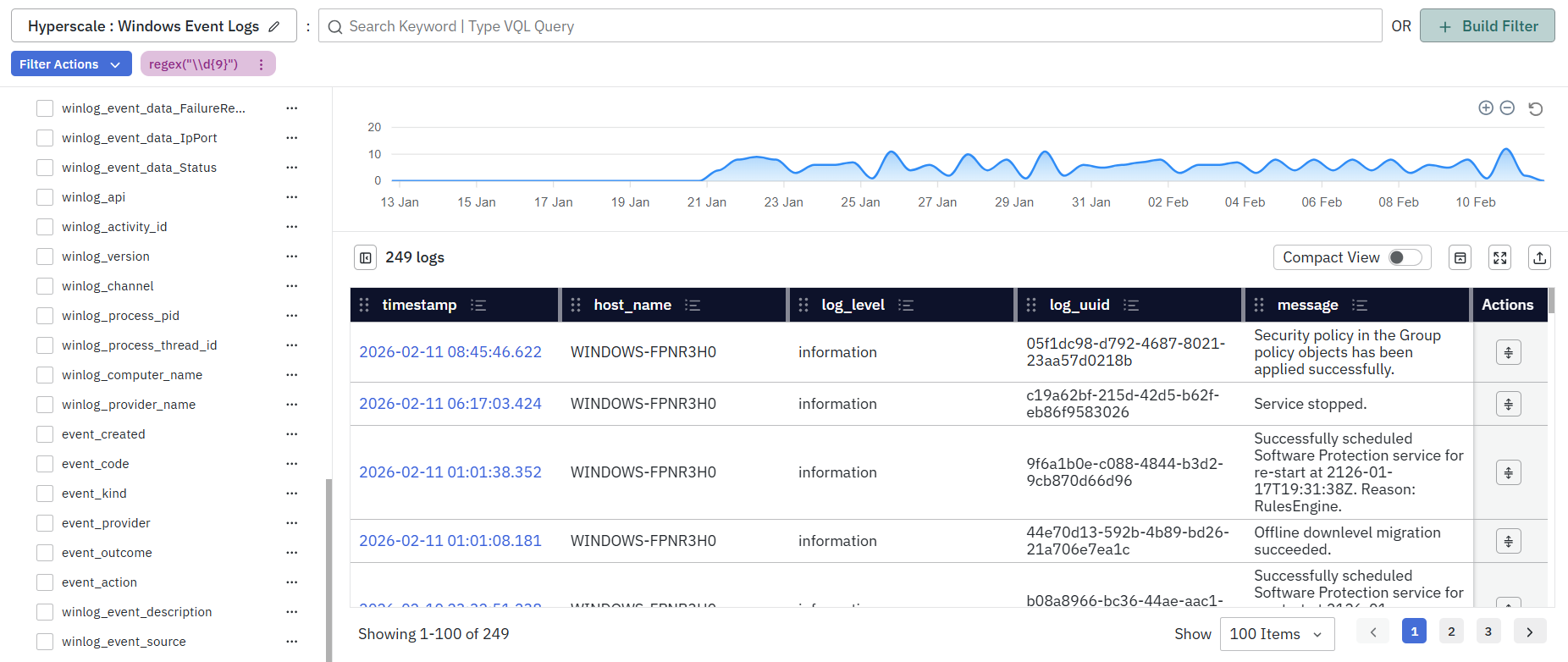
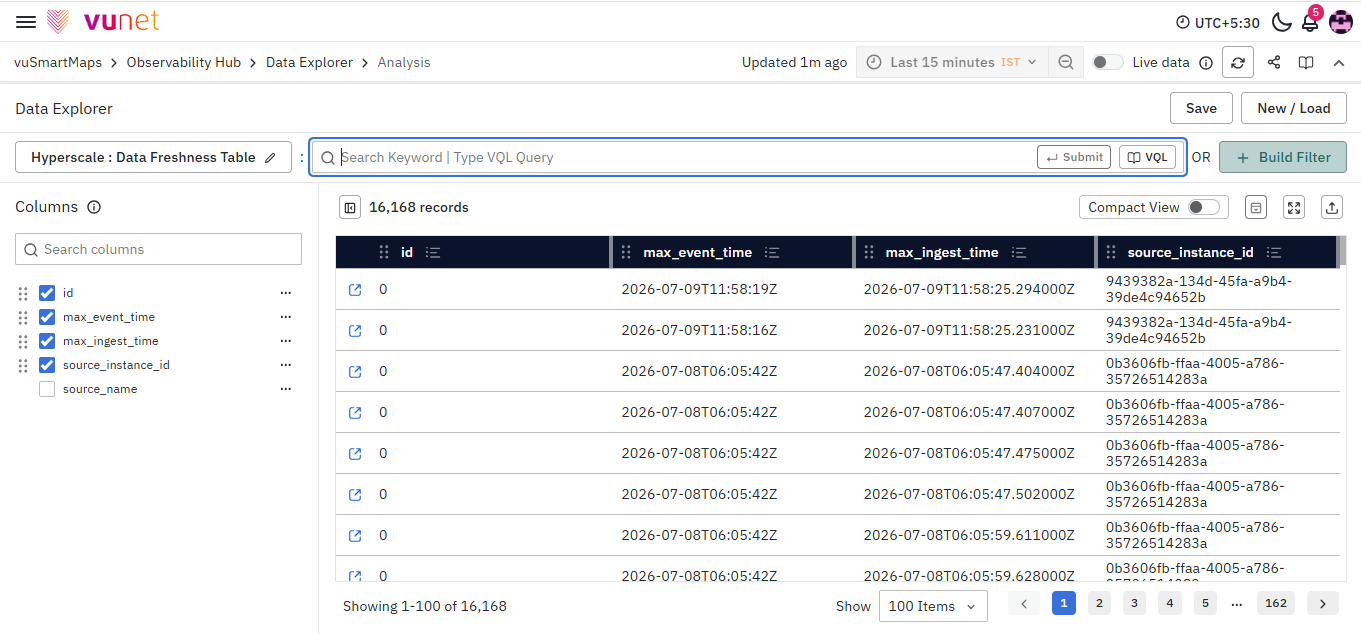
The source document mainly explains VQL syntax and usage. It does not provide a complete navigation path for opening the VQL search screen. Information needed from product team: Exact navigation path for where users enter VQL queries in the product UI. The document shows VQL being used in search/query screens where users can enter a query and view matching results. It also states that $__VQL() is used in the Data Modelling Workspace - Write Query section, specifically for Hyperscale datastores.
Query Input Area
The query input area is where users type VQL expressions. Examples include token searches, string searches, phrase searches, regex filters, comparison filters, and combined queries.
Result Area
After a query is executed, matching entries are displayed in the result area. The document screenshots show result tables and charts, but the source document does not explain all result columns or UI controls.
Data Model Write Query Section
For Data Models, VQL can be used inside SQL queries through the $__VQL() macro. This is supported in the Data Modelling Workspace - Write Query section for Hyperscale datastores. The $__VQL() macro must be used inside the WHERE clause of a Hyperscale query.
Example:
SELECT * from vulog WHERE $__VQL(case(Error) + django)
Step-by-Step Instructions
Use a String Search
Use string search when the value contains spaces, symbols, or special characters.
Syntax:
field_name:"value"
Example:
log_group:"group1"
This returns rows where the log_group column contains the string group1.
- Any value inside double quotes is treated as a string search.
- Quoted searches are internally translated to a
LIKEcondition in ClickHouse. - Characters such as
%and_have special meaning and must be escaped. Incorrect handling of special characters may cause errors or unexpected results.
Escape Special Characters in String Search
Use escaping when search values contain special characters.
| Character | Why It Is Special | How to Escape | Example |
|---|---|---|---|
' | String delimiter | \' or '' | 'O\'Reilly' or 'O''Reilly' |
\ | Escape character | \\ | 'C:\\logs\\app.log' |
% | LIKE wildcard | Escape using \ | LIKE '%\%%' ESCAPE '\' |
_ | LIKE wildcard | Escape using \ | LIKE '%\_%' ESCAPE '\' |
" | Normal character | No escape needed | 'He said "OK"' |
\n | Newline | \n | 'line1\nline2' |
\t | Tab | \t | 'col1\tcol2' |
\r | Carriage return | \r | 'abc\rdef' |
\0 | Null byte | \0 | 'a\0b' |
Examples:
Search for a value containing a backslash:
log_group:"group\\new"
Search for a value containing double quotes:
log_group:"group\"name"
Search for a value containing a newline:
log_group:"group\nname"
Search for a value containing a tab:
log_group:"group\tname"
Use Token Search
Use token search to filter entries by a continuous alphanumeric value.
Syntax:
field_name:value
The field parameter is optional. If the field is not provided, the search is performed only in the message field.
Example: Search for Error in the message field:
Error
Example: Search for Error in the severity field:
severity:Error
- Token Search is case-insensitive.
- Token Search supports only alphanumeric values.
- Token Search does not support special characters.
- If the value contains spaces or special characters, use String Search instead.
- If the table does not contain a
messagefield, the field parameter must be specified.
Use Phrase Search
Use phrase search to search for phrases with spaces or special characters.
Syntax:
field_name:"phrase to be searched"
The field parameter is optional. If the field is not provided, the search is performed only in the message field.
Example: Search for Error in VuBlock in the message field:
"Error in VuBlock"
Example: Search for log collector in the vublock_name field:
vublock_name:"log collector"
- Phrase Search is case-insensitive.
- Phrase Search supports spaces and special characters.
- Phrase Search follows the same escaping rules as String Search.
- Phrase Search is currently not supported for VQL functions such as
case(),starts(), orends(). - If the table does not contain a
messagefield, the field parameter must be specified.
Use Regex Filter
Use Regex filter for advanced pattern matching. Syntax to search in the message field:
regex("pattern")
Example: Search for entries containing a 9-digit number:
regex("\\d{9}")
Syntax to search in a specific field:
field_name:regex("pattern")
Example: Search for a 9-digit number in the log_uuid field:
log_uuid:regex("\\d{9}")
- Regex patterns are enclosed in double quotes.
- Regex follows the same escaping rules as String Search.
- If the regex pattern contains special characters such as
\,",%, or_, they must be escaped. - To match a digit using
\d, escape the backslash inside the quoted string.
regex("\\d{9}")
Here, \\ represents a literal \, and the regex engine receives \d{9}. Regex can be used to identify specific patterns such as stack traces, exception logs, custom error messages, IP address structures, different date formats, or partial matches following a specific pattern.
Use Case Sensitive Search
By default, VQL operations are case-insensitive. Use case() when exact case matching is needed.
Syntax:
field_name:case(value)
The field parameter is optional. If the field is not provided, the search is performed only in the message field.Example: Search for VuAlert in the message field:
case(VuAlert)
Example: Search for Linux in the log_group field:
log_group:case(Linux)
If the table does not contain a message field, the field parameter must be specified.
Use Prefix Search
Use prefix search to find values that start with a specified value.
Syntax:
field_name:starts(value)
The field parameter is optional. If the field is not provided, the search is performed only in the message field.
Example: Search for entries where the message field starts with err:
starts(err)
Example: Search for entries where log_group starts with lin:
log_group:starts(lin)
Prefix Search is case-insensitive.
VQL supports searching for phrases inside the starts() function. This allows users to filter values that start with a specific phrase, including spaces and special characters.
Phrases used inside starts() follow String Search escaping rules. Special characters must be escaped if present.
Use Suffix Search
Use suffix search to find values that end with a specified value.
Syntax:
field_name:ends(value)
The field parameter is optional. If the field is not provided, the search is performed only in the message field.
Example: Search for entries where the message field ends with ror:
ends(ror)
Example: Search for entries where log_group ends with ux:
log_group:ends(ux)
Suffix Search is case-insensitive.
VQL supports searching for phrases inside the ends() function. This allows users to filter values that end with a specific phrase, including spaces and special characters.
Phrases used inside ends() follow String Search escaping rules. Special characters must be escaped if present.
Find Entries with Provided Values
Use in() to match entries that contain one of the provided exact values.
Syntax:
field_name:in(value1, value2, ...)
Example: Search for entries where severity is either error or warning:
severity:in(error, warning)
- This function is case-sensitive.
- It returns entries containing any of the exact specified values.
- This function does not support phrases.
- If the field is not provided, the search is performed only in the
messagefield. - If the table does not contain a
messagefield, the field parameter must be specified.
Search for Entries with a Non-Null Value
Use exists to return entries where a specified field has a non-null value.
Syntax:
field_name:exists
Example: Retrieve entries where the message field is not null:
exists
Example: Retrieve entries where the log_group field is not null:
log_group:exists
If the user needs to search for the word exists, it must be enclosed in double quotes:
"exists"
Use Equals Operator
Use the equals operator for exact matching.
Syntax:
field_name:=value
The field parameter is mandatory.
Example: Find entries where port equals 9000:
port:=9000
Example: Find entries where module equals VuAlert:
module:=VuAlert
Use Greater Than Operator
Use the greater-than operator to filter values above a numeric threshold.
Syntax:
field_name:>threshold
Example:
error_count:>20
- The field parameter is mandatory.
- The threshold must be numeric.
- This operator is supported only for numeric fields.
Use Less Than Operator
Use the less-than operator to filter values below a numeric threshold.
Syntax:
field_name:<threshold
Example:
error_count:<20
- The field parameter is mandatory.
- The threshold must be numeric.
- This operator is supported only for numeric fields.
Use Greater Than or Equal To Operator
Use this operator to filter values that meet or exceed a numeric threshold.
Syntax:
field_name:>=threshold
Example:
error_count:>=20
- The field parameter is mandatory.
- The threshold must be numeric.
- This operator is supported only for numeric fields.
Use Less Than or Equal To Operator
Use this operator to filter values that are lower than or equal to a numeric threshold.
Syntax:
field_name:<=threshold
Example:
error_count:<=20
- The field parameter is mandatory.
- The threshold must be numeric.
- This operator is supported only for numeric fields.
Filter Entries Within a Range
Use range filtering to find numeric values between a start and end value.
Syntax:
field_name:[start:end]
Example: Find entries where error_count is between 0 and 5:
error_count:[0:5]
- The field, start, and end parameters are mandatory.
- Start and end must be numeric values.
- This operator is supported only for numeric fields.
Negate a Query
Use the negation operator ~ to exclude a value or condition.
Syntax:
~field_name:value
Negation is compatible with other functions and operators:
~field_name:case(value)
~field_name:>threshold
Example: Return entries that do not contain success:
~success
Example: Return entries where log_group does not start with Lin:
~log_group:starts(Lin)
The field parameter is optional. If the field is not provided, the operation is performed only in the message field. If the table does not contain a message field, the field parameter must be specified.
Combine Multiple Queries
Use logical operators to combine multiple conditions. AND can be written using a blank space or +.
Example:
log_group:Linux error_count:[0:5]
The same query can also be written as:
log_group:Linux + error_count:[0:5]
OR can be written using |.
Example:
log_group:Linux | module:=VuAlert
Brackets are not currently supported. Operators are applied in the order they appear.
Use $__VQL() Macro in Data Models
Use $__VQL() to add VQL-based filtering in Data Model queries.
Current availability:
- It works only within Data Modelling Workspace - Write Query.
- It is specifically designed for Hyperscale datastores.
- It must be integrated into the
WHEREclause of a Hyperscale query. - It currently supports filtering and searching tables.
- Aggregation and ordering are planned for the future.
Example:
SELECT * from vulog WHERE $__VQL(case(Error) + django)
Users can also use $__dynamicVariable() inside $__VQL() for dynamic value population. The raw option must be used for proper functionality.
Example:
SELECT * from vulog WHERE $__VQL(case(Error)
+ $__dynamicVariable(server, django, 'raw'))
Use VQL with Data Models
VQL can be used in Data Models to dynamically filter data during query execution. Data Models support template-based queries. In these queries, parts of SQL can be dynamically replaced or enabled at runtime using macros. Data Models provide __$dynamic* macros that allow values to be injected into SQL queries at execution time.
Data Model Variables
Data Model variables are value templates that are substituted into SQL at runtime. If a value for a variable is not provided, it is either:
- Replaced with an appropriate SQL value that does not affect statement execution, or
- Replaced with a user-defined default value, where applicable.
The $__dynamicVariable macro alone can alter SQL behavior at runtime, including modifying entire SQL statements. However, this requires the caller to be SQL-aware.
To reduce this complexity, the source document proposes separating the templating problem into two parts:
- Allowing the caller to replace specific SQL fragments at runtime.
- Allowing the caller to enable or disable certain SQL logic at runtime.
This enables the caller to control SQL execution without needing to be SQL-aware.
Use Categories in Data Models
Categories are control flags defined by query authors. They allow the caller or executor to modify specific query behavior at execution time.
Categories can be used to:
- Enable bucketing.
- Enable time bucketing.
- Change the type of aggregation being performed.
The following categories can be defined:
timebucketagghostappenvservicebranchcityetc.
For self-defined categories, the naming convention can be:
<predefined_category>_<desired_name>
These categories must be associated with SQL expressions that can be enabled or disabled at runtime.
Use Categorical Macros
Categorical macros enable specific SQL segments when the corresponding categories are active. They disable those SQL segments when the categories are inactive.
Supported macros:
$__catSelect(category, expr, repl=>NULL)$__catFilter(category, expr, repl=>NULL)$__catGroup(category, expr, repl=>NULL)$__catOrder(category, expr, repl=>NULL)
| Argument | Description |
|---|---|
| category | Category name. |
| expr | SQL expression enabled when the category is active. |
| repl | Optional replacement expression used when the category is disabled. This defaults to a value appropriate for the database. |
Use $__catSelect
Use $__catSelect to conditionally include a field in the SELECT clause.
Syntax:
SELECT $__catSelect(category, expr)
FROM table_name
WHERE condition
Example:
SELECT
  timestamp,
  cpu_used_pct AS "CPU Util",
  mem_used_pct AS "Memory Util",
  $__catSelect(app, app_name AS "Application"),
  $__catSelect(branch, branch_name AS "Branch")
FROM system_stats
WHERE $__timeFilter("timestamp")
If the caller enables the app category, the query expands to include app_name AS Application, while the disabled category becomes NULL.
The NULL value in the SELECT clause is ignored during data retrieval.
Use $__catFilter
Use $__catFilter to conditionally include a filter in the WHERE clause.
Syntax:
SELECT column_name(s)
FROM table_name
WHERE $__catFilter(category, expr)
Example:
SELECT
  timestamp,
  cpu_used_pct AS "CPU Util",
  mem_used_pct AS "Memory Util",
  $__catSelect(app, app_name AS "Application"),
  $__catSelect(branch, branch_name AS "Branch")
FROM system_stats
WHERE $__timeFilter("timestamp")
  AND $__catFilter(app, $__dynamicFilter("app_name", $Application))
  AND $__catFilter(branch, $__dynamicFilter("branch_name", $Branch))
If the caller enables the app category and provides:
$Application = ['App1', 'App2']
The query expands to:
AND "app_name" IN ('App1', 'App2') AND true
Use $__catGroup
Use $__catGroup to conditionally include a field in the GROUP BY clause.
Syntax:
SELECT column_name(s)
FROM table_name
WHERE condition
GROUP BY $__catGroup(category, expr)
$__catGroup should always be used together with $__catSelect to avoid GROUP BY errors.
Example:
SELECT
  timestamp,
  avg(cpu_used_pct) AS "CPU Util",
  avg(mem_used_pct) AS "Memory Util",
  $__catSelect(app, app_name AS "Application"),
  $__catSelect(host, server_ip AS "Server IP"),
  $__catSelect(branch, branch_name AS "Branch")
FROM system_stats
WHERE $__timeFilter("timestamp")
GROUP BY
  $__catGroup(app, "Application"),
  $__catGroup(host, "Server IP"),
  $__catGroup(branch, "Branch")
Use $__catOrder
Use $__catOrder to conditionally include fields in the ORDER BY clause.
Syntax:
SELECT column_name(s)
FROM table_name
WHERE condition
ORDER BY $__catOrder(expr, category)
Sort order, ASC or DESC, is determined dynamically by the caller module at query execution time. If the caller does not specify an order, ASC is used by default.
Example:
SELECT
  timestamp,
  avg(cpu_used_pct) AS "CPU Util",
  avg(mem_used_pct) AS "Memory Util",
  $__catSelect(app, app_name AS "Application"),
  $__catSelect(app, server_ip AS "Server IP"),
  $__catSelect(branch, branch_name AS "Branch")
FROM system_stats
WHERE $__timeFilter("timestamp")
ORDER BY
  $__catOrder(app, "Application"),
  $__catOrder(app, "Server IP"),
  $__catOrder(branch, "Branch")
Use $__catDynReplace
Use $__catDynReplace for advanced dynamic replacement use cases that are not covered by the other $__cat* macros.
Syntax:
$__catDynReplace(cat, expr, repl, clause, choices=>NULL)
| Argument | Description |
|---|---|
| category | Category name. |
| expr | SQL expression enabled when the category is enabled. This may include variables. If variables are used, choices must be provided. |
| repl | SQL expression used when the category is disabled. No default replacement is applied. |
| clause | SQL clause where the macro is used. |
| choices | Allowed choices for the macro, including default values. |
Rules for choices:
- The number of choices must match the number of variables.
- If one choice is provided per variable, it is treated as the default value.
- If multiple choices are provided per variable, the first choice for each variable is treated as the default value.
This macro provides extensive control over SQL behavior. The query author must ensure that the Data Model schema is preserved for all replacements. This includes correct use of AS in the SELECT clause, correct use of repl, and overall SQL correctness.
Example: Enable Time Bucketing with Different Intervals
Use the following pattern when a query needs to enable time bucketing with different intervals:
SELECT
  $__catDynReplace(
    timebucket,
    toStartOfInterval("timestamp", INTERVAL $interval),
    toStartOfInterval("timestamp", INTERVAL '1 hour'),
    SELECT,
    choices=>('1 hour', '5 minutes', '15 minutes', '30 minutes')
  ) AS ts,
  $__catSelect(timebucket, avg(cpu_used_pct), cpu_used_pct) AS "CPU Util",
  $__catSelect(timebucket, avg(mem_used_pct), mem_used_pct) AS "Memory Util"
FROM system_stats
WHERE $__timeFilter("timestamp")
GROUP BY ts
Example: Aggregate Fields Dynamically
Use the following pattern when the caller needs to dynamically choose the aggregation type and the column:
SELECT
  $__catDynReplace(
    agg,
    $aggType($aggField),
    min(cpu_used_pct),
    SELECT,
    choices=>((min, max, avg), (cpu_used_pct, mem_used_pct))
  ) AS aggregate,
  $__catSelect(app, app_name AS "Application"),
  $__catSelect(branch, branch_name AS "Branch"),
  city
FROM system_stats
WHERE $__timeFilter("timestamp")
GROUP BY
  $__catGroup(app, "Application"),
  $__catGroup(branch, "Branch"),
  city
The query returns one aggregate of type $aggType on the field $aggField.
Example: Return Multiple Dynamic Aggregates
There are two ways to return two aggregates.
Option 1: Use two instances of $__catDynReplace()
SELECT
  $__catDynReplace(agg, $aggType1($aggField1), min(cpu_used_pct), SELECT, choices=>((min, max, avg), (cpu_used_pct, mem_used_pct))) AS aggregate1,
  $__catDynReplace(agg, $aggType2($aggField2), min(cpu_used_pct), SELECT, choices=>((min, max, avg), (cpu_used_pct, mem_used_pct))) AS aggregate2,
  $__catSelect(app, app_name AS "Application"),
  $__catSelect(branch, branch_name AS "Branch"),
  city
FROM system_stats
WHERE $__timeFilter("timestamp")
GROUP BY
  $__catGroup(app, "Application"),
  $__catGroup(branch, "Branch"),
  city
Option 2: Use a single instance and handle the expression appropriately
SELECT
  $__catDynReplace(
    agg,
    $aggType1($aggField1) AS aggregate1, $aggType2($aggField2) AS aggregate2,
    min(cpu_used_pct) AS aggregate1, min(mem_used_pct) AS aggregate2,
    SELECT,
    choices=>((min, max, avg), ("cpu_used_pct", "mem_used_pct"), (min, max, avg), ("cpu_used_pct", "mem_used_pct"))
  ),
  $__catSelect(app, app_name AS "Application"),
  $__catSelect(branch, branch_name AS "Branch"),
  city
FROM system_stats
WHERE $__timeFilter("timestamp")
GROUP BY
  $__catGroup(app, "Application"),
  $__catGroup(branch, "Branch"),
  city
In the second approach, $__catDynReplace() is used to return multiple selections within a single expression. This is supported, but the query author must ensure that the Data Model schema is preserved. Otherwise, downstream issues may occur.
Example: Return Both Time-Bucketed and Raw Time Series Data
Use the following pattern when the same query should support time-bucketed data and raw time series data:
SELECT
  $__catDynReplace(
    timebucket,
    toStartOfInterval("timestamp", INTERVAL $interval),
    "timestamp",
    SELECT,
    choices=>('5 minutes', '15 minutes', '30 minutes', '1 hour')
  ) AS ts,
  $__catSelect(timebucket, avg(cpu_used_pct), cpu_used_pct) AS "CPU Util",
  $__catSelect(timebucket, avg(mem_used_pct), mem_used_pct) AS "Memory Util"
FROM system_stats
WHERE $__timeFilter("timestamp")
GROUP BY $__catGroup(timebucket, ts)
What Happens After the Steps
After a VQL query is entered and executed, the system filters the available data based on the query conditions.Depending on the query, the result may show:
- Entries containing a token or string.
- Entries matching a phrase.
- Entries matching a regex pattern.
- Entries matching exact values.
- Entries with non-null fields.
- Entries above, below, or within numeric thresholds.
- Entries excluding a value or condition.
- Entries that satisfy combined AND or OR logic.
When VQL is used in Data Models, the query is applied at execution time through macros. This allows Data Model queries to support dynamic filtering, category-based SQL segment enablement, conditional grouping, conditional ordering, and dynamic replacement behavior.
Tips / Best Practices
- Use Token Search only for simple alphanumeric values.
- Use String Search or Phrase Search when values contain spaces, symbols, or special characters.
- Specify the field name when the selected table does not contain a
messagefield. - Escape
%and_when using quoted searches because they are treated asLIKEwildcards. - Use
case()only when exact case matching is required. - Use Regex Filter for pattern-based searches such as IDs, exception patterns, stack traces, or IP-like values.
- Use numeric comparison operators only with numeric fields.
- Use
~to exclude noise or unwanted conditions from the result. - Use
+or a blank space for AND logic and|for OR logic. - Avoid relying on brackets for grouping because brackets are not currently supported.
- Use
$__VQL()only in the supported Data Modelling Workspace - Write Query section for Hyperscale datastores. - Use
$__catGroup()together with$__catSelect()to avoidGROUP BYerrors. - Preserve the Data Model schema when using
$__catDynReplace().
Troubleshooting
-
Issue Query gives unexpected results for
%or_.- Possible Cause: Quoted searches are translated to ClickHouse
LIKE.%and_areLIKEwildcards. - Solution: Escape
%and_using\.
- Possible Cause: Quoted searches are translated to ClickHouse
-
Issue: Query fails when special characters are used.
- Possible Cause: Special characters are not escaped correctly.
- Solution: Use String Search escaping rules. Escape backslashes, percent signs, underscores, newlines, tabs, carriage returns, and null bytes as required.
-
Issue: Token Search fails or gives errors.
- Possible Cause: Token Search supports only alphanumeric values. It does not support special characters or spaces.
- Solution: Use String Search or Phrase Search for values with spaces or special characters.
-
Issue: Search does not work because no field name was provided.
- Possible Cause: When no field is provided, VQL searches the
messagefield. If the table does not have amessagefield, the query cannot search correctly. - Solution: Specify the field name explicitly.
- Possible Cause: When no field is provided, VQL searches the
-
Issue: Phrase Search does not work inside
case(),starts(), orends().- Possible Cause: Phrase Search is currently not supported for VQL functions such as
case(),starts(), orends(). - Solution: Use a supported syntax based on the required search behavior.
- Possible Cause: Phrase Search is currently not supported for VQL functions such as
-
Issue: Numeric comparison does not work.
- Possible Cause: Comparison operators are supported only for numeric fields.
- Solution: Confirm that the field used with
>,<,>=,<=, or[start:end]is numeric.
-
Issue: Searching for the word
existsdoes not work as expected.- Possible Cause:
existsis treated as a non-null value function. - Solution: Search for the word using double quotes:
"exists" - Possible Cause:
-
Issue: Combined AND/OR query does not produce expected grouping.
- Possible Cause: Brackets are not currently supported. Operators are applied in the order they appear.
- Solution: Write the query in the required order and avoid relying on bracket-based grouping.
-
Issue:
$__VQL()macro does not work in a Data Model query.- Possible Cause: The macro works only within the Data Modelling Workspace - Write Query section for Hyperscale datastores.
- Solution: Use
$__VQL()only in the supported area and include it in theWHEREclause.
-
Issue:
$__dynamicVariable()inside$__VQL()does not work correctly.- Possible Cause: The
rawoption may not be used. - Solution: Use the
rawoption for proper functionality.
- Possible Cause: The
-
Issue:
$__catGroup()causes aGROUP BYerror.- Possible Cause:
$__catGroup()may not have been used together with$__catSelect(). - Solution: Use
$__catGroup()with$__catSelect()for the same category or expression.
- Possible Cause:
-
Issue:
$__catDynReplace()causes downstream query issues.- Possible Cause: The Data Model schema may not be preserved.
- Solution: Ensure correct use of
ASin theSELECTclause, correct replacement expressions, and overall SQL correctness.
FAQs
What is VQL?
Vunet Query Language (VQL) is a text-based query language used to search, filter, and analyze data in vuSmartMaps. It supports string search, token search, phrase search, regex, comparison operators, logical operators, and Data Model query macros.
When should I use String Search instead of Token Search?
Use String Search when the value contains spaces, symbols, or special characters. Token Search should be used only for simple alphanumeric values.
What happens if I do not provide a field name in a VQL query?
If the field name is not provided, VQL searches only in the message field. If the table does not contain a message field, the field name must be specified.
How do I search for an exact phrase in VQL?
Use Phrase Search by enclosing the phrase in double quotes. For example, use "Error in VuBlock" to search for that phrase in the message field.
How do I search using a pattern, such as a 9-digit number?
Use the Regex Filter. For example, regex("\\d{9}") searches for entries that contain a 9-digit number.
Are VQL searches case-sensitive?
By default, VQL searches are case-insensitive. To perform a case-sensitive search, use the case() function.
How do I filter numeric values in VQL?
Use comparison operators such as >, <, >=, <=, or range filtering such as [0:5]. These operators are supported only for numeric fields, and the field name is mandatory.
How do I exclude results from a VQL query?
Use the negation operator ~. For example, ~success returns entries that do not contain success.
How do I combine multiple VQL conditions?
Use a blank space or + for AND logic. Use | for OR logic. Brackets are not currently supported, so operators are applied in the order they appear.
Where is $__VQL() used?
The $__VQL() macro is used in Data Models to apply VQL filtering inside SQL queries. It currently works only in the Data Modelling Workspace - Write Query section for Hyperscale datastores.
