Identity and Access
Overview
Identity & Access is the central feature in vuSmartMaps for managing Users, Roles, Service Accounts, and API Keys. It allows administrators to control who or what can access the platform and the actions and data available to them. A similar concept can be seen in a smartphone, where users and applications are allowed to access only the settings, files, or features required for their purpose. In the same way, Identity & Access helps ensure that platform users, OmniAgent, and external applications receive only the access required for their operations.
Users receive permissions through assigned Roles. Service Accounts provide dedicated identities for OmniAgent and external applications. Integration Service Accounts can have one or more Roles for functional access and one Data Access Role for data-level access. For the system-provided OmniAgent Service Account, the assigned system Role cannot be modified. API Keys created under Service Accounts allow applications to authenticate with vuSmartMaps APIs without using a user’s login credentials.
Key Benefits of Identity & Access
Let’s explore the key benefits that Identity & Access brings to your vuSmartMaps experience:
- Centralised Access Management: Manage Users, Roles, Service Accounts, and API Keys from a single location.
- Role-Based Access Control: Assign Roles to control the modules, objects, and actions available to Users and Service Accounts.
- Data-Level Access Control: Configure data-access permissions through Roles for Users and select one Data Access Role for each Service Account.
- Separate Application Access: Use Service Accounts for OmniAgent and external applications instead of relying on individual user accounts.
- Secure API Authentication: Create API Keys under Service Accounts to provide controlled access to vuSmartMaps APIs.
- API Key Lifecycle Management: Set expiry, rotate credentials, or revoke API Keys when access is no longer required.
- Efficient Administration: Search, filter, export, and perform supported bulk actions on Service Accounts and API Keys.

Why This Feature Is Useful
Banking and payment environments include platform users, OmniAgent deployments, and external applications that require different levels of access. Operations teams use dashboards, alerts, and other platform features, while applications interact with vuSmartMaps through APIs.
Identity & Access allows administrators to manage these access requirements separately. Users receive Roles based on their responsibilities, while Service Accounts provide dedicated identities for OmniAgent and external applications. Functional permissions are inherited from assigned Roles, and data-level access is controlled through a Data Access Role.
API Keys allow applications to authenticate securely without using a user’s username and password. Their expiry, rotation, and revocation can be managed independently, helping administrators control application access without affecting unrelated users or integrations.
Example Scenario
Consider a bank that uses vuSmartMaps to monitor its payment infrastructure. The NOC team requires access to operational dashboards and alerts, while the platform administrator requires access to configuration and administration features. The required Roles and data-access settings are assigned to each user based on their responsibilities.
The bank also uses OmniAgent to collect and communicate monitoring information with vuSmartMaps. The required system-provided OmniAgent Service Account is already created by the platform. When OmniAgent is downloaded, the required API Key is automatically created under the system-provided OmniAgent Service Account.
When access is no longer required, the administrator can revoke the relevant API Key or disable the owning Service Account without affecting unrelated users or Service Accounts.
When to Use This Feature
Use Identity & Access when:
- Creating, updating, or removing a vuSmartMaps user.
- Creating and managing Roles and their permissions.
- Managing module-level, object-level, or data-level access.
- Creating a Service Account for OmniAgent or an external application.
- Assigning functional Roles and a Data Access Role to a Service Account.
- Enabling or disabling one or more Service Accounts.
- Creating an API Key for programmatic access to vuSmartMaps APIs.
- Setting an API Key expiry during key creation.
- Rotating an API Key as part of planned credential maintenance or in response to a suspected security breach.
- Revoking an API Key that is no longer required or may be compromised.
- Reviewing effective permissions, owned API Keys, rotation details, or Audit Log.
Comprehensive Understanding
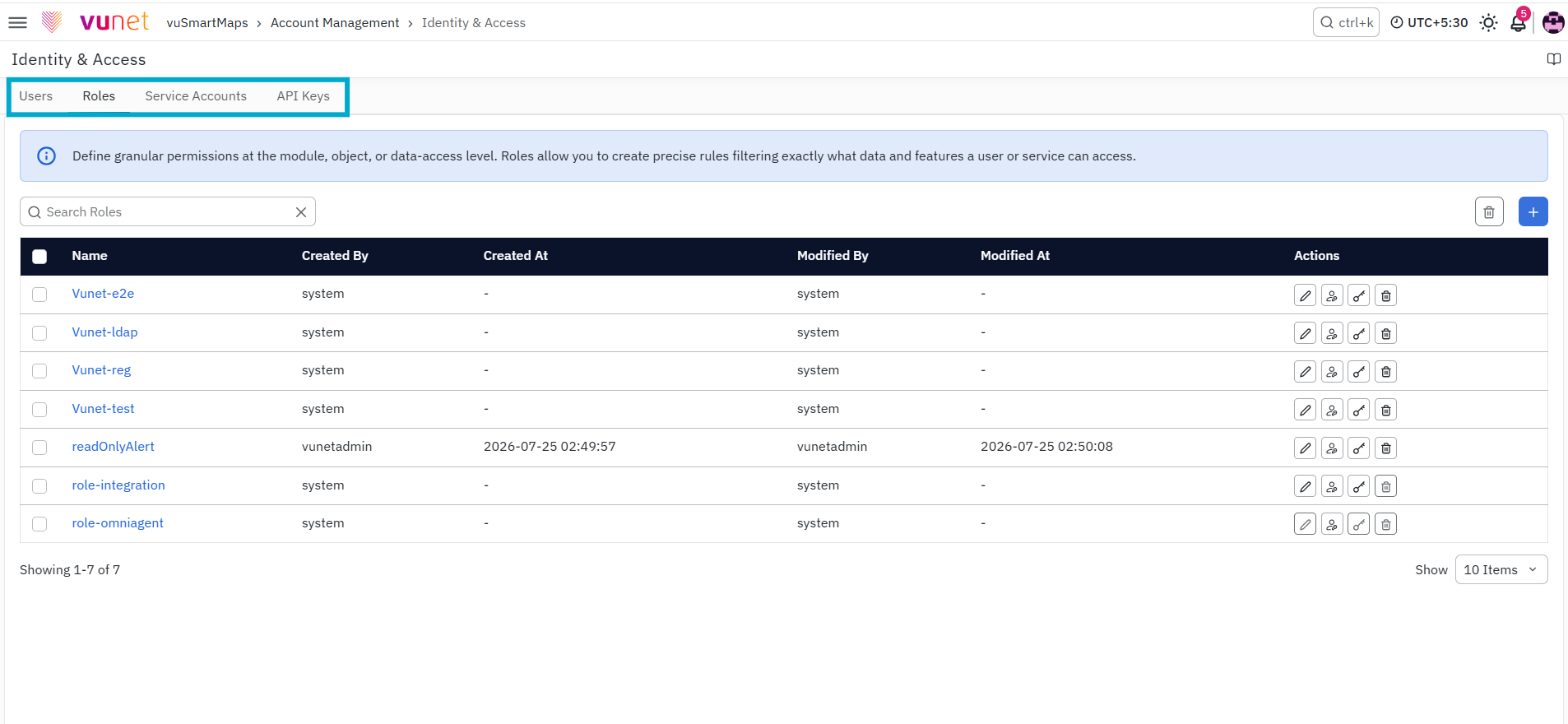
-
The Identity & Access page can be accessed from the platform left navigation menu by navigating to Account Management > Identity & Access . The page contains four main tabs:
-
The users' page lists the existing users and their details. The operations related to the users can be done from this tab.
-
The roles page lists the various existing user roles and permissions associated with them. The operations related to the Roles can be done from this tab.
-
The Service Accounts page is used to create and manage Service Accounts for machine-based authentication for OmniAgent and external integrations. The operations available from this page include:
-
The API Keys tab is used to create and manage authentication keys owned by Service Accounts. API keys follow the permissions available to their owning Service Account. The operations available from this page include:
