SNMP Definitions
Overview
SNMP Definitions is a feature in vuSmartMaps that allows users to configure and manage SNMP monitoring directly from the user interface. It provides a simple and structured way to define vendors, models, device types, MIB groups, and OID sets required for monitoring network devices. Instead of relying on manual processes, users can create and update these configurations directly within the platform.
With SNMP Definitions, users can:
- Define vendors, models, device types, and MIB groups
- Create and manage OID sets
- Extend existing monitoring configurations
This feature acts as a central place to manage all SNMP-related configurations, making it easier to maintain and scale monitoring across different environments.
Key benefits include
- Faster onboarding of new devices - You can add vendors, models, and OIDs without waiting for releases.
- Extend existing SNMP-based O11ySources – Allows users to add new OIDs to collect additional metrics from existing configurations.
- Reusable configurations - OID sets can be reused across multiple devices.
- Consistent monitoring setup - Standardized configurations help maintain uniform monitoring across environments.
In summary, SNMP Definitions help you extend monitoring quickly while keeping the system simple and consistent.
Example Scenario
Consider a bank monitoring its payment infrastructure using vuSmartMaps. A new network device is introduced to route transactions between systems. The device belongs to a vendor that is not currently available in the platform.
The operations team needs to monitor:
- CPU utilization
- Interface health
- Error counters
Using SNMP Definitions:
- The engineer creates a new vendor and model
- A new OID set is defined with required OIDs
- The configuration is saved
- The SNMP Polling source uses this configuration
Once this is done:
- Data starts getting collected
- The collected data can be used to create dashboards and alerts
When to Use This Feature
Use SNMP Definitions in the following situations:
- When a required SNMP vendor is not available
- When a device model is missing
- When you need to add new OIDs for an existing device
- When you want to create reusable monitoring configurations
- When you need to import multiple OIDs in bulk
- When you want to export configurations for reuse or audit
This feature is not intended for:
- SNMP traps
- automatic OID discovery
- automatic dashboard creation
Comprehensive Understanding
To access SNMP Definitions:
Navigate to → Data Studio → SNMP Definitions
The page contains multiple tabs to manage different components.

OID Sets
An OID Set is a collection of SNMP OIDs grouped together to monitor a device or a specific functionality. It defines what data will be collected from a device. OID sets are the core configuration used by the platform for SNMP data collection. They can be pre-built or user-defined and can be extended by adding new OIDs.
Here, you can:
- View all OID sets
- Create new OID sets
- Extend existing ones
- Import and export configurations
KPI Summary in OID Sets
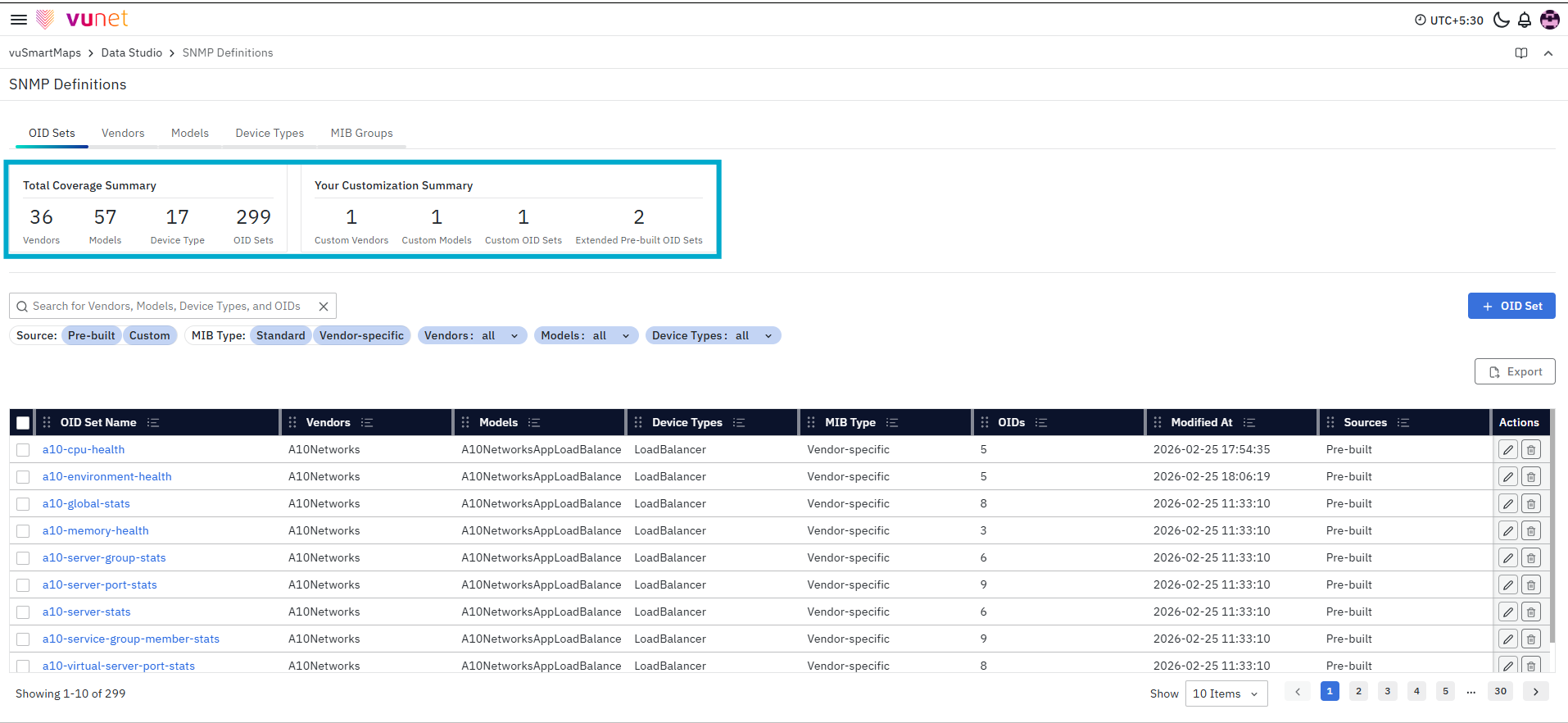
At the top of the OID Sets page, you will see two sections:
-
Total Coverage Summary - This section represents the overall SNMP definitions present in the system. It includes:
- Vendors – Total number of vendors configured
- Models – Total number of models available
- Device Types – Total categories of devices
- OID Sets – Total OID sets defined
-
Your Customization Summary - This section highlights the configurations that have been added by users. It includes:
- New Vendors added in this setup
- New Model added in this setup
- New Device Types added in this setup
- New OID Sets added in this setup
- OID Sets Extended in this setup
This summary provides visibility into configurations that have been newly added by users, separate from the default system configurations.
OID Sets Table
The table displays all available OID sets.
Each row provides the following details:
- OID Set Name
- Vendor
- Model
- Device Type
- MIB Type
- OIDs
- Modified At
- Sources
Each row also provides actions:
- Edit
- Delete
Vendors
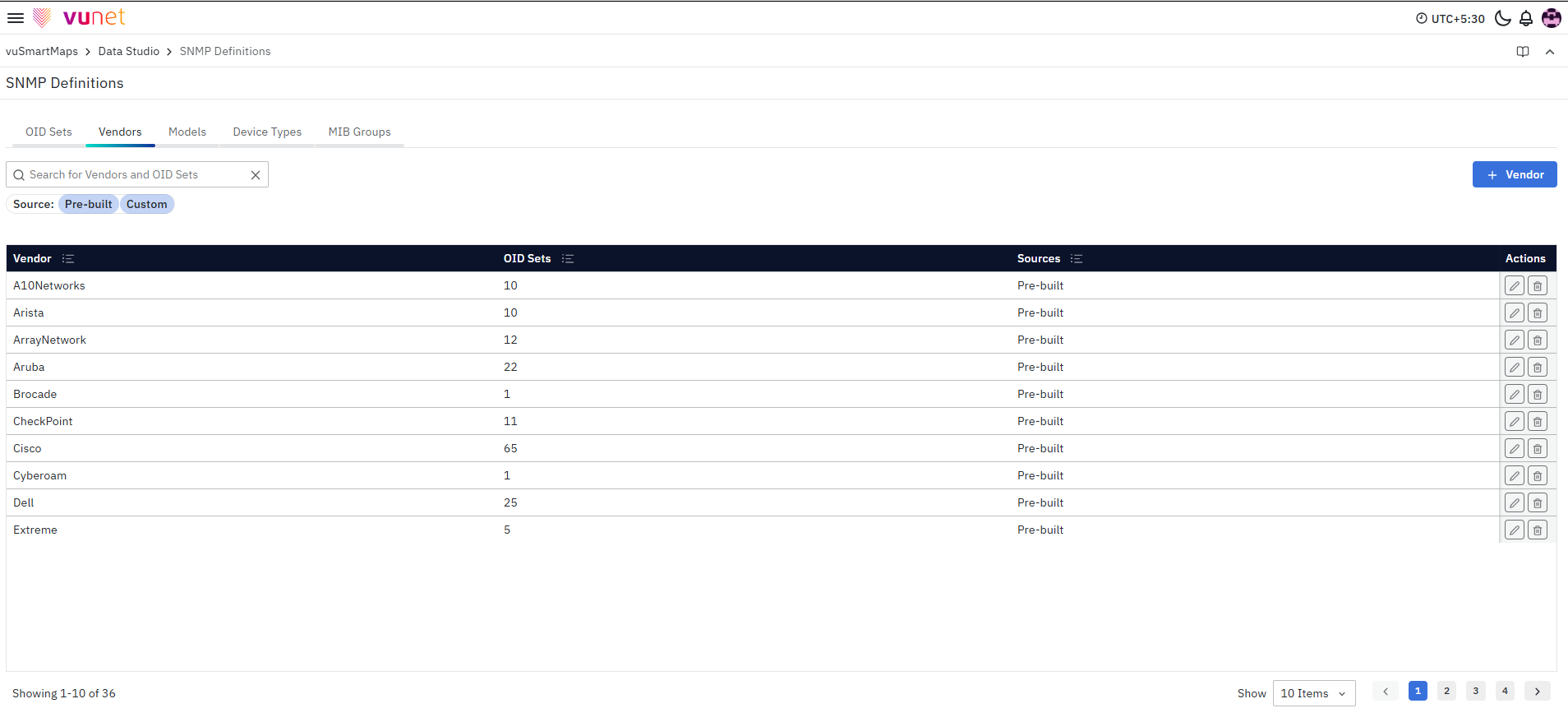
A Vendor represents the manufacturer of a device. It is used to organize and associate device models and vendor-specific monitoring configurations. Vendors help structure SNMP configurations and enable mapping of OID sets to specific device ecosystems.
You can:
-
Search by vendor name or OID sets.
-
Apply filters based on: Source
- Pre-built
- Custom
-
Create new vendors
-
Edit custom vendors
Models
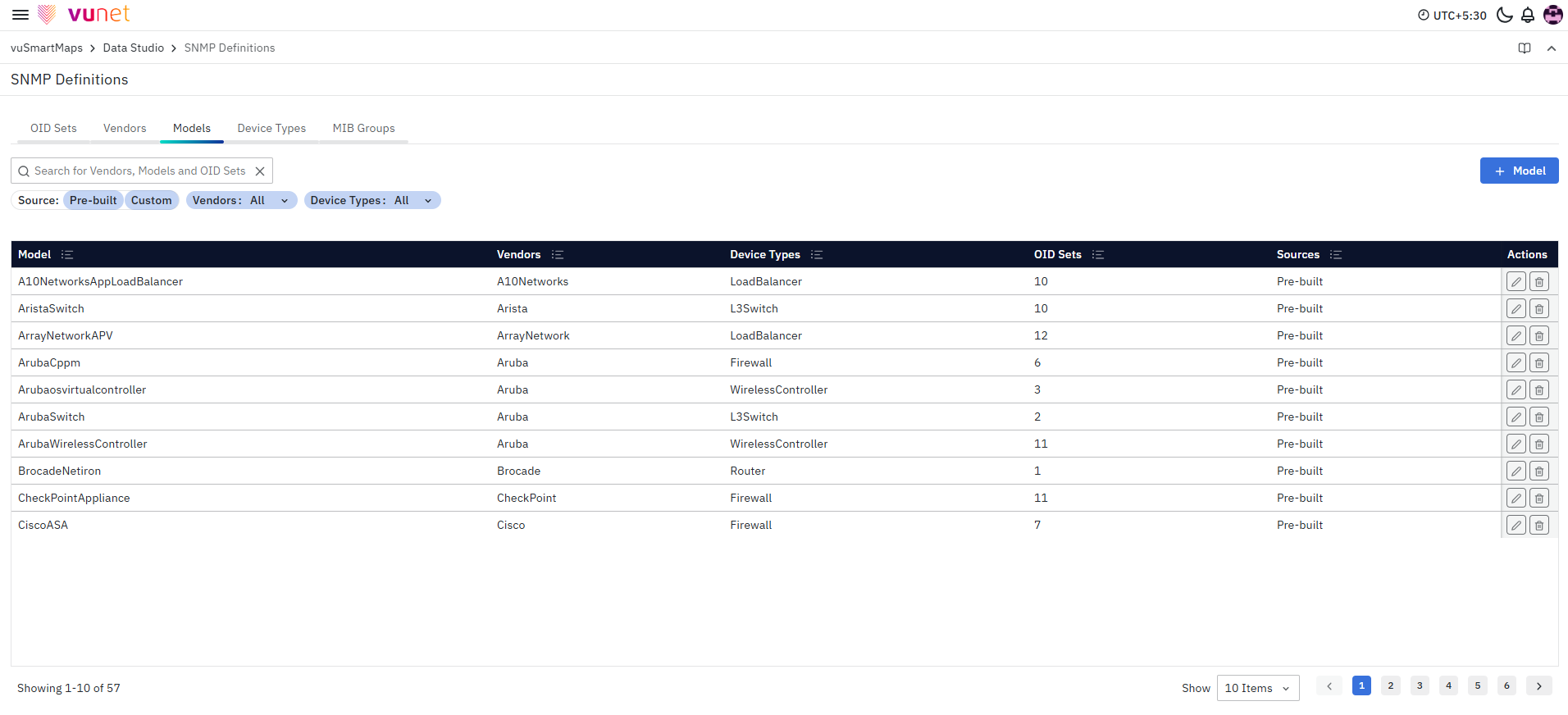
A Model represents a specific device type provided by a vendor. Models are linked to vendors and define device-level granularity for monitoring. They help ensure that the correct OID sets are applied to the appropriate devices during data collection.
From this tab, you can:
- Search by vendor name,model name, or OID sets
- Apply filters based on: Source (Pre-built or Custom), vendor name or device types
- Create models under a vendor
- Edit custom models
Device Types
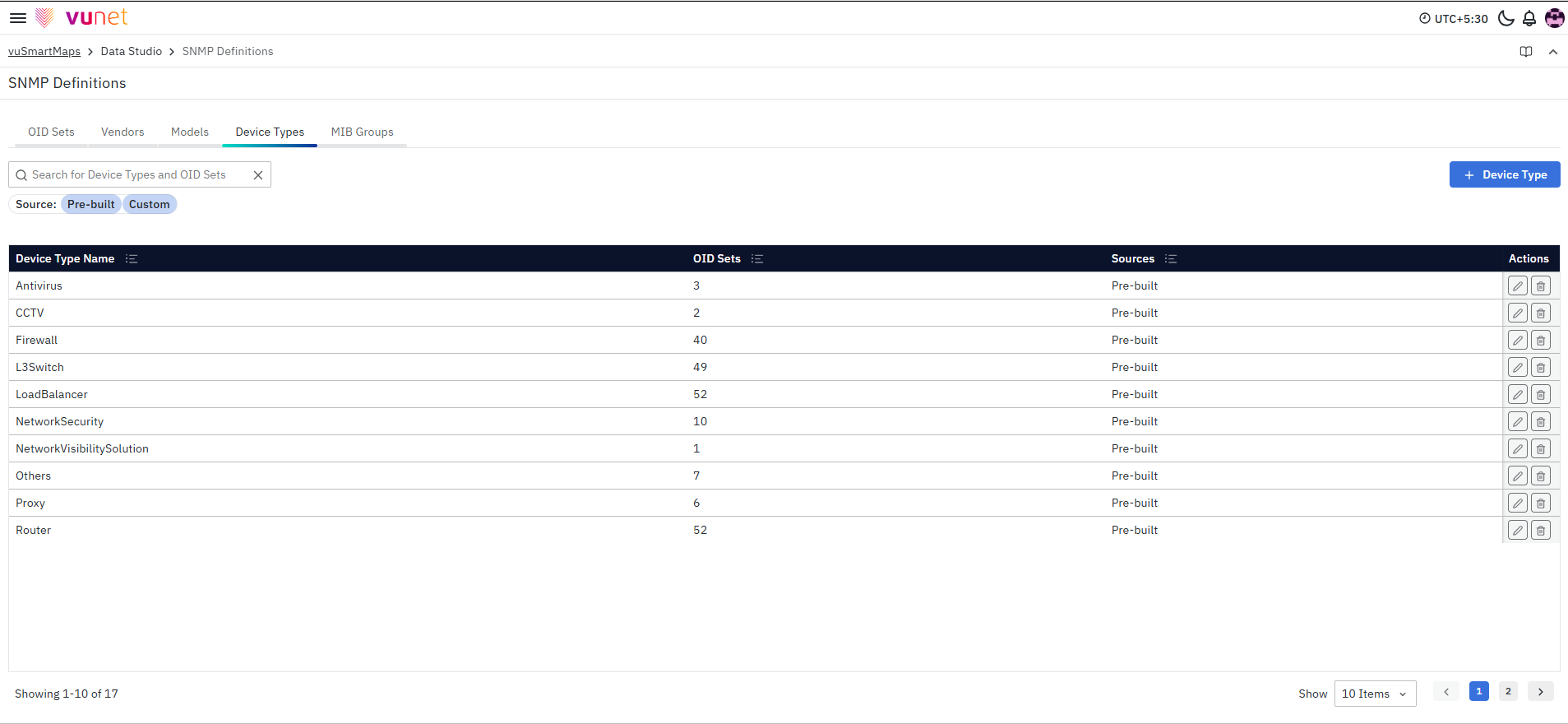
A Device Type defines the category of a device, such as router, switch, or firewall. It helps organize monitoring configurations and enables grouping and filtering of devices. Device types also assist in associating OID sets with broader device categories.
From this tab, you can:
- Search by device types, or OID sets
- Apply filters based on: Source (Pre-built or Custom)
- Create device types
- Edit custom device types
MIB Groups
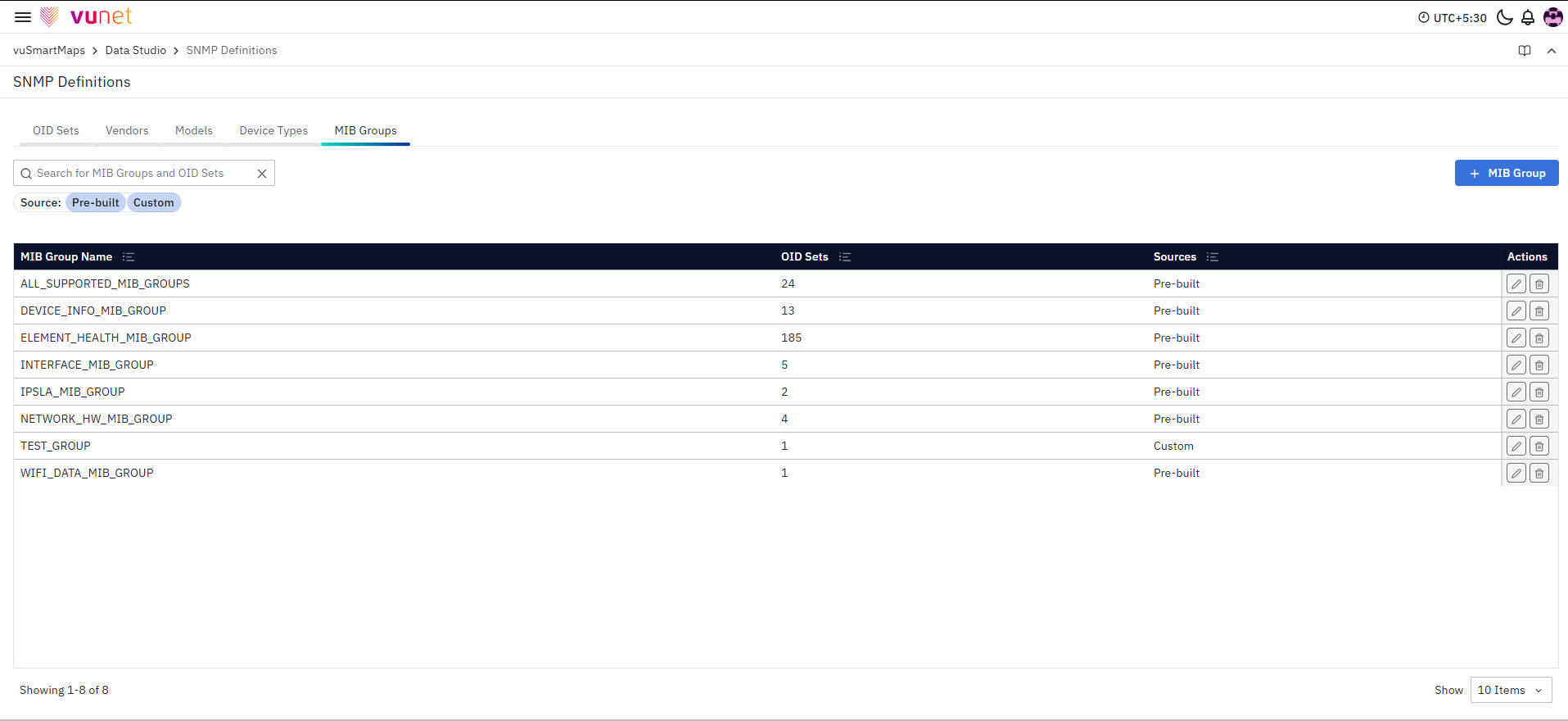
A MIB Group is a logical grouping of related OIDs. It helps organize OIDs into meaningful categories such as system metrics, interface data, or performance indicators. MIB groups improve structure and reusability of OID definitions across configurations.
From this tab, you can:
- Search by MIB Groups, or OID sets
- Apply filters based on: Source (Pre-built or Custom)
- Create MIB Groups
- Edit custom MIB Groups
- Users cannot delete prebuilt OID sets, vendors, models, device types, or MIB groups.
- Custom entities (Vendors, Models, Device Types, and MIB Groups) can be deleted only if they are not referenced by any OID set.
- When deleting or modifying an OID set, vendor, model, device type, or MIB group, a warning message is shown indicating that the change may potentially cause breakages.
